


If you haven't yet, follow us on X (Twitter), Mastodon, or Bluesky to know when we post new articles, and join our Reddit or Subscribe to us on YouTube to check out our content and interact with our awesome community. Thank you for supporting us!
When it comes to playing third-party games on the Steam Deck, there are multiple avenues to do it. One of my current favorites is a plugin called Unifideck. It basically creates collections from your third-party libraries, making games you own from Epic Games, GOG, and Amazon Prime easily accessible and playable in Game Mode. I love using it, and its newest update. Makes me want to use it even more.
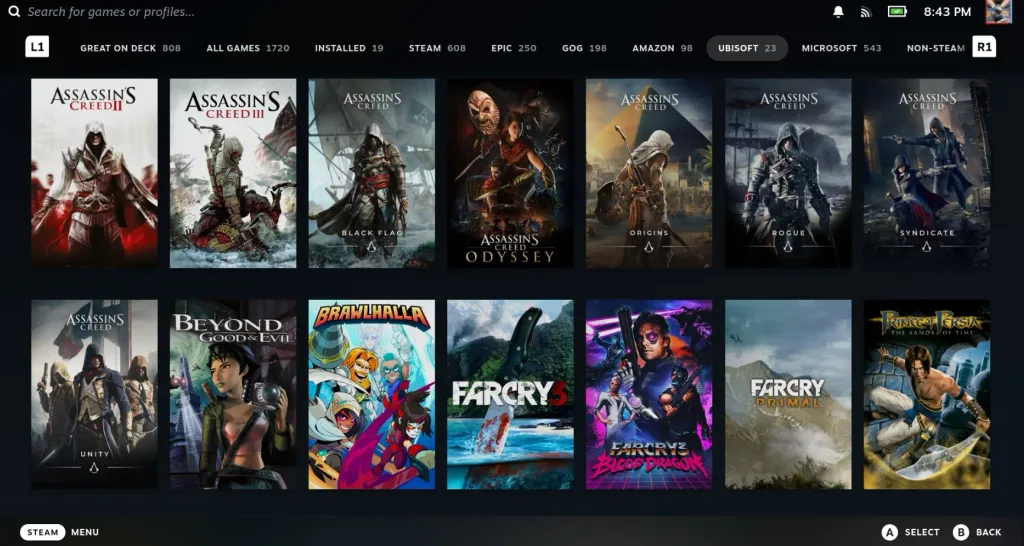
Over the weekend, developer mubaraknumann published a new update, version 0.6.0. In this update, we have some big changes, including two new stores that we can grab our games from: the Ubisoft Connect store and Xbox Game Pass cloud streaming. While the former means we can bring over all the games we owned from Ubisoft Connect, the latter is actually an organized way to start cloud streaming any of the games we have from our Xbox Game Pass library. Of course, this means that we will need an internet connection to play the Xbox games, but still nice to have the option.
But that’s not all! We have some other, pretty nice improvements, including DLC from Epic and GOG being downloaded automatically, the lossless scaling command has been fixed, and we can also set up our own custom install locations if preferred. There were also some other fixes for DOSBox and cleanup, but I would say the big features from this update are the two new stores that we can now grab our games from. It means we now have five stores to get our games from, and more are planned.
If you already have Unifideck, installation is as simple as uninstalling the old version and reinstalling the new one. And if you don't, you can check out how to install it in our previous article.
If you enjoyed this article, check out the rest of the content on SteamDeckHQ! We have a wide variety of game reviews and news that will help your gaming experience. Whether you're looking for news, tips and tutorials, game settings and reviews, or just want to stay up-to-date on the latest trends, we've got you covered!

RECENT NEWS
Categories
Accessories
Anbernic
Android
ASUS ROG Ally
ROG Xbox Ally
Classics on Deck
Community
Cryobyte33
Deals
Deck Mods
Emulation
Events
Featured Post
Game News
Game News
General Game News
HandheldHQ
Hardware
Lenovo
Linux
MagicX
MSI
Nintendo
ONE-NETBOOK
Opinion
Other Reviews
Accessory Reviews
Handheld Reviews
PlayStation
Proton
Retro Handhelds
Anbernic
AYANEO
AYN
GPD
MagicX
MANGMI
Miyoo
Retroid
Rumors
TrimUI
SDHQ
Steam
Steam Controller
Steam Frame
Steam Machine
SteamOS
The Unsupported Report
Uncategorized
Uncategorized
VR
Recent Tips & GUIDES
recent reviews





This article convinced me to give it a try, it was better than heroic for epic games but not perfect. When the free epic games start working reliably on the steam deck i would start considering spending money on that store.
I was dissapointed with the GOG integration. I was hoping to have the older PC games available on the steam deck (wing commander, crusader, dungeon keeper etc.) But the GOG DosBox games dont appear to be working.
How the plugin works with the steam library is amazing, i think once the GOG issues are worked out this would be an essential plugin for me.
Do you have the latest version? I believe there were some improvements in the newer versions.
It's really impressive what what done with this plugin. The integration into the steam menu is. It perfect but still impressive and much more comfortable that anything else. It's also cause less issues "at least for me" with games from the epic store than when installed with heroic launcher. I could never play the epic games I received for free offline when installed with heroic and the controls often had various issues so I had to use "workarounds" to play my games on my deck.
I'm still looking forward to more features and Bugfixes. It's was always exciting to be a gamer on Linux 😀 okay not always but I'm doing it a long while already even before the time of vulkan and proton