


If you haven't yet, follow us on X (Twitter), Mastodon, or Bluesky to know when we post new articles, and join our Reddit or Subscribe to us on YouTube to check out our content and interact with our awesome community. Thank you for supporting us!
One of my favorite things I got into PC gaming all those years ago is mods. Being able to inject unique content into a game to give it a longer lifespan is just awesome. Steam is pretty great with it, giving us a mod browser in the storefront (Steam Workshop), but the undisputed champion of mod collections, browsing, and installing comes from Nexus Mods. While they are working on making sure their mod application, Vortex, is working on the Steam Deck, the only other way to utilize it is to manually download and install each mod individually. However, a new plugin was created that not only simplifies the process but also allows us to browse, install, and set up mods for supported games, and it’s pretty awesome.
Before I go further into talking about the mod, it’s worth noting that the mod is vibe-coded to some degree. The mod uses CLAUDE, which can be seen in the contributors section and in the files. This mod is a great idea and seems to work well, but it’s worth being fully transparent about it out of the gate. Please be aware of the AI involvement if you are going to try this for yourself.
As of right now, the only way to install it is manually. You’ll have to go to the GitHub page, download the latest release, and either add it to your plugin folder or use the developer tools in Game Mode to install from a zip.
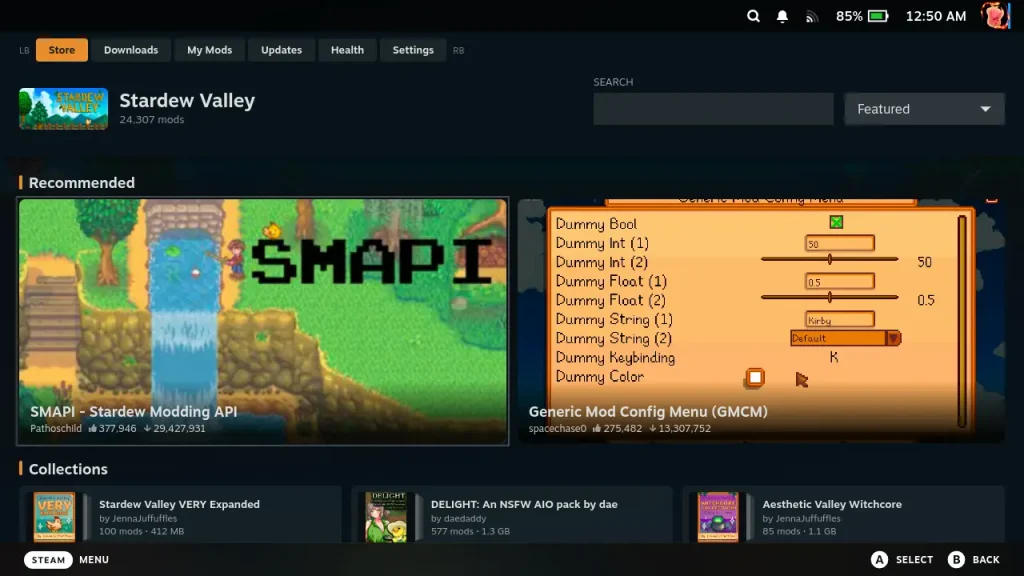
Decky-nexus is a new plugin created by RedRanger14 (and CLAUDE) that allows us to browse and install mods from Nexus Mods, and I really like the way that it operates. It isn’t a blanket support for Nexus Mods; it only supports specific games, but each of those games gets specific support for them. Each of the games has its own steps to make sure they are ready for mods. For example, Stardew Valley’s step 1 is for installing SMAPI, but for Fallout: New Vegas, step 1 has us install xNVSE. All the supported games have their own steps to ensure that mods will work, and that extra level of support makes getting it set up much easier.

But that’s not all! Some of these games have specific options to accommodate matting them, like save transfers for Slay the Spire 2. It makes it feel like it was handcrafted to work with this plugin and make sure it’s able to run and work.
Right now, there are only nine games that are supported, with four on the way:
Supported Games:
- Cyberpunk 2077
- Elden Ring
- Fallout 4
- Fallout: New Vegas
- Resident Evil 4
- Skyrim Special Edition
- Slay the Spire 2
- Stardew Valley
- The Witcher 3
Upcoming Support:
- Fallout 3
- Hollow Knight: Silksong
- Mount & Blade II: Bannerlord
- Palworld
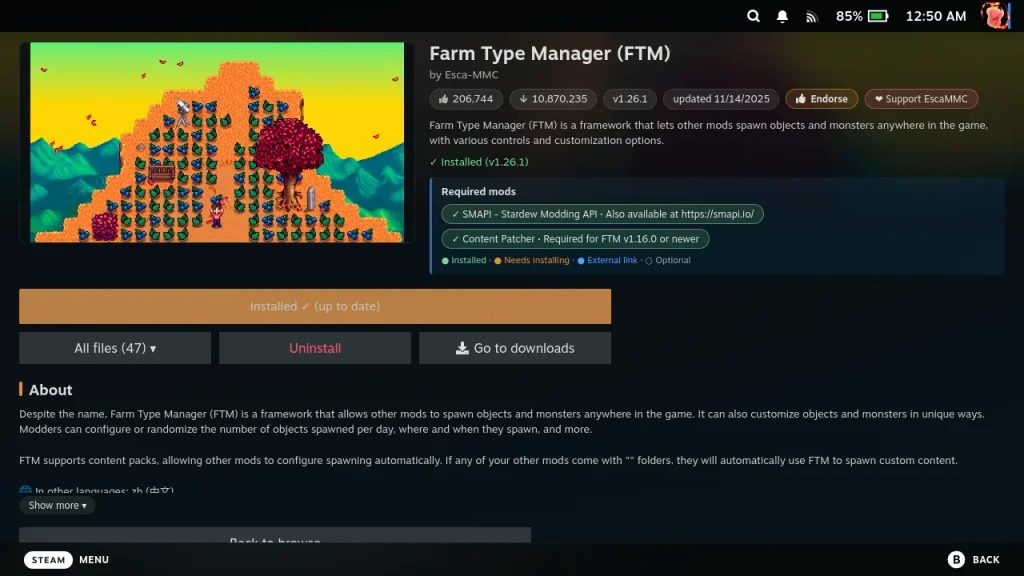
I also want to praise the mod browser. It’s easy to look and navigate to find new mods to install, and it’s all accessible with the controller. It’s great for what it is, and I’m glad that we can endorse and support the mod authors easily. It would be nice to be able to see other screenshots or search for mods by category, but it’s a good start. I like that we can see our current downloads and mods that we have installed, as well as which ones need to be updated.
Currently, he is working on manual loader order editing, Vortex profile support, and mods that need a Windows tool to install, but there’s no timeline for when these will be added. Still, it’s nice to see that more features are on the way, and it seems to be one of the best ways to easily install from Nexus Mods on the Steam Deck.
If you enjoyed this article, check out the rest of the content on SteamDeckHQ! We have a wide variety of game reviews and news that will help your gaming experience. Whether you're looking for news, tips and tutorials, game settings and reviews, or just want to stay up-to-date on the latest trends, we've got you covered!

RECENT NEWS
Categories
Accessories
Anbernic
Android
ASUS ROG Ally
ROG Xbox Ally
Classics on Deck
Community
Cryobyte33
Deals
Deck Mods
Emulation
Events
Featured Post
Game News
Game News
General Game News
HandheldHQ
Hardware
Lenovo
Linux
MagicX
MSI
Nintendo
ONE-NETBOOK
Opinion
Other Reviews
Accessory Reviews
Handheld Reviews
PlayStation
Proton
Retro Handhelds
Anbernic
AYANEO
AYN
GPD
MagicX
MANGMI
Miyoo
Retroid
Rumors
TrimUI
SDHQ
Steam
Steam Controller
Steam Frame
Steam Machine
SteamOS
The Unsupported Report
Uncategorized
Uncategorized
VR
Xbox
Recent Tips & GUIDES
recent reviews





They ruined my game with their stupid assed updates. Offer no support or warning that theyre going to ruin your shit. Then they want me to spend money i guess already being a premium member isnt enough .