


If you haven't yet, follow us on X (Twitter), Mastodon, or Bluesky to know when we post new articles, and join our Reddit or Subscribe to us on YouTube to check out our content and interact with our awesome community. Thank you for supporting us!
Yooka-Replaylee was provided on both PC and Switch 2 by PM Studios. Thank you!
Coming from Banjo-Kazooie, the great team at Playtonic came out with Yooka-Laylee, a spiritual successor to the incredible classic. I enjoyed it a lot, which made the announcement of Yooka-Replaylee more exciting. At first, I felt the game didn't need a refresh; it held up quite nicely, but after checking out the demo and some comparisons side-by-side, I saw some massive improvements to the visuals and physics.

With the game coming out tomorrow, and our review going up right now, I wanted to check out and see whether the game would be better to play on the Switch 2 or the Steam Deck, and that's what this article is for! I took a look at Switch 2 in handheld and docked, as well as the Deck in default settings and modified, to see which handheld is going to be the best way to play.
Switch 2 Handheld Vs. Steam Deck
For the most part, it appears the quality levels of Switch 2 in handheld mode and Steam Deck are nearly on par with each other. Textures and lighting are nearly identical, while the details seem to be on par with each other and view distance is relatively the same. However, there are a few key differences between the two devices when the Switch 2 is in handheld mode.
The biggest obvious one is framerate. The default framerate on the Steam Deck is 45 FPS, while the Switch 2 is capped at 30 FPS. With this alone, the Deck feels significantly smoother overall. There are also some framerate drops on both devices in certain scenarios, like in the opening when the cutscene goes over to the One Book for the first time or watching coins appear on our ship. It feels a little more impactful on the Switch 2, but it is still there on Deck as well.
The Switch 2 in handheld mode does have a couple of benefits, though. It has increased sharpness due to running at 1920x1080 resolution instead of the Deck's 1280x800. This sticks out against the Deck's version, especially when it comes to the edges of objects and our playable characters. The Deck's version looks more rigid, while the Switch looks much smoother. There also seems to be more visible foliage in some scenes.
However, the Deck does have some benefits of its own. Shadow resolution is significantly better, making sure the shadows actually look like the objects they represent instead of being blocky. The colors, when playing on the Steam Deck OLED, and even when comparing pictures on an LCD screen, just look a little better as well. I also found that some models, like trees further away, looked a little better on the Deck.
Switch 2 Docked Enhancements
Oddly enough, the Switch 2 docked didn't seem to have many enhancements overall. Shadow resolution was about the same, as well as model and shadow pop-in with view distance. It is at a higher resolution when docked, sitting at 2560x1440, so the details on characters and models do look even sharper, but I expected more. The Steam Deck is pushing 45 FPS with slightly better details in some areas, so I assumed the extra power from docked would push it to 60 or give more visual enhancements, but it didn't seem like it.
Overall, playing docked will give the best sharpness overall, but the shortcomings of the Switch 2 version are still noticeable and very apparent.
Further Steam Deck Enhancements
So, when playing Yooka-Replaylee on the Steam Deck, the graphical settings are locked by default. However, if we use the SteamDeck=0 %command launch option, we can get the settings to come back and modify them further. With some sacrifices or enhancements, we can change up the way we play the game a bit. While the game doesn't have detailed settings to comb through, only different presets ranging from Low to Ultra, we can still enhance the experience further.
It appears that we can actually play at Very High quality settings if you want to stick to 30 FPS. There were some areas that dropped below 30 FPS, and some slight stuttering, but the game still looked beautiful. There are more detailed shadows and edges looked sharper, but it was still very similar to the default settigns on Deck. Interestingly, shadow and model popin were also prevalent here, as well as Ultra quality, so I don't think we can get rid of that.
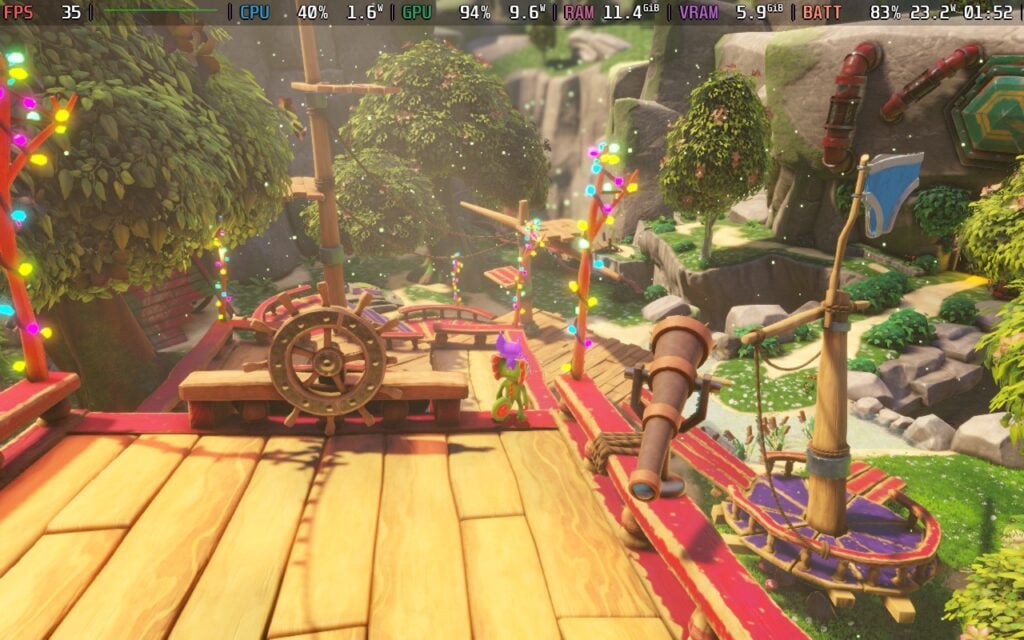
If you want to save as much battery as possible, we could cap the framerate to 30 FPS and go on Very Low quality settings. It doesn't look terrible, but there are some noticeable drops in shadow quality, foliage, and anti-aliasing. However, the game gets about an extra 2-3 hours of battery life. Compared against the default's average of 3-3.5 hours, this is a big step up. This will also most likely beat the Switch 2's handheld battery life when playing.

The biggest change that can come from changing settings is going to be framerate. At the Very Low quality settings, we can actually hit 60 FPS a majority of the time, which feels significantly more smooth than the Switch 2 and default Steam Deck settings. There are still some spots that will drop, most likely due to the game realizing there aren't enough resources to keep the framerate at 60, but it will stick there for the most part. This can be mitigated by bringing the resolution below 720p, so it will be possible to play at a stable 60, but I found it a little too much of a reduction in quality to enjoy.
For the most stable and consistent experience, I would still say the default Deck settings would be best, but I appreciate having options.
So Which Handheld Should You Play On
Yooka-Replaylee is an awesome game to play on the go, and I would say it will be enjoyable regardless of how you choose to play. However, if you are looking for the best bang for your buck, my edge goes to the Steam Deck. The enhanced resolution of the handheld and docked Switch 2 does make the game look significantly sharper, but the increased smoothness of the framerate and slight improvements to visual quality make the Deck feel more premium. We also have the option of increasing quality and framerate further if preferred, and having that option is wonderful.
Overall, getting it on either handheld is going to be enjoyable, and I think it will be worthwhile no matter what. It's a wonderful experience and a nice enhancement over the original, but in my opinion, Steam Deck is going to be the way to go for this one.
If you enjoyed this article, check out the rest of the content on SteamDeckHQ! We have a wide variety of game reviews and news that will help your gaming experience. Whether you're looking for news, tips and tutorials, game settings and reviews, or just want to stay up-to-date on the latest trends, we've got you covered!

RECENT NEWS
Categories
Accessories
Anbernic
Android
ASUS ROG Ally
ROG Xbox Ally
Classics on Deck
Community
Cryobyte33
Deals
Deck Mods
Emulation
Events
Featured Post
Game News
Game News
General Game News
HandheldHQ
Hardware
Lenovo
Linux
MagicX
MSI
Nintendo
ONE-NETBOOK
Opinion
Other Reviews
Accessory Reviews
Handheld Reviews
PlayStation
Proton
Retro Handhelds
Anbernic
AYANEO
AYN
GPD
MagicX
MANGMI
Miyoo
Retroid
Rumors
TrimUI
SDHQ
Steam
Steam Controller
Steam Frame
Steam Machine
SteamOS
The Unsupported Report
Uncategorized
Uncategorized
VR
Recent Tips & GUIDES
recent reviews



How do you get 45 fps? By default I get 30 fps with the Steam Deck configuration. If I set vsync to on it unlocks the framerate, but the game should have locked 45 fps out of the box, and I'm not able to achieve it...