


If you haven't yet, follow us on X (Twitter), Mastodon, or Bluesky to know when we post new articles, and join our Reddit or Subscribe to us on YouTube to check out our content and interact with our awesome community. Thank you for supporting us!
When it comes to playing games on the Steam Deck, there are some great tools that can help us push the visuals and framerate to be more playable. A lot of times, this means turning down graphical settings, but on more demanding games, we would need to use upscalers. These tools make the game run at a lower resolution and use an algorithm to upscale it, making it seem like it's running at a higher resolution when it isn't.
Upscalers have come a long way, and on the Steam Deck, there are three that are mainly used: XeSS, TSR, and FSR. FSR is not only the first upscaler we usually test, but it's also implemented directly within SteamOS. Currently, the newest version of FSR available on the Deck is FSR 3, which does a decent job of making the upscaling look good, but there are still some edges here and there that are too noticeable. FSR 4 is currently available as well, but unfortunately, it was locked to GPUs that use RDNA 4 cores, which the Deck doesn't have. However, that's about to change.
Recently, there was a leak of the FSR SDK, which included FSR 4 files that work on older GPUs that use RDNA 2 and 3 cores, which include the Steam Deck. So, we just had to test it out and see how well it works.
I also want to thank King Vulpes for bringing this to my attention in our Discord server.
How To Get FSR 4 In Games On Steam Deck
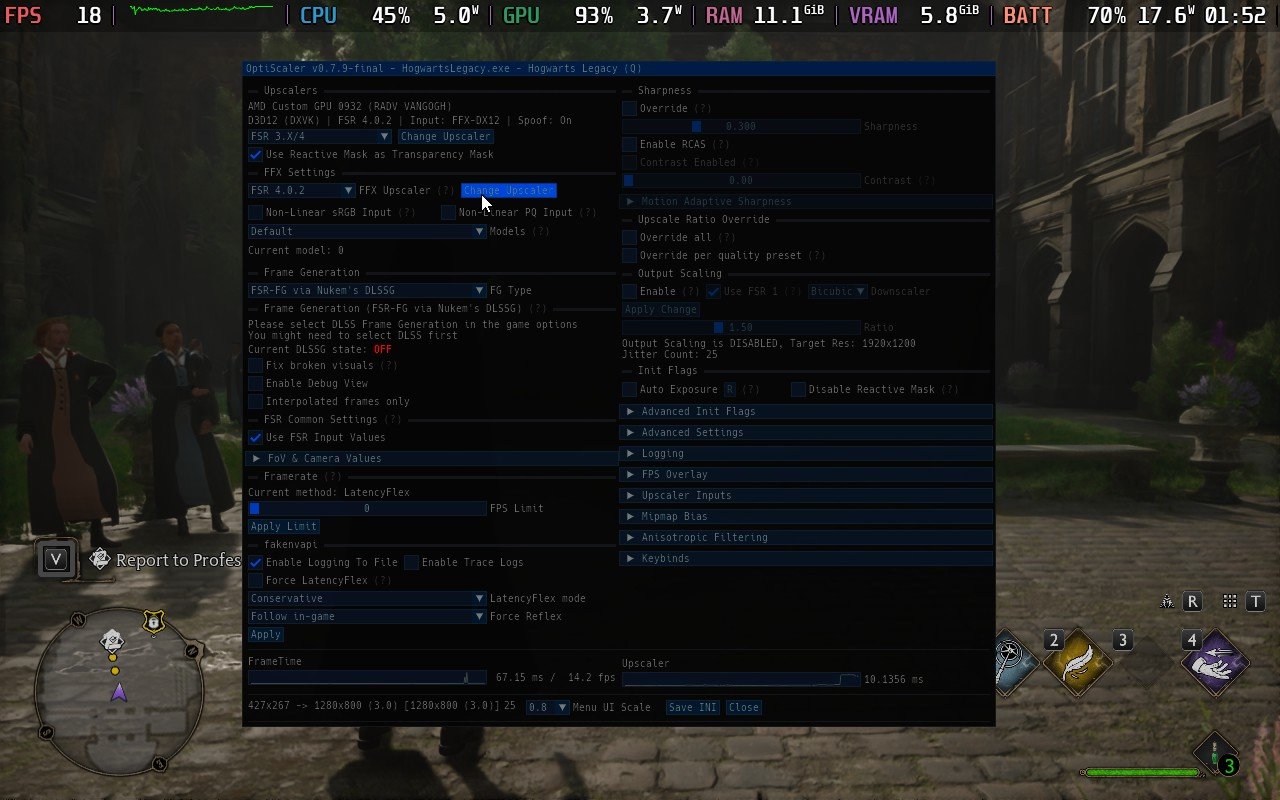
Before I go into our testing, I want to first go over how to install FSR 4 into games. The easiest method, and the one we are using, is through the Decky Framegen plugin for Decky Loader. The plugin was recently updated to include FSR 4, so we can easily just load it in using OptiScaler.
Before doing any of this, make sure the Decky Loader plugin framework is installed. You can follow our guide on how to install it.
To do this, first install the plugin. We need to manually download it from the GitHub page. Make sure to download the newest version, which at the time of writing is v0.11.15. Once done, move the Decky Framegen file inside the downloaded .zip into the plugins folder that we can find inside the Homebrew folder in the Home folder. You may need to right-click the plugins folder to change the permissions and make sure you can view and edit files inside.
After that, you should be done. Just make sure Decky Loader is fully updated, and you can start accessing it. For getting in-game, make sure you set one of your back buttons on your controller scheme to emulate the "insert" key on a keyboard to bring up OptiScaler, and I recommend changing the left trackpad to act as a mouse and the left trackpad click to emulate a left mouse click. Then, once in-game, all it takes is opening up OptiScaler and changing the upscaler to FSR 3.x.x/4.
Game Testing With FSR 4 On Steam Deck
Now, we get to test some actual games, and so far, the results are pretty wild, with some positives and clear negatives.
Hell is Us
First up, I tested Hell is Us, and the results were immediately apparent. I tested on Ultra Performance for both FSR 3 and FSR 4, and it was insane seeing the difference. FSR 3 had very pixelated, shiny visuals that would sparkle the more I moved. It was clear that upscaling was going on, and my eyes were hurting by the end of my test with it.
Then, I went ahead and installed FSR 4, and at first, I thought I just didn't have an upscaler on. However, I was wrong. FSR was turned on to Ultra Performance, and it was incredible seeing the difference. There was no pixelation, no shininess, and the details were significantly clearer and more defined. I also noticed a higher battery drain using FSR 4, but the visuals were a night-and-day difference. There is a little bit of morphing on the tree branches when moving, but otherwise, it just looks better.
This was my first test, and I was in disbelief at how well it seemed to work. This excitement fueled me into the next game I tested, and my hope for good results continued.
Marvel's Spider-Man Remastered
Next up, I went into Marvel's Spider-Man Remastered, and I was curious about this one. The game is generally very well optimized and looks great, so I was curious if there would be any improvement whatsoever. And to my surprise, there was, albeit less noticeable than Hell is Us.
FSR 3 on Ultra Performance showed a little bit of that wonderful glistening that I experienced in Hell is Us, but the further away models had blurry details and were more noticeable. There was also a slight bit of glistening around Spider-Man when he moved, but it wasn't as clear as it was in Hell is Us.
Then, here comes FSR 4, which is also on Ultra Performance, and there is definitely a difference. While Spider-Man did look a little clearer, the biggest changes came from further away objects. Windows had less blurriness, super far away windows showed much more detail, pedestrians on the ground didn't look like blobs, and even the trees on the ground looked clear as day. And, just like Hell is Us, the game was more demanding. FSR 3 Ultra Performance could hit 90 FPS, but FSR 4 Ultra Performance was around 70.
This is starting to very much show a pattern, but I needed more testing done to see if my theories were correct.
Hogwarts Legacy
I also went ahead and checked out Hogwarts Legacy. I was curious about how it performs and looks using FSR 3/4, and it appears it continues the trend from the previous games.
FSR 3 looks very blurry and shimmery, while FSR 4 looks significantly better, while needing more power to run. It's a pretty big night-and-day difference here as well and it's hard not to state just how great it looks compared to how it was before on FSR 3 Ultra Performance.
Using the Decky Framegen mod did seem to hurt performance of Hogwarts Legacy overall a little bit, but I went back and checked out the game on FSR 3 Ultra Performance after uninstalling it and it was similar-ish to when it was enabled, but a little better.
Kingdom Come: Deliverance 2
While Kingdom Come: Deliverance 2 does have similar improvements to the other games, the changes are less noticeable. Warhorse Studios has done a great job optimizing their game and implementing upscaling, so much so that it's very hard to see the improvements in a screenshot.
The grass is very shiny when moving around in FSR 3, and putting FSR 4 in makes it look significantly better. This is a fantastic improvement, just not one that can be easily seen. FSR 4 does draw more battery as well, but from my testing, I would still consider it under the realm of playable.
Cyberpunk 2077
Finally, I wanted to test out Cyberpunk 2077 to see just how well it looks and performs with FSR 4. Like Kingdom Come: Deliverance 2, the changes are a bit hard to see over pictures, but there are some definitive visual improvements.
Between FSR 3 Performance and FSR 4 Performance, FSR 4 definitely looks better with less shimmering and drains more, which is something we have seen in the rest of the games. I did see some drops below 30 FPS running around and shooting, so this may not be one to use FSR 4 on, but it's still very cool to see.
So, there are a couple of conclusions we can come to here. FSR 4 is a massive improvement over FSR 3, taking away almost all the shimmering and looking incredible. However, the upscaler needs more power in this current state, which can make some games that would be used for it unplayable. There are some I can see taking advantage of it, like Hell is Us and Kingdom Come: Deliverance 2, but there are also ones I would probably say to avoid, like Hogwarts Legacy and Cyberpunk 2077.
Regardless, this is awesome being able to use it, and I am glad we have an option to try it out so easily thanks to the Decky Framegen plugin. Hopefully, we can get official support from AMD, which should optimize FSR 4's use for older GPUs and take away some of that intensive overhead it brings with it.
If you enjoyed this article, check out the rest of the content on SteamDeckHQ! We have a wide variety of game reviews and news that will help your gaming experience. Whether you're looking for news, tips and tutorials, game settings and reviews, or just want to stay up-to-date on the latest trends, we've got you covered!

RECENT NEWS
Categories
Accessories
Anbernic
Android
ASUS ROG Ally
ROG Xbox Ally
Classics on Deck
Community
Cryobyte33
Deals
Deck Mods
Emulation
Events
Featured Post
Game News
Game News
General Game News
HandheldHQ
Hardware
Lenovo
Linux
MagicX
MSI
Nintendo
ONE-NETBOOK
Opinion
Other Reviews
Accessory Reviews
Handheld Reviews
PlayStation
Proton
Retro Handhelds
Anbernic
AYANEO
AYN
GPD
MagicX
MANGMI
Miyoo
Retroid
Rumors
TrimUI
SDHQ
Steam
Steam Controller
Steam Frame
Steam Machine
SteamOS
The Unsupported Report
Uncategorized
Uncategorized
VR
Xbox
Recent Tips & GUIDES
recent reviews




The comment that FSR is built-in to SteamOS is misleading. That's just FSR1, aka, something you probably shouldn't be using anyway.
Every other version is implemented per-engine and per-game.
Also, this is leaked code and it is unclear what this implementation actually comprises. At first glance, it seemed these are custom compiled to work on Int8 due to RDNA3's lack of FP8 support. I would assume that at the very least, this would make this "custom" version of RDNA4 more resource intensive and potentially not the best fit for the Deck.
Furthermore, it makes it hard to rely on other people's performance reports, because you will not be using FSR4. Rather, this is a "modified" version of FSR4.
This article is also purely anecdotal, containing zero measurements, so its hard to actually tell what the upside is. Who knows what the results actually are.
Personally, I'd wait a bit for AMD to potentially chime in and announce something official.
Hey there! Thank you for checking out the article. I appreciate the feedback, and I am happy to respond.
The claim that FSR is built into SteamOS being misleading is incorrect. As you mention, it is FSR 1, but that's still FSR. FSR 2 and 3 are implemented per-engine due to using Temporal data, while FSR 1 can stay outside the engine due to it using Spatial Upscaling. It's still built into SteamOS, but it's a very old version.
As you have mentioned, this is a leaked version of FSR 4 that utilizes Int8. It is definitely more resource intensive and I mention this throughout the article. It's not going to be the best fit for every game, as I also mention in the article, but it's an option that people have. There will be some games that can benefit from it, but the tradeoff means worse performance.
This is the only version of FSR 4 that is usable on the Steam Deck. As far as I am aware, this modified version is the only one people can use. Of course, if that changes, and AMD announces something official, we will only be using that.
This article is meant to cover the news that FSR 4 can be used on the Steam Deck with some light testing. For something more in-depth, we would need more time to compile data and I would test more games. Even still, we made a video showing the difference in performance and visual quality for 9 different games.
I also agree with you here. I check out FSR 4 to see the differences, but I recommend waiting for AMD to officially implement FSR 4 for RDNA 2 and 3 cores, if they ever do. FSR 4 was meant to make use of AI accelerators that the RDNA 2 and 3 cores don't have. So, I consider this as more of a showcase of what could be possible, rather than open recommendations to use it.
Great article! Would you mind testing Path of Exile 2? I remember FSR looking horrible back on launch, everything looked like pixelated blobs, so bad I decided it wasn’t worth it, so I’m curious on how it’s going nowadays with FSR 4
I can check it out, sure!
How is this a great article?
That's a personal blog post at best!
Not a single performance number given, only talks about how it feels and how he thinks it looks better etc. Urinalism at its best.
There is a video and several images in the article detailing the performance and visual changes between FSR3 and FSR4.
Thank you for reading our article!
The main reason we made this was to cover the news that FSR 4 can be used on the Deck, while lightly covering a couple of games and the changes made. We do have a video detailing performance and visual changes, as well as the images included. Even still, the focus of the article was to cover this development, not analyze the changes in significant detail. We would need more time for that, and I wrote this up maybe two hours after I first saw the news.
I updated the Decky Framegen plugin and patched RE4 Remake with it... and Optiscaler doesn't have FSR4 on it, so I dunno what I did wrong. Do all games just not support it?
As long as the game supports FSR 2, 3, or DLSS, it should work. I will take a look.
RE4 remake doesn't have built in DLSS, XeSS or FSR3 for optiscalar to work. I haven't been able to make it work yet, but from what I found online, you first need to enable XeSS using REFramework and then Optiscalar will detect it and let you swap that out with FSR3/FSR4
Those tests are great but I would like to see comparison with two profiles that achieves similar performance ex. FSR4 performance in KCD2 costs 10fps compare to FSR3, so maybe go with FSR3 balance o quality preset and than make comparison.
I can take a look into doing that as well!
That would be really cool if you could, thanks!
I have a Rog Ally X with steamos, KDC2 crash when I try to patch it…it works with Cyperpunk 2077