If you haven't yet, follow us on X (Twitter), Mastodon, or Bluesky to know when we post new articles, and join our Reddit or Subscribe to us on YouTube to check out our content and interact with our awesome community. Thank you for supporting us!
The Legend of Heroes, or “Trails” series, is one of my favorite JRPGs. I have regularly called at the Marvel Cinematic Universe of JRPGs, since all of the entries in the series not only follow the same storyline, but events and characters from the past will show up and influence how it moves forward. The series has gone on for a long time, which is why the fact that developer Nihon Falcom remade the first game in the series, Trails in the Sky 1st Chapter, is a great way to get people to jump in and try it from the beginning. However, the game recently got a surprise update, which added in FSR upscaling out of nowhere, so I wanted to test to see if the game would perform and look better on the Steam Deck.
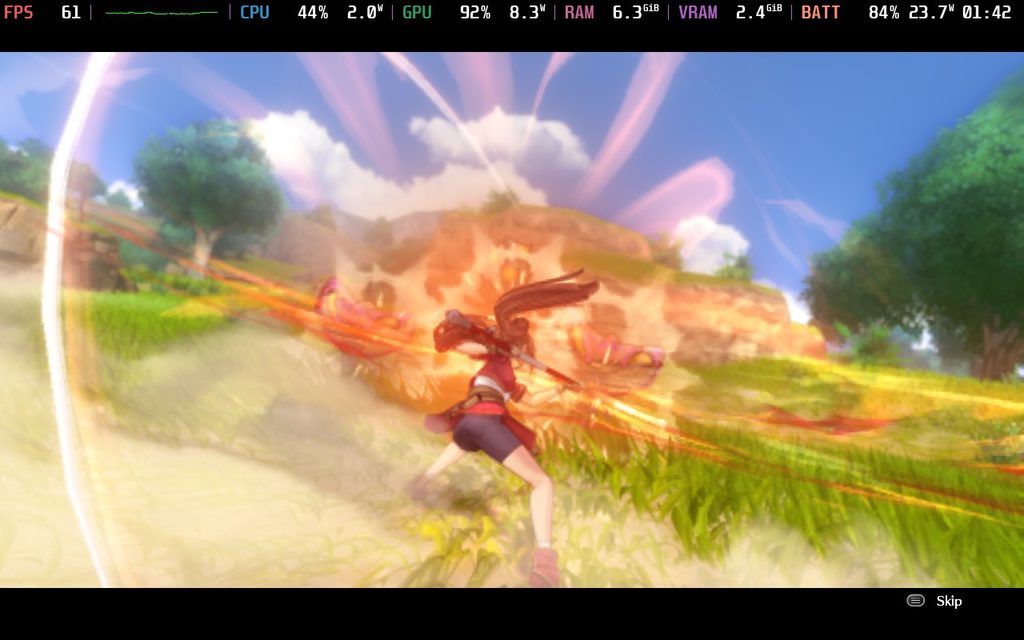
The update came four days ago on July 9th and didn’t include much. It only brought with it DLSS 4 and FSR 2.2 upscaling, as well as some fixes for random bugs. It’s a little weird that the team went for FSR 2.2 instead of the newer FSR 3.1.5 or FSR 4, but there wasn’t any option for upscaling before, so this is completely brand new. I tested it for myself, and I found some surprising results that made me feel this was a welcome update.
Taking a look at the settings, we don’t have the traditional selector for FSR. Instead of the usual “Quality”, “Balanced”, and “Performance” presets, we have a slider that can move in increments of 10. So, we can use FSR to upscale from a 90%, 80%, 70%, 60%, or 50% internal resolution. We can even render it from a 100% internal resolution, though I wouldn’t do it.
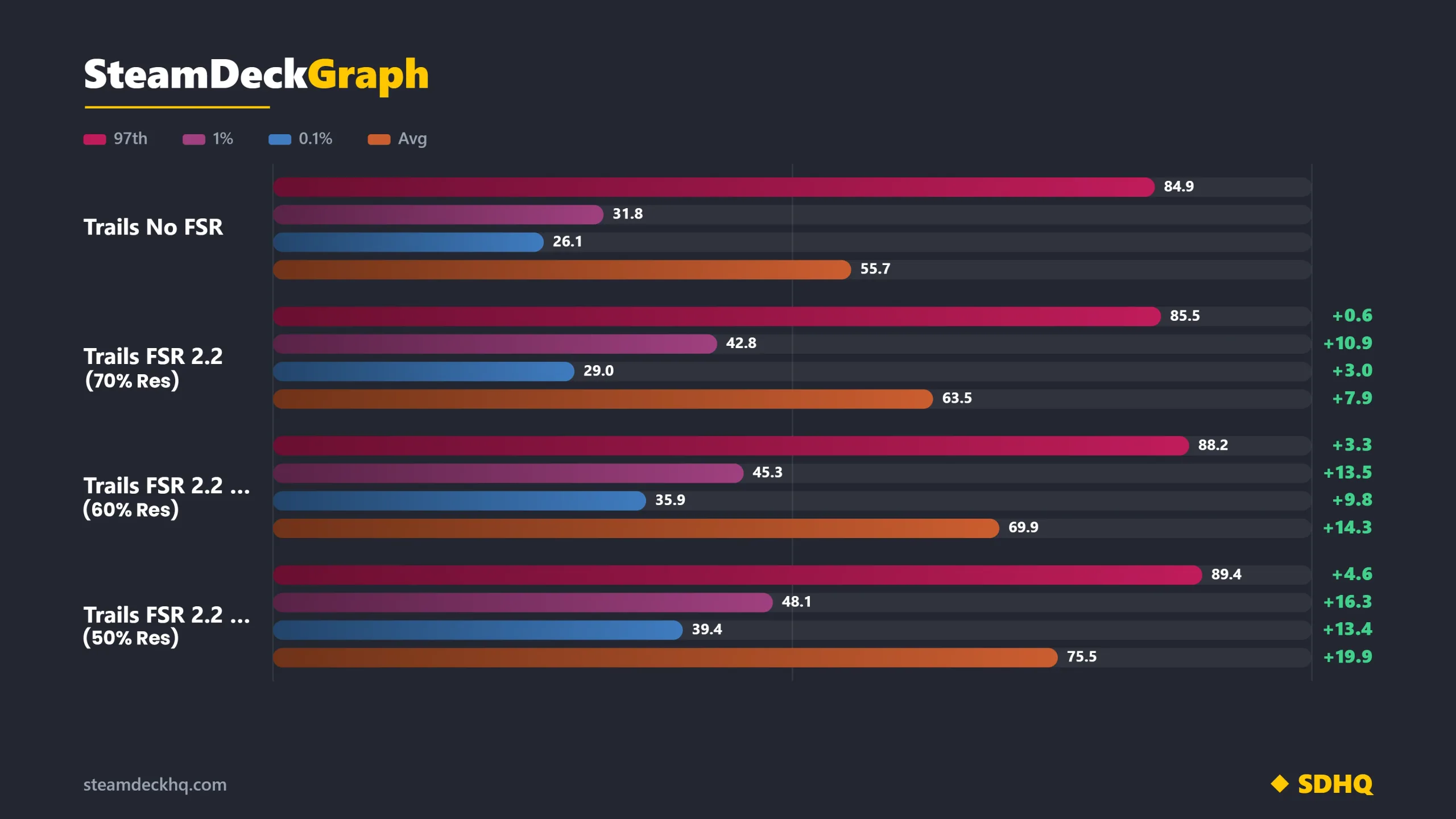
On the performance side, it started off a little bit weird. I would assume that using upscaling at all, even if it’s just going from 90% of the resolution scale, is going to be better than a game rendering at 100%, but not in this case. Playing the game at 100% resolution performs better than trying to play this game with FSR above 70%. So, using FSR 2.2 at 80%, 90%, or 100% will make the game perform worse while actually looking a little bit blurry. The performance drop is pretty drastic and unexpected since the game at 100% resolution without upscaling is actually doing better.
However, 70%, 60%, and 50% FSR 2.2 upscaling start to show some pretty big gains. As detailed in the comparison below, and compared to the game without using upscaling, we can see increases across the board. I tested the same spot of the game at the low quality preset and did the same things each time I recorded the framerate. The game progressively performs better as we go down the FSR resolution, with the jump from 70% to 60% seeing the most drastic changes. There are also significantly fewer 0.1% stutters at 60%, with only six recorded bumps instead of 12 bumps at 70%.
This also means that the possible slowdowns we might see from the game when using FSR upscaling at 60% won’t be felt nearly as often or go down as far, making the gameplay stay as smooth as it possibly can.
Then, we have the visual changes, which are apparent immediately. The game immediately becomes more blurry compared to without FSR at 100% internal resolution. It’s shown primarily in the greenery and setting, but can be seen on characters when they move around and pay attention. If you’re looking for less sharpness, it’ll be a no-brainer to use FSR, since bumping up anti-aliasing can hit performance quite hard. However, with FSR, that blurriness translates to any movement from characters, making it seem like they have a little bit of a blurry bubble around them.
On the other hand, FSR can help a lot if you're trying to play the game at a lower internal resolution. Just looking at 50% internal resolution Vs using FSR upscaling at 50% internal resolution, we can see a huge improvement using FSR in this case, with the game looking significantly sharper with more visible detail.
Overall, FSR is a great option to have and can enhance the performance pretty significantly if you can deal with some of the more blurry visuals. If you are looking for a balance of visuals and performance improvements, FSR upscaling at 60% internal resolution offers the best performance without just reducing the internal resolution to the lowest. This is a great option to have, especially if you don't mind the blur that comes with upscaling. The blur wasn't as noticeable to me during combat, so I didn't mind as much, but as a compromise that can get rid of the extra sharpness from the low-quality preset, it's solid.
Trails in the Sky 1st Chapter can be purchased for $59.99 and is rated Verified.
If you enjoyed this article, check out the rest of the content on SteamDeckHQ! We have a wide variety of game reviews and news that will help your gaming experience. Whether you're looking for news, tips and tutorials, game settings and reviews, or just want to stay up-to-date on the latest trends, we've got you covered!

RECENT NEWS
Categories
Accessories
Anbernic
Android
ASUS ROG Ally
ROG Xbox Ally
Classics on Deck
Community
Cryobyte33
Deals
Deck Mods
Emulation
Events
Featured Post
Game News
Game News
General Game News
HandheldHQ
Hardware
Lenovo
Linux
MagicX
MSI
Nintendo
ONE-NETBOOK
Opinion
Other Reviews
Accessory Reviews
Handheld Reviews
PlayStation
Proton
Retro Handhelds
Anbernic
AYANEO
AYN
GPD
MagicX
MANGMI
Miyoo
Retroid
Rumors
TrimUI
SDHQ
Steam
Steam Controller
Steam Frame
Steam Machine
SteamOS
The Unsupported Report
Uncategorized
Uncategorized
VR
Xbox
Recent Tips & GUIDES
recent reviews