If you haven't yet, follow us on X (Twitter), Mastodon, or Bluesky to know when we post new articles, and join our Reddit or Subscribe to us on YouTube to check out our content and interact with our awesome community. Thank you for supporting us!
Update 11/4/25 - The DeckSettings app is now live on iOS and public for everyone! You can download it on the App Store.
While I am always testing games myself and figuring out the best settings, it's nice to have a way to search up whatever game you want and see if there are some recommendations to enjoy as best as possible on the Steam Deck. While I am biased and will always say to come to SteamDeckHQ, there are some other great resources to find out what others say about games that we haven't covered yet, including ProtonDB and Deck Verified. However, while we have plugins and websites, we don't generally have a solid mobile app to put it all together.
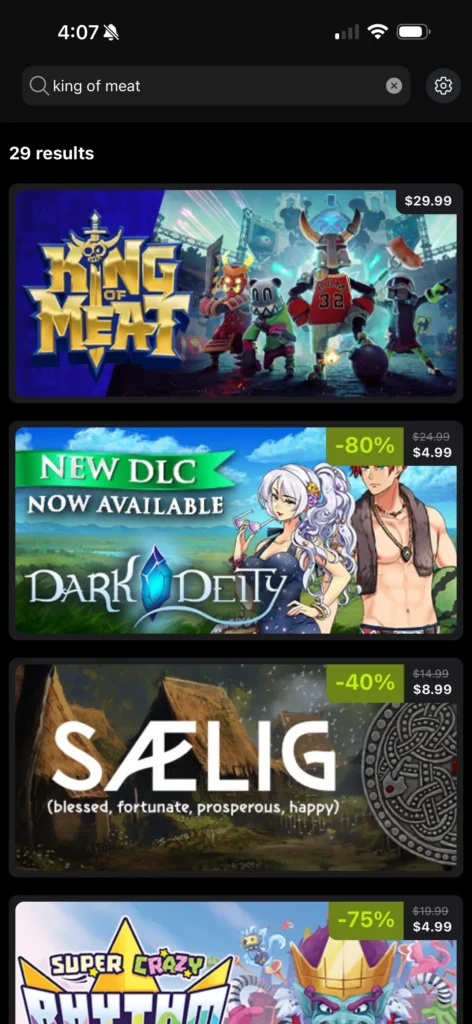
That is about to change. The developer of DeckFilter, Felix, is testing his newest mobile app, DeckSettings (iPhone / Android), and it feels like the perfect way to check the games you are interested in to see if they have not only been tested on the Deck, but also if there are any recommended settings. And the best part about it: It's completely free.
As of writing, the DeckSettings app is pretty barebones in extra features, but it does exactly what it needs to and efficiently. Basically, you search for whatever game you want to, and it operates similarly to a Steam Store search and shows you the game as well as the current price. Once you click on it, it shows some extra links to the Steam store page, ProtonDB, and How Long to Beat, with a button to go directly to game setting recommendations. Once you click on the game settings recommendations, you will be met with our own SteamDeckHQ review (if there is one), ShareDeck reports, and a quick search on YouTube.

I have been playing around with the app for myself, and I like it so far. It's quick, easy, efficient, and shows exactly what we need to see. It's a solid start for a mobile app that is filled with the info we need, and it is still early and in testing, though there are a few areas I would love to see some improvement down the line.
The home screen is essentially empty space, and I would love to see it filled with either favorited games or even updating automatically with new reviews or reports that come in. For example, I would love to see if we review a new release to appear on the home screen, or a new ShareDeck report coming in. I also wouldn't mind getting rid of that first window that shows the small Game Settings button, and instead just going directly to the game settings. That is the reason for the app in the first place, so making us hit another smaller button to get to that feels a little redundant. Info like the Verified badge and ProtonDB rating could be shown on the banner when searched, and doesn't necessarily need a second window for it.
We have shown Felix our thoughts as well, and has acknowledged to implement some of these ideas I had outlined above. It hasn't been implemented yet, but changes are coming.


I also had a chance to ask Felix some questions about the app. He decided to make this app because he found the apps that were available not really efficient or had ugly UI, and since he had already created the DeckFilter app, he had a lot of the framework already built. This app is going to stay free, though it may have an ad or two for DeckFilter, and will stay pretty streamlined, focusing on a lightweight way to search games and check their recommended settings. He is open to ideas from the community, so it's very possible the app will just get better and better as time goes on.
Even still, I am overjoyed to see a great option for checking out recommended settings easily on the phone. I am hopeful we will continue to see improvements throughout development, whether it be streamlining the process or making the home page more interesting and helpful, but even in its current state, I see lots of promise.
DeckSettings is actively looking for more testers on iOS, and you can test it for yourself via TestFlight. The app is also available on the Google Play store if you have an Android phone.
If you enjoyed this article, check out the rest of the content on SteamDeckHQ! We have a wide variety of game reviews and news that will help your gaming experience. Whether you're looking for news, tips and tutorials, game settings and reviews, or just want to stay up-to-date on the latest trends, we've got you covered!

RECENT NEWS
Categories
Accessories
Anbernic
Android
ASUS ROG Ally
ROG Xbox Ally
Classics on Deck
Community
Cryobyte33
Deals
Deck Mods
Emulation
Events
Featured Post
Game News
Game News
General Game News
HandheldHQ
Hardware
Lenovo
Linux
MagicX
MSI
Nintendo
ONE-NETBOOK
Opinion
Other Reviews
Accessory Reviews
Handheld Reviews
PlayStation
Proton
Retro Handhelds
Anbernic
AYANEO
AYN
GPD
MagicX
MANGMI
Miyoo
Retroid
Rumors
TrimUI
SDHQ
Steam
Steam Controller
Steam Frame
Steam Machine
SteamOS
The Unsupported Report
Uncategorized
Uncategorized
VR
Xbox
Recent Tips & GUIDES
recent reviews