If you haven't yet, follow us on X (Twitter), Mastodon, or Bluesky to know when we post new articles, and join our Reddit or Subscribe to us on YouTube to check out our content and interact with our awesome community. Thank you for supporting us!
Some of my favorite sports games in the past have all been either Football or Baseball, and now I very much want to try out eBaseball Pro Spirit 2026. It’s exactly as it sounds: an authentic baseball experience for us to enjoy. It’s something I can’t wait to dive into myself, especially since the game was released yesterday. However, while the game has the Steam Deck Playable rating, I didn’t expect that Konami would actually provide two sets of recommended settings for those playing on the Deck.

Over on Konami’s website, they have a section for recommended settings on Steam, and it includes some settings for the Steam Deck. They provide two sets of settings, one for those using FSR upscaling and another for those not using it. The settings that use FSR can bring most of their quality settings up to medium, will use FSR 3 Performance, and have a 60 FPS cap. For the settings that don’t use it, we need to stick to low quality and use a 30 FPS cap. They also recommend adjusting the camera settings to improve performance if you are still experiencing some issues on the batting screen.
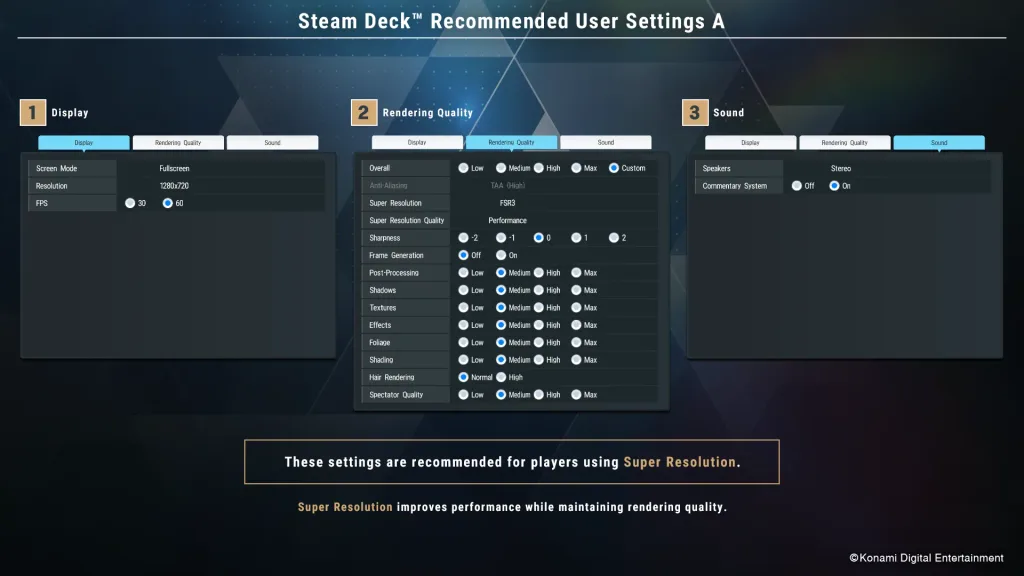
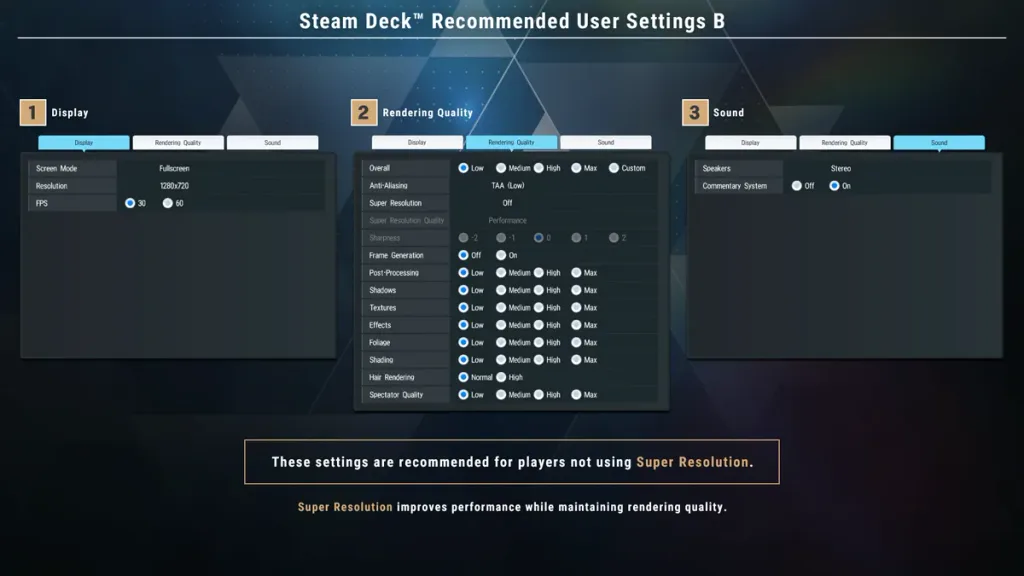
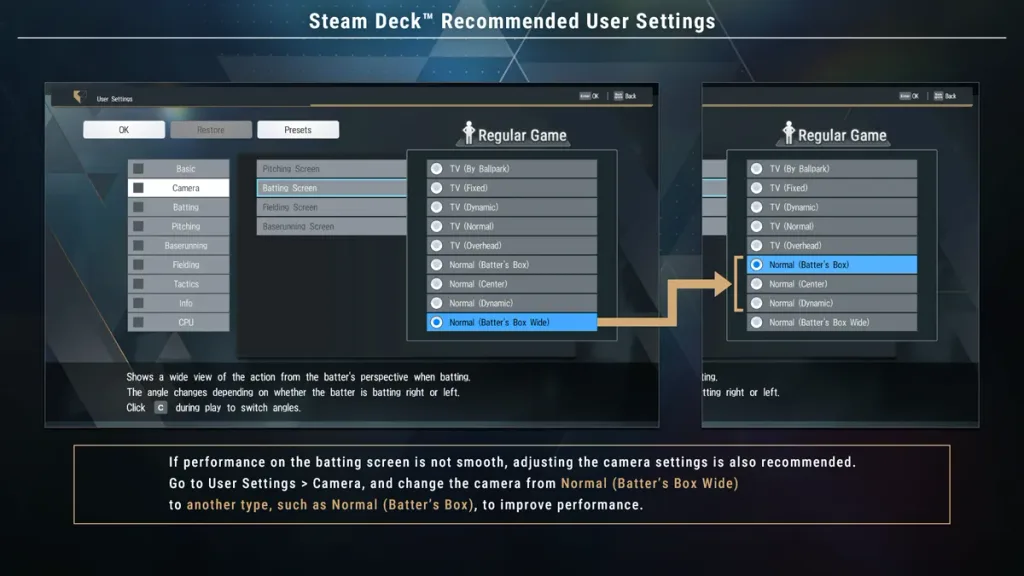
This is a pretty nifty idea, and I’m excited that they actually provided the information themselves. Usually, we wouldn’t see a mention of recommended settings, let alone any changes outside of the quality settings; the Konomi went ahead and provided two sets for those who want to use upscaling and those who don’t. I love that they did this, and it makes me want to try the game even more.
eBaseball Pro Spirit 2026 can be purchased on Steam now for $59.99. It’s currently rated playable due to needing a community controller configuration, showing incorrect controller icons, small text, needing to bring up the virtual keyboard manually, and needing to configure the graphical settings.
If you enjoyed this article, check out the rest of the content on SteamDeckHQ! We have a wide variety of game reviews and news that will help your gaming experience. Whether you're looking for news, tips and tutorials, game settings and reviews, or just want to stay up-to-date on the latest trends, we've got you covered!

RECENT NEWS
Categories
Accessories
Anbernic
Android
ASUS ROG Ally
ROG Xbox Ally
Classics on Deck
Community
Cryobyte33
Deals
Deck Mods
Emulation
Events
Featured Post
Game News
Game News
General Game News
HandheldHQ
Hardware
Lenovo
Linux
MagicX
MSI
Nintendo
ONE-NETBOOK
Opinion
Other Reviews
Accessory Reviews
Handheld Reviews
PlayStation
Proton
Retro Handhelds
Anbernic
AYANEO
AYN
GPD
MagicX
MANGMI
Miyoo
Retroid
Rumors
TrimUI
SDHQ
Steam
Steam Controller
Steam Frame
Steam Machine
SteamOS
The Unsupported Report
Uncategorized
Uncategorized
VR
Recent Tips & GUIDES
recent reviews