


If you haven't yet, follow us on X (Twitter), Mastodon, or Bluesky to know when we post new articles, and join our Reddit or Subscribe to us on YouTube to check out our content and interact with our awesome community. Thank you for supporting us!
NVIDIA provided us advanced access to the native app to test it. Thank you!
Recently, there have been more and more AAA titles that are either not able to run on the Steam Deck or require heavy sacrifices to make sure it works, which could compromise how we enjoy the game. There are a couple of options to circumvent the issue, with one of the most popular being cloud streaming from NVIDIA GeForce NOW. By connecting your Steam account, you can sync and stream games from significantly more powerful computers to give the best experience without needing the best hardware.
Up until now, the only way to utilize this on the Steam Deck was through a web browser, which can be set up quickly thanks to a script NVIDIA created. However, at the beginning of this year, NVIDIA announced that they are creating a native app that will run on the Steam Deck, giving us a more accessible and easier way to use the service, with better performance. I had a chance to try out the app for myself ahead of its launch, and not only does it simplify the experience with native gamepad support, but it also performs significantly better than any other way to use this service.

It's also very easy to install. Once the file is downloaded, simply open it, and the program will be installed, added to Steam, and Steam will be rebooted to ensure it appears in the list. It will apply the best controller scheme and artwork to ensure it fits seamlessly with your library.
The biggest difference between a native app and the script installer we had before is with its pre-requisites and direct support. The way we used it before involved installing Google Chrome and NVIDIA configuring it to best support GeForce NOW. While this approach works, it introduces a slew of issues and a cumbersome way to navigate the home screen, requiring the use of the touchscreen for pop-ups.
With the native app, all of those issues are gone. Everything is directly supported with the gamepad and is extremely easy to use. You will need a phone or desktop PC to log in to your account and connect to Steam or Epic, as the app generates an 8-digit code to enter instead of directing you to an account screen. However, the process is smooth regardless. The menu feels perfectly sized, with all text clearly visible and no blurriness. Even though this is a small part of the actual service, it's nice to have a good UI to navigate through.
While the general cloud streaming aspect is largely the same as the script, and gameplay feels fantastic and responsive as usual, we also have significantly lower battery drain. Compared to the script, we reduced the battery drain from 12-13W to 6.5-7.5W. Later tests with the script fluctuated and sometimes resulted in values below 7.5W, while others exceeded it. However, I experienced no battery drain issues with the native app.
Then, we have the gameplay. Cloud streaming allows us to play games at a higher quality than we would on the Deck, and it can make a significant difference. I tested Clair Obscur (Epic Quality with DLSS Quality mode at 60 FPS), Monster Hunter Wilds (High Quality with DLSS Quality at 60 FPS), and Warhammer 40,000: Space Marine 2 (High Quality with DLSS Quality at 60 FPS), and they all ran nearly perfectly. I was achieving higher framerates and higher quality, which made playing significantly easier. This is also a great way to play games that aren't supported on the Steam Deck/Linux like Genshin Impact, Wuthering Waves, and Fortnite.
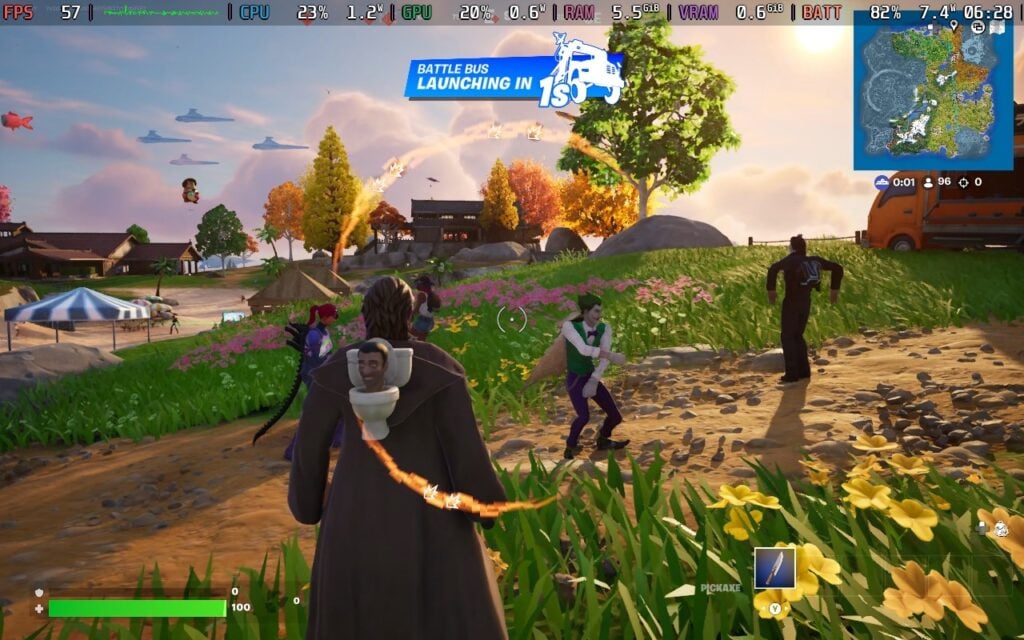
Between the two, I didn't notice huge quality differences, but I will say I had more streaming quality drops from the script instead of the native app. The service is essentially the same between the two, and the quality will, in part, be determined by the subscription tier you have through GeForce NOW. I am always a bit worried by input lag as well with streaming, which has been an issue for me in the past, but I had no problems with the native app.

The biggest quality difference comes with trying to play some of these games natively instead of cloud streaming. Some games, such as Fortnite, simply cannot be played on the Steam Deck, but others can be with significant compromises. The service gives us the chance to push visual quality without sacrificing framerate and battery life. Just looking at Clair Obscur gives a clear picture of the difference, which is very noticeable. And yes, the native app supports higher resolutions and RTX for sharper visuals with amazing lighting.
The biggest downside to the service is the need to be around a solid WiFi network. Using this offline will be impossible, but that is the case with cloud streaming in general, so it's not unexpected. We also do have a hard framerate cap at 60 FPS, but support for 90 FPS on the Steam Deck OLED is being evaluated for future releases.
I have to admit, I am a bit surprised. My experiences with cloud streaming have been negative, and I went into this hoping this would change my mind. After playing with it, I can confidently say it did. The GeForce NOW Native App makes navigation easy and readable, while giving us a chance to take advantage of the fantastic cloud streaming service to play games we normally wouldn't be able to on the Deck. I was surprised at how smooth it felt, how great the games looked, and how little the input lag affected my gameplay. With some of the biggest games on GeForce NOW already, like DOOM: The Dark Ages, Monster Hunter Wilds, Clair Obscur, Blades of Fire, and so much more, it's hard not to look at this and deny how good of a deal it is.

The NVIDIA GeForce NOW Native App takes an already great service and makes it easier to use and more accessible with a gamepad. Even though the web browser script still works perfectly fine, the ease of navigation with the native app helps make the experience feel more complete and tailored for the Deck, which is another reason I can see myself coming back and using it more and more. If you are on the fence about trying GeForce NOW, I encourage you to try it, because this experience has started to make a believer out of me.
The NVIDIA GeForce NOW Native App is available now and can be downloaded through NVIDIA's website.
If you enjoyed this article, check out the rest of the content on SteamDeckHQ! We have a wide variety of game reviews and news that will help your gaming experience. Whether you're looking for news, tips and tutorials, game settings and reviews, or just want to stay up-to-date on the latest trends, we've got you covered!

RECENT NEWS
Categories
Accessories
Anbernic
Android
ASUS ROG Ally
ROG Xbox Ally
Classics on Deck
Community
Cryobyte33
Deals
Deck Mods
Emulation
Events
Featured Post
Game News
Game News
General Game News
HandheldHQ
Hardware
Lenovo
Linux
MagicX
Nintendo
ONE-NETBOOK
Opinion
Other Reviews
Accessory Reviews
Handheld Reviews
PlayStation
Proton
Retro Handhelds
Anbernic
AYANEO
AYN
GPD
MagicX
MANGMI
Miyoo
Retroid
Rumors
TrimUI
SDHQ
Steam
Steam Controller
Steam Machine
SteamOS
The Unsupported Report
Uncategorized
Uncategorized
Recent Tips & GUIDES
recent reviews


If you launch it from game mode where does it track the time played, is it against the (steam) game played? Or is it all tracked against the GFN app? Or both?
Technically both. It tracks the entire time you are using GFN with the app, but when you play games from your Steam account, it logs in, so your playtime with that specific game should be logged with your account individually.