If you haven't yet, follow us on X (Twitter), Mastodon, or Bluesky to know when we post new articles, and join our Reddit or Subscribe to us on YouTube to check out our content and interact with our awesome community. Thank you for supporting us!
The AYN Thor was provided to us by AYN for review. Thank you!
To say that I am a fan of handhelds is arguably an understatement. I love them. Ever since I got my Game Boy Advance, playing games on portable devices has been my preferred way to play. That love has only grown, and while I had accepted that to play the newest and best games, I would also need a stationary setup (like my trusty desktop PC), I longed for the days of being able to take my games with me again. Now, there are tons of ways to do that. The Steam Deck is one of my favorite choices still, with an unbeatable screen and great ergonomics, but there was still something missing. I wanted to go back and play some of the classics I fell in love with, and the AYN Thor has been that handheld for me.
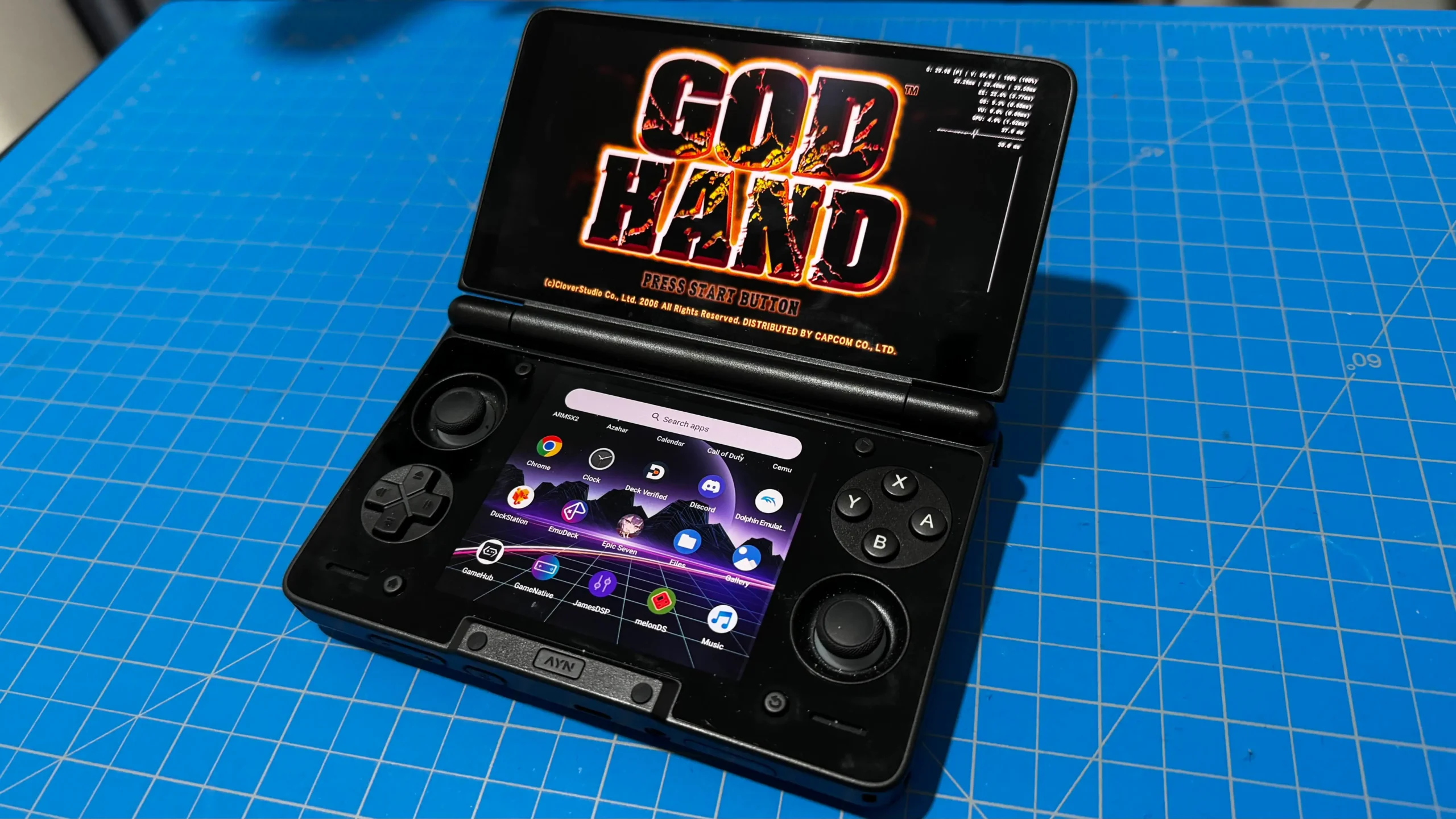
While I can just play older games on my Deck, the AYN Thor was able to provide an experience that couldn't be matched, thanks to its dual-screen clamshell design. And, despite some minor inconveniences, the AYN Thor has become my go-to secondary handheld that finds a balance between power, battery life, and design to create a nostalgia-filled device that is hard to put down. Even as a Steam Deck owner and handheld PC enjoyer, this felt like the perfect complement to my more powerful handhelds, and I see myself bringing it with me wherever I go.
Model
So before I go into my review, I first want to go over the exact model of the AYN Thor that I have. There are four models of the handheld:
- Lite - 8GB RAM+128GB SSD
- Base - 8GB RAM+128GB SSD
- Pro - 12GB RAM+256GB SSD
- Max - 16GB RAM+1TB SSD
The Lite version is also the only one that has the Snapdragon 865 chip, while the other three models all have the Snapdragon 8 Gen 2 chip. While the 8 Gen 2 chip is a good deal more powerful than the 865, both chips can hold their own in a lot of ways. If you are looking to emulate up to the PS2, the 865 will more than suffice. It should be able to handle some PS3, WiiU, and Switch, but there will be more that work with the 8 Gen 2.
The Lite version also has slower RAM, a slightly worse WiFi and Bluetooth module, and it can only output to 1080p, while the 8 Gen 2 models can output to 4K.
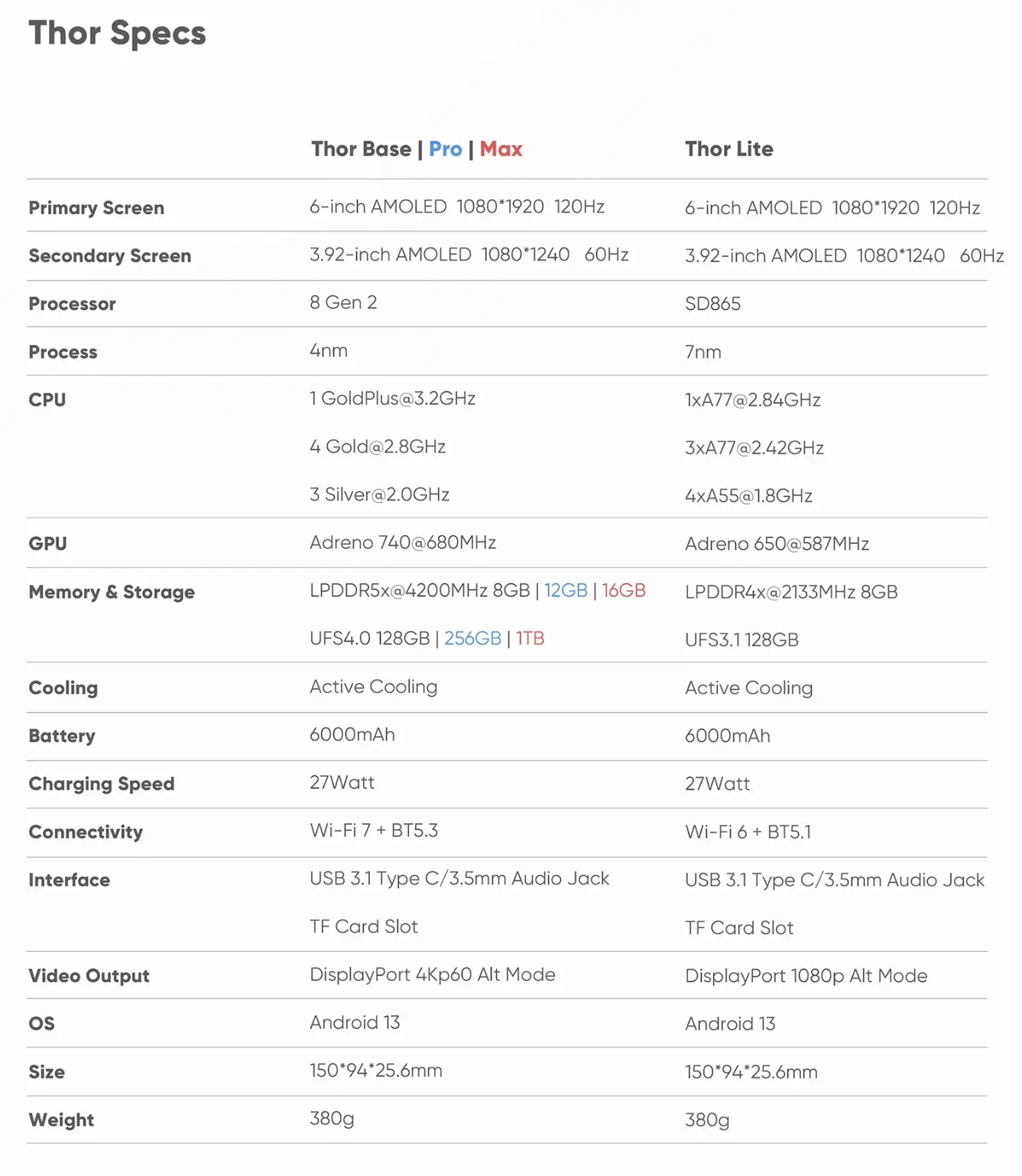
As for the model I have, AYN sent over the Base model to me. So I have a Snapdragon 8 Gen 2 chip, 8GB RAM, and 128GB of storage. For general use, Android gaming, and emulation, I feel like 8GB should be more than enough. You may need more if you are going into PS3 and Switch emulation, but I found 8GB to be a good amount for what I was looking for the most.
Build Quality
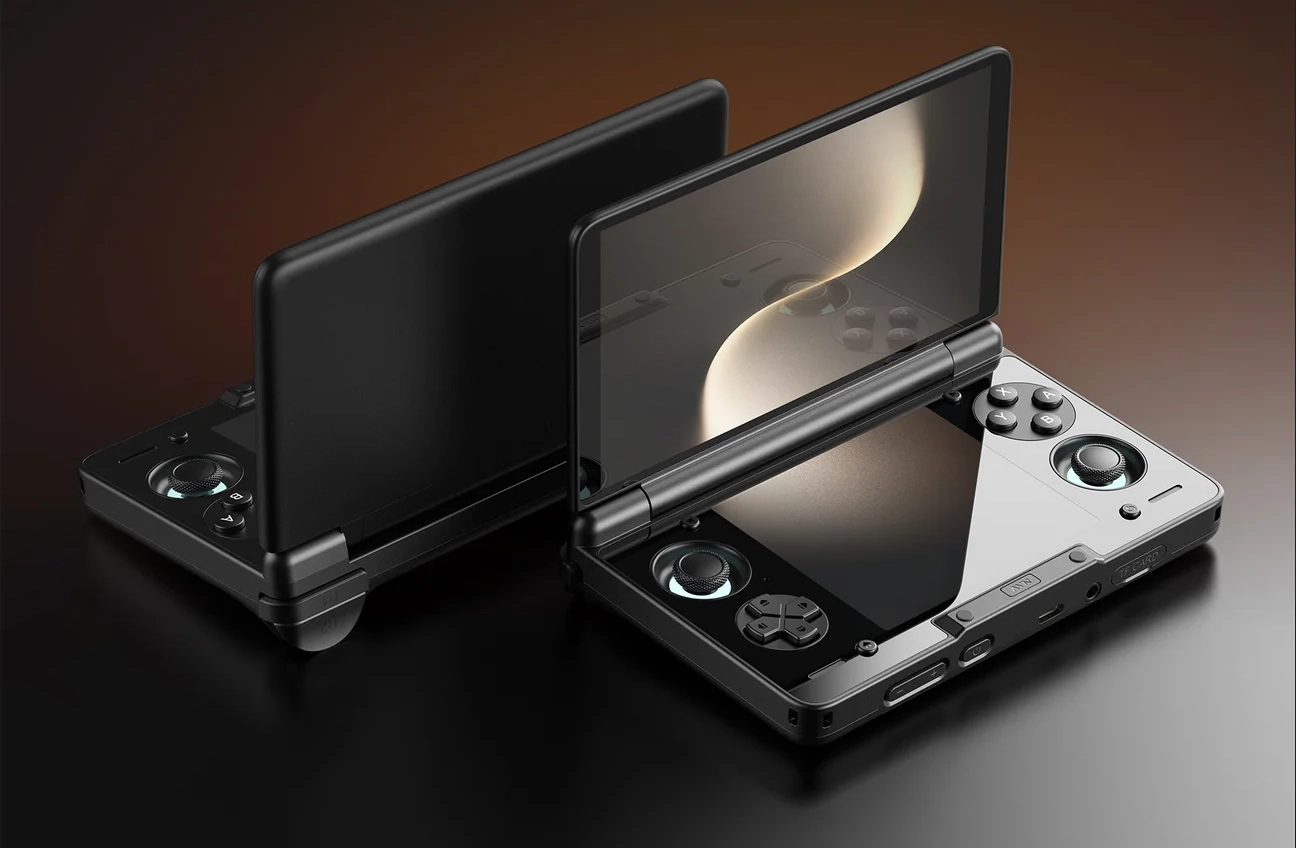
Starting with the device itself, it has a very premium feel to it. I have the black colored model, which looks wonderfully sleek and premium. The top, bottom, and sides of the AYN Thor look very obviously plastic, and it does the job. It feels well secured and relatively smooth. However, the inside has a much nicer glossy look to it due to the glass panels on the top and bottom screens. They blend well with each other, and they made me feel like I was using a top-of-the-line device. The glass panels are prone to smudges, which were definitely apparent as I was using them, but after some wiping, they looked good as new.
It also has a good weight to it. It strikes a balance between too heavy and too light to hit this sweet spot where it is easy to hold, but still feels like it's built well. I know that sounds weird, but I always feel like even the quality items that don't weigh much are just missing something. Take the Steam controller from Hori. I like the controller a lot; it's built well, and I use it quite often. But it is very light, making it have this cheaper feel to it from time to time.

The AYN Thor doesn't have this issue. It's still light enough to feel great in my hands for long sessions, which I expect from an Android handheld, but weighty enough not to feel cheap. If I were super nitpicky, it could maybe be a little lighter and still have that balanced feel, but I am happy with it right now as it is.
The speaker quality is about what I would expect from a handheld. It can get pretty loud, which is a nice aspect, but it's missing the bass to really emphasize the music. It sounds...digital, and yes, I know it is technically digital, but there are speakers that play music which sound significantly better. I don't really view this as a negative for the Thor, as I have yet to find a handheld or mobile device that fixes this problem, so I see it more as the standard.
Before I wrote my review, I was told about a tweak app that could improve the audio quality a bit, and it did. However, as I was testing and the days went by, the app stopped working, and I was no longer able to modify the audio settings more in-depth. It's possible it will work again later on, and I will write up a new article on how to improve the quality when that happens, but as of writing, it wasn't working. The tool is O2P Tweaks and JamesDSP, so if you want to try it out, you can. Hopefully, it will be working again soon!
Design and Ergonomics
The design will probably be where my biggest criticisms are, and it is the most subjective part of the review. For some context, I have fat, stubby hands that get in the way of enjoying compact devices, and in the beginning, that's what happened with the AYN Thor.
Overall, I like the design, but there are some inconveniences that creep up when I use them. I love the interface button placement and overall layout. It’s easy to reach all of the buttons I need to, from the ABXY to the D-Pad, and it doesn’t sacrifice much. Even the sunken joysticks were easier to use and reach than expected. My thumbs were never outstretched, and I found myself comfortably playing Wuthering Waves and Castlevania: Dawn of Sorrow for hours without feeling any strain.
I was initially worried about the triggers when I saw them, but actually using them proved to be no issue. My fat fingers never missed or slipped off the triggers, and I love the resistant feel they have when pulling them down.it makes it feel more impactful, responsive, and easier to designate whether I want it halfway or all the way down. The RB/LB buttons are even smaller, but even still, they never felt like a strain to use.
While not hugely impactful, I’m not a huge fan of the placement of the power and volume buttons. I’m so used to seeing them at the top or sides of a device that having them at the bottom felt a little awkward. It’s not the end of the world, and I will admit it’s a little nitpicky, but having to go to the bottom of the device to turn it on and turn the volume up and down was not something I was used to.

However, my biggest issue with the design is the handles. Going with the DS-like design, there are almost no handles on the device itself. Well, this makes it more compact and portable, but it is also more uncomfortable to use. I had to arch my hands in an awkward way just to hold the device, and I could not see myself playing for longer sessions like this.
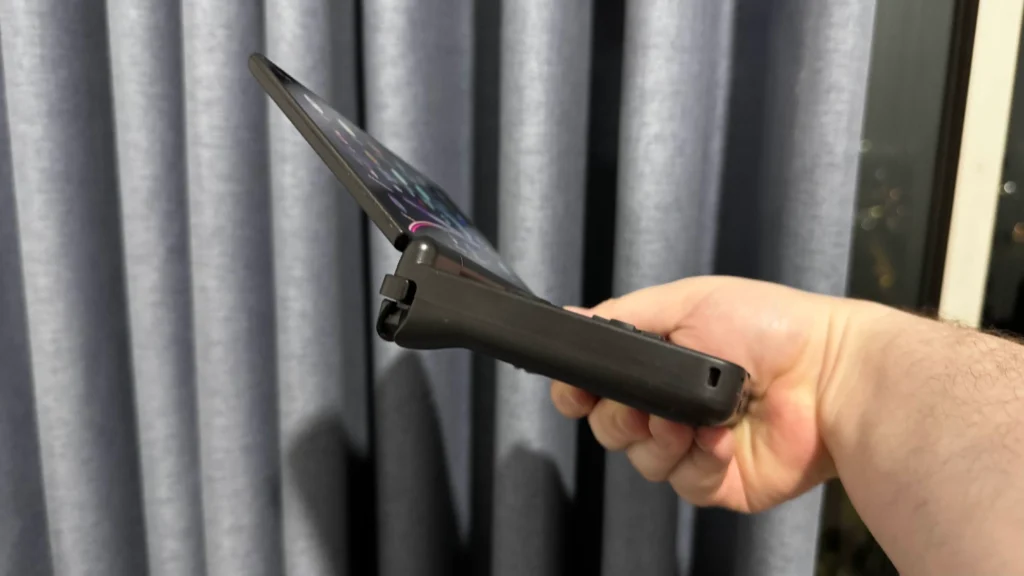
Thankfully, AYN does have a grip accessory that can slide onto the device, which feels wonderful. AYN provided this to me, but it is an extra purchase as it’s considered an accessory. If you have bigger hands, I would say this is very worthwhile to get, as it makes the Thor more comfortable to use. It does add a little to the size, but it’s still very portable.

Speaking of the size, it’s extremely easy to bring around. I love how big it is, fitting easily in my pocket and not weighing too much. As someone who is used to bigger handhelds like the Steam Deck, having a decently powerful device that can fit in my pocket was just outstanding.
The OLED Screen Goodness
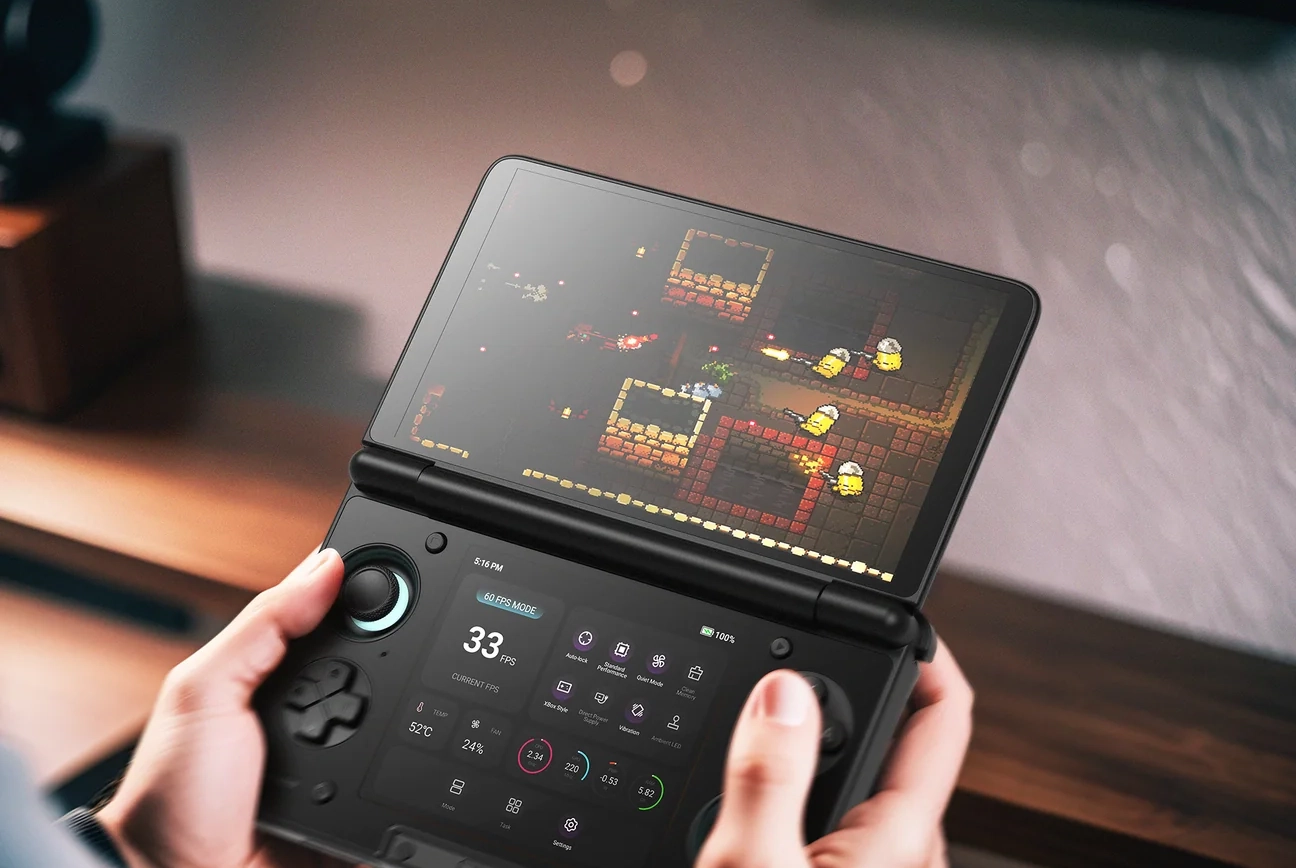
I also want to take special mention of the AYN Thor’s screens, which are just amazing. The device features dual AMOLED screens, making every color pop with vibrancy and true blacks. I am a sucker for OLED screens, and I was sucked into the Thor. I appreciate the top screen being as large as it is, perfect for Android games, but still big enough to give me the option to keep the original resolutions of the emulated consoles while enhancing the resolutions. And with both screens having touch capabilities, I was able to fine-tune my layout and use touch if I had to.
The bottom screen is a bit on the small side, but it remains very usable. It’s a great size for DS and 3DS emulation, while still reaping the benefits of the OLED goodness. It’s a little difficult to read or watch on the smaller screen, so multitasking does have some limits, but it’s still possible. I had a walkthrough video up while I played Shadow of the Colossus, and it wasn’t uncomfortable to use as I could move it around with my fingers or zoom in and out.
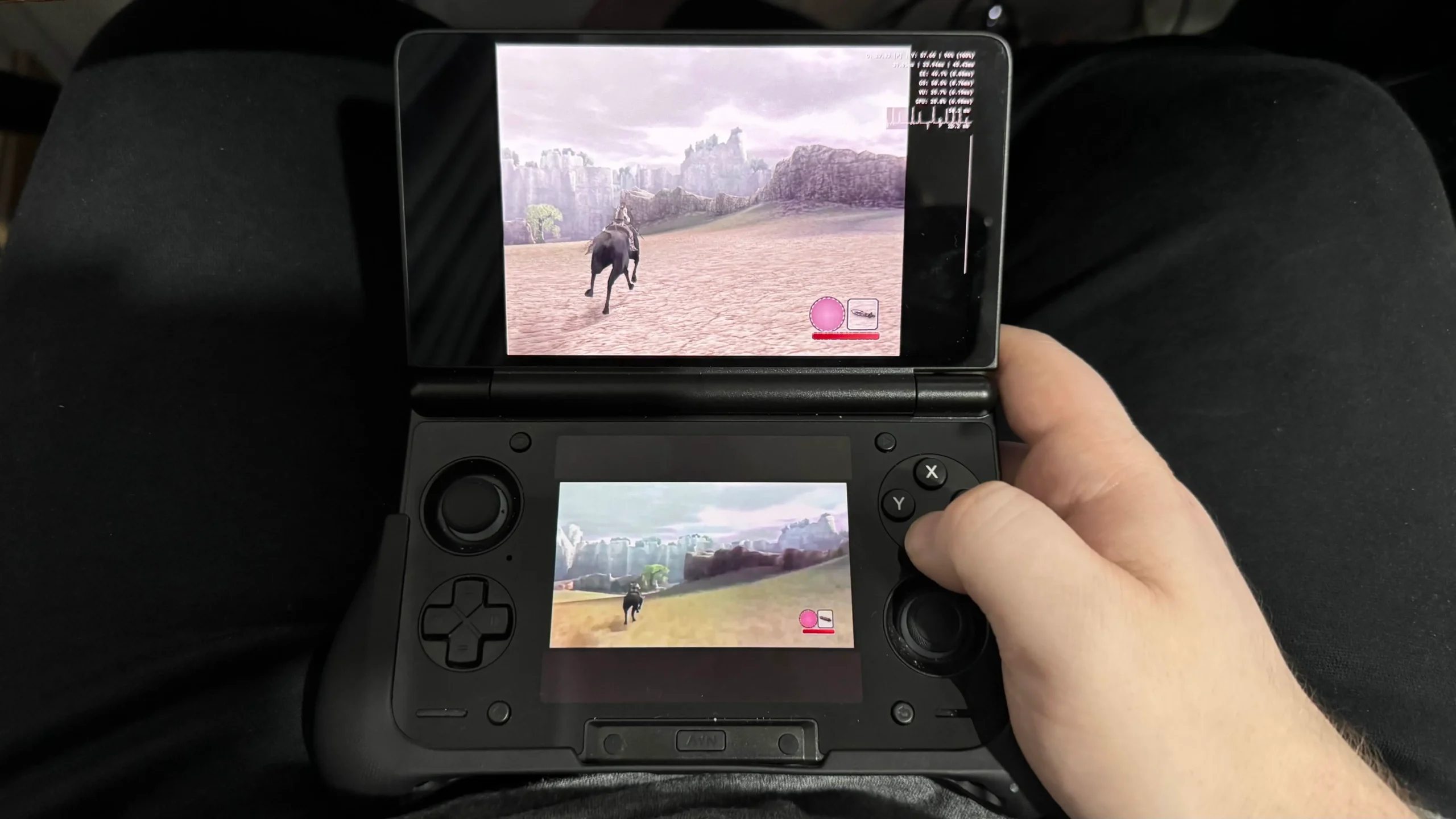
The more pertinent problem is heat. The bottom screen can get very hot when playing demanding games. Emulation won’t be much of an issue, especially if the fan is on, but trying to multitask while playing Wuthering Waves was not comfortable.
The Thor's screens also support 120Hz refresh rate, and we have the option of turning on "120 FPS Mode" if desired. While it isn't something I found myself using often, I do appreciate the option. Wuthering Waves is one of the few games I tested with a 40 FPS in-game limit, which pairs perfectly with the 120 FPS mode. Turning this on can also help with any input lag from emulators a little bit, but it doesn't eliminate it.
Device Management Software
The AYN Thor comes with its own software to manage the device, including a launcher and quick settings options. While the launcher does have a more streamlined interface that reminds me of the Nintendo Switch boxes all put together on a grid form, I just preferred seeing everything in the usual Android layout. It was familiar and controllable with the gamepad, so it’s just where I defaulted to.
However, the Thor’s quick settings are phenomenal. We can bring them up with the press of the AYN button at the bottom of the bottom screen, and bring with it some fantastic options. On the technical side, we can change the performance mode, forcing the device to use the max GPU power for extra stability in games, change fan speed, toggle vibration, and turn on the joystick LEDs. We can also clean up the memory whenever we want to, check the stats of the device (CPU, GPU, RAM, Power usage), and change the brightness and audio levels for both the top and bottom screens individually.
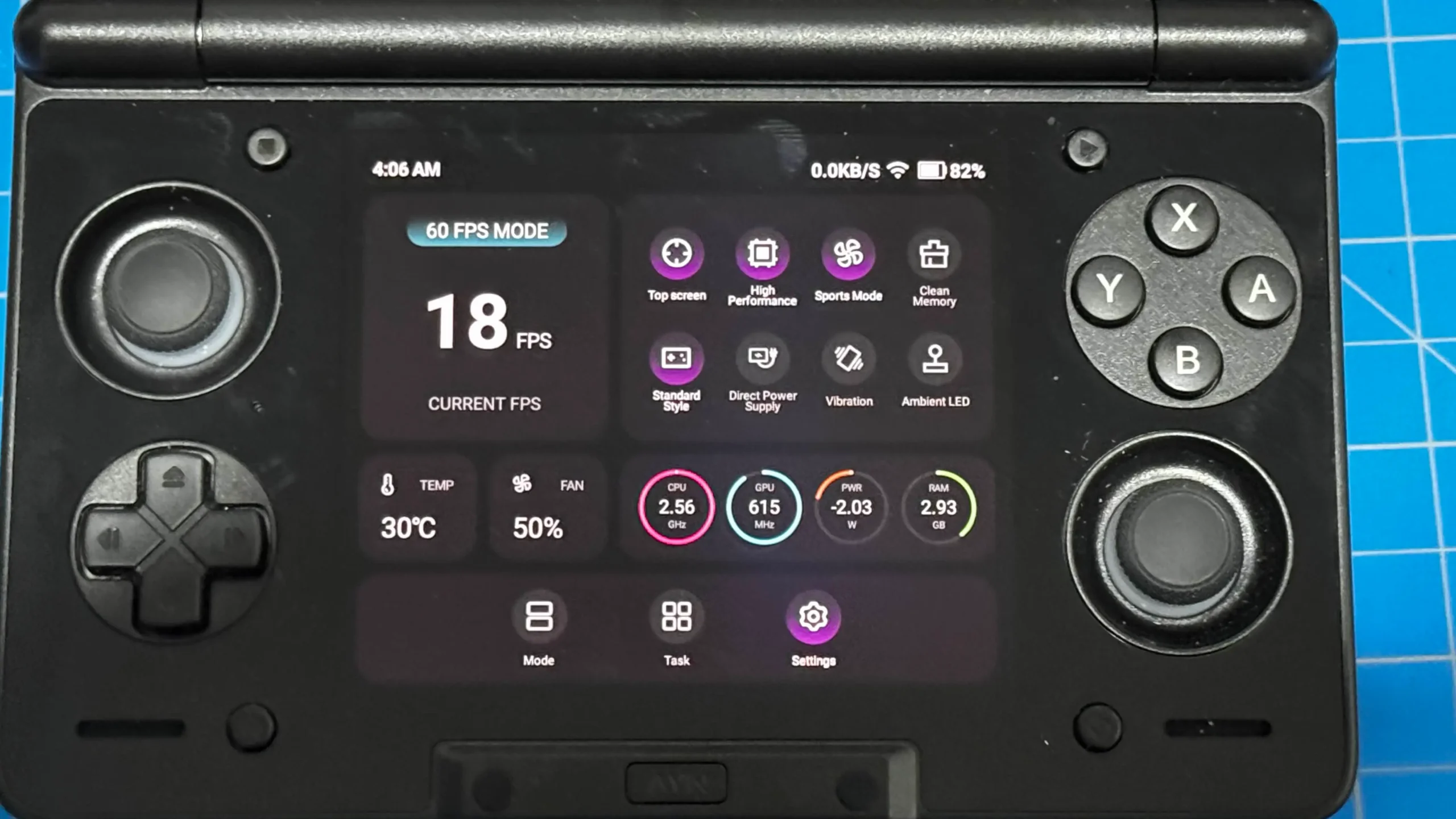
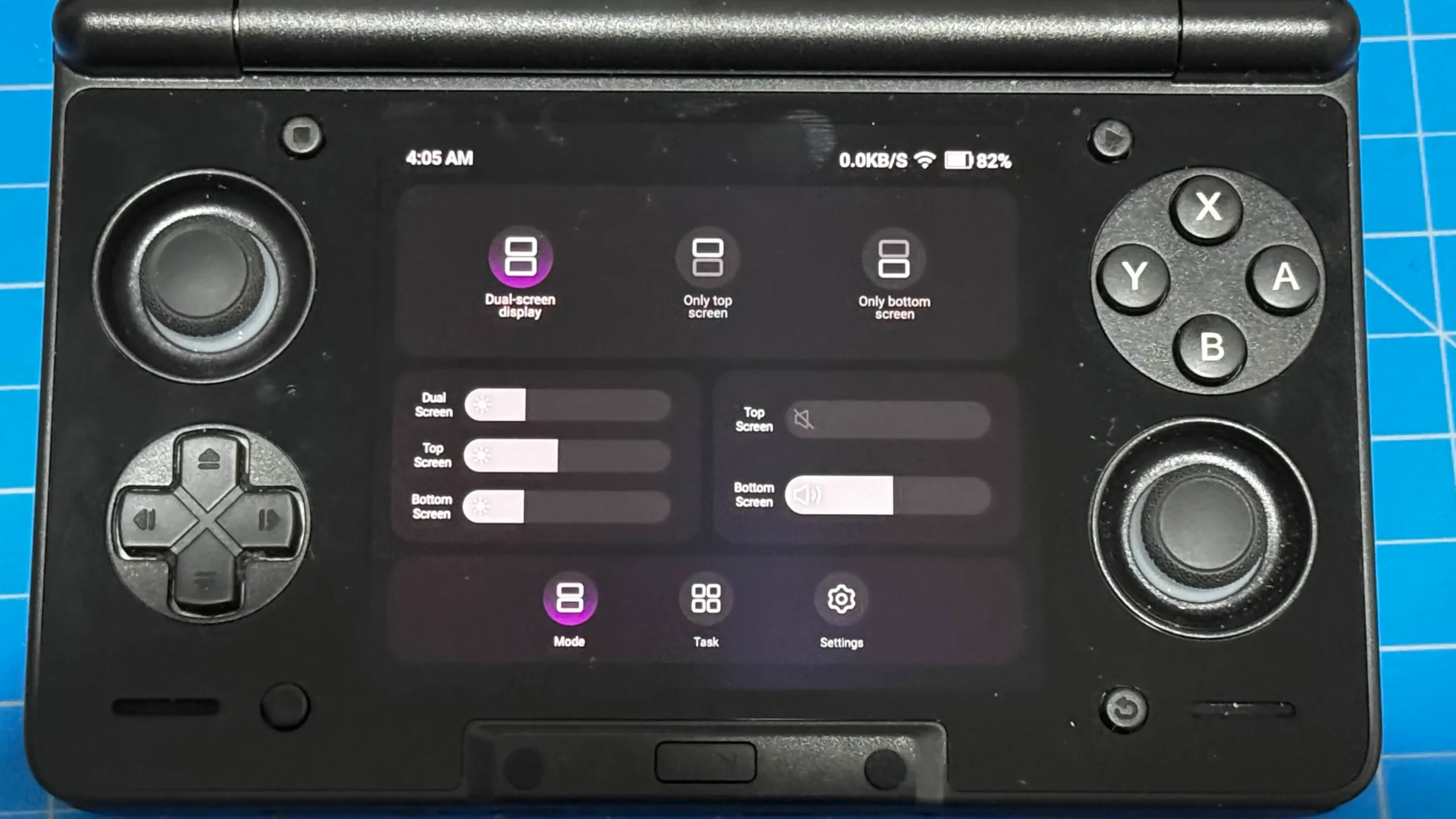
However, there are two options that stand out as my favorites: Auto Lock and Direct Power. One of the early grievances I had with the Thor was how the controller would swap screens when I would touch it. So, let's say I am playing Wuthering Waves on the top screen and manually turn the fan up on the bottom with my finger, the controller will now go to the bottom screen since that's the last one I touched. This was a bit annoying, but that is solved with screen locking. By changing "Auto Lock" to "Top Screen", the controller will stay connected to the top screen, meaning I can touch the bottom as much as I want and still control the top screen at all times. It's quite possibly my favorite feature of the quick settings.
As for Direct Power, this is just a nice option to have. Essentially, if you have your Thor connected to an outlet, you can turn on Direct Power to turn off any battery power and just use the outlet. This eases strain on your battery and can prolong it. I found myself using this all the time when I am sitting at my desk, and was still testing while plugged in.
Game Testing
Android Game Testing
While the big draw of the AYN Thor is easily dual-screen emulation, it is a full Android device and can play games from the Play Store. With the Snapdragon 8 Gen 2 chip, we can play some of the most demanding games from the store, and with the connected controller, it makes it much more enjoyable.
Genshin Impact was the first game I tested, and I was surprised by how much I could push. Using the High Performance setting in AYN, I was able to get 60 FPS on high settings most of the time. There were a few drops here and there, but ultimately, it was still very playable. It may get a little difficult to hit 60 in large fights with tons of effects, but I was able to keep it at 60 in fights with multiple enemies while I used my abilities. Sadly, I do have to go to the settings and switch to controller controls each time I open the game, but it was still very playable.
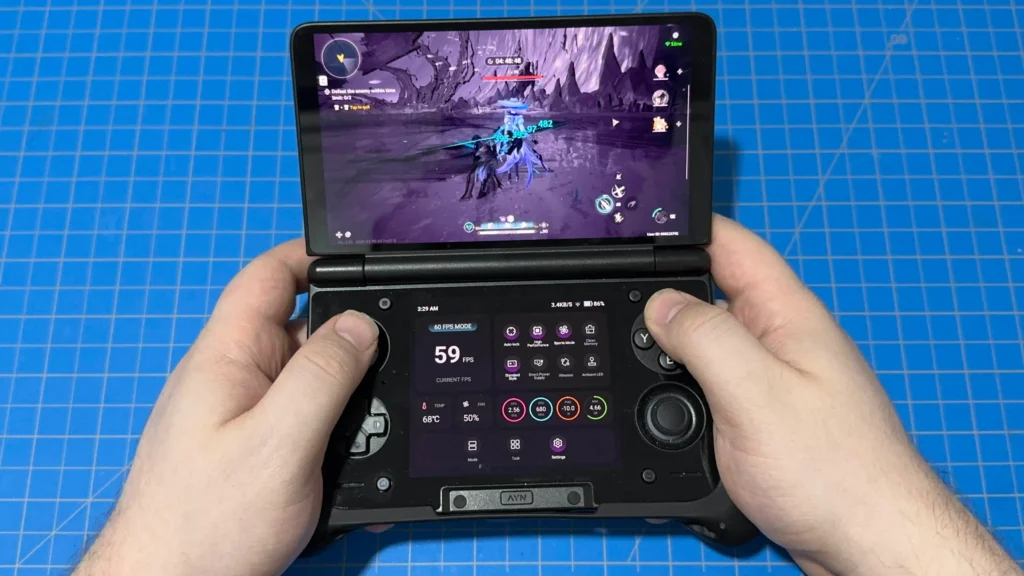
Wuthering Waves also held up quite strongly on the Thor. I started off on the Balanced preset and, using the high-performance mode, was able to nicely stick to 30 FPS with power to spare. I was able to push to quality mode at 60 FPS as well, though I did experience some dips. I recommend setting it to 40 FPS and using 120Hz mode for the best experience. I did encounter a couple of crashes after long play sessions, but it was perfectly playable overall. It did recognize the connected gamepad by default, which I really appreciated.
GameNative/Steam Game Testing
Thanks to apps like GameNative, we are actually able to play Steam games on our Android devices, and it's pretty amazing. While I was able to get some games running, like Hollow Knight (which runs very well), my model of the Thor only has 8GB RAM, which limits me on which games I can test out. The best way to see which games are going to be good to use is to use the GameNative compatibility site. You can specify the AYN Thor there, and reports will come up showing which games are running, their rating, and which version of the app is being used.
There are very good reports for tons of great games like Hades 2, ANIMAL WELL, Skyrim, and one of my favorites, BALL x PIT. This is one of the games I was able to get running with my low RAM, and it was just a blast. It isn't perfect, and there were some slowdowns here and there, but it was playable, and that alone is pretty damn awesome.

If you are looking to play more of your Steam library, I would recommend going for the 12GB RAM model. You should be able to play most indies and older titles with ease, but doing it only with 8GB RAM locks out a good chunk of PC games.
Emulation Testing
As far as emulation goes, there will be a few compromises here. It will be able to handle almost everything from arcade and NES all the way to PS3 and Switch. Of course, once you get to tougher-to-run games, it will start to show some warning signs, but it should be able to handle almost everything thrown at it.
Of course, the big draw for the Thor is going to be DS and 3DS, and there should be no problems. Using MelonDS and Azahar, I was able to play almost every game that I threw at it with ease. I found myself sinking into Castlevania: Dawn of Sorrow, Sonic Rush, and Spectrobes again on the DS side, while putting in more time with Shin Megami Tensei 4 and Bravely Default on the 3DS. Utilizing both screens for DS and 3DS was easy to set up, and when I did, I was able to control and use both with ease. It was like having a DS all over again, and it was magical.
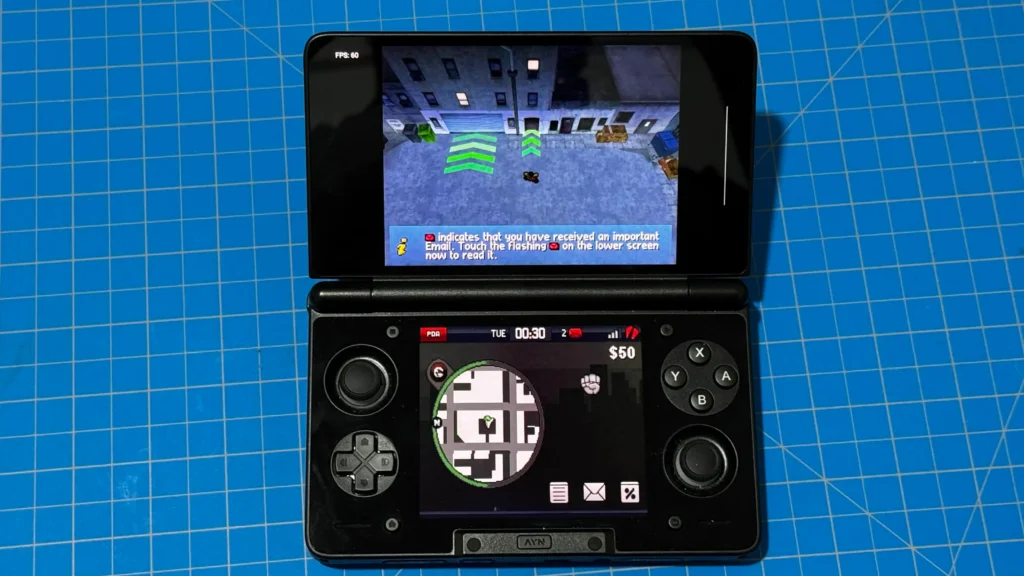
The one drawback in this case will be any games that require sticking to a beat or tapping in time. Emulators have a bit more input latency than the original consoles do, and it's very apparent here. For example, I would miss beats in Elite Beat Agents when only listening to the music. Going off of visual cues worked better for me, but it was still more difficult and less enjoyable than I remembered.
Regarding emulation, I found that we can push it pretty far with upscaling to make our games look as good as possible:
- DS (MelonDS): 8x resolution is possible, but there may be some stuttering in games like GTA: Chinatown Wars. I also tested C.O.P., which worked like a charm, along with Mega Man Battle Network 5.
- 3DS (Azahar): 2x-3x resolution is doable depending on the game. Monster Hunter Generations started to test the limits, but I was still comfortably playing most games at 3x. Resident Evil Revelations was the only game that felt unbearable to play, with constant stuttering, slowdowns, and nothing could fix it.
- GameCube/Wii (Dolphin): 2x-3x resolution is also quite doable, though some games did show warning signs at 3x, like Star Wars: Rogue Squadron 2 and The Last Spell.
- WiiU (Cemu): 1x is definitely playable for a good chunk of games, but WiiU emulation in general on Android has been spotty. Most games I tried had graphical issues and just weren't enjoyable, but they were playable. As development progresses, I am sure it will get better, and the Thor will be able to handle it.
- PS2 (NetherSX2): 2x-3x resolution is pretty doable for most games here. I was able to enjoy games like GTA: San Andreas, Naruto Ultimate Ninja 5, and God Hand at 3x comfortably, so I would say this range is good. However, there may be some games that are too demanding and need to be brought down a little more. Shadow of the Colossus showed some warning signs, but ultimately was still very playable.
- PS3 (RPCSX): Smaller-scale games are going to be playable, but there will be some compromises needed. God of War 1 HD isn't an extremely demanding game, as it is a PS2 remaster, but even that had some trouble staying stable. It was still playable, and still is, but I wouldn't expect rock-solid emulation here. Smaller games will be great, but I wouldn't go in expecting to play The Last of Us or Uncharted.
PS3 is where it starts to test the limits, and it does get a little hot when using it, which is a similar issue I mentioned above when playing Wuthering Waves. However, if you are just using it to play some Naruto Ultimate Ninja while reading up on Sonic Rumble's performance on the Steam Deck, you should have no problems whatsoever with heat.

Battery Life Estimations
Battery life for these games will vary depending on how you play, but if you are pushing it with 60 FPS on the highest quality, I would expect around 2.5 to 3 hours. However, when using emulators, I would expect significantly longer battery life, depending on the system. The more demanding systems, like WiiU and PS3, will get around 3 hours or so, while DS/3DS can get around 8. I was also seeing even longer battery life for easier-to-run emulation like GBA or SNES, with some reporting 15+ hours of battery life.
Conclusion
All in all, the AYN Thor is one of my favorite handhelds that I have ever had the pleasure of using. The DS form factor and dual OLED screens are just a joy to use, and the quick access settings give enough control to customize the experience using it and ease some of the issues that could have popped up. The design is a little tougher to use with my larger hands, but the grip accessory that slides on relieves all of that and allows me to use all those wonderful buttons and triggers needed to play some games.
With how powerful the Snapdragon 8 Gen 2 chip is, we can enjoy almost anything that comes our way. Whether that be demanding Android games like Genshin Impact or Wuthering Waves, or emulation going up to the PS3 era, we can handle it. The dual screens are perfect for DS and 3DS emulation, and with the ability to multitask and pull up guides at the same time for single-screen games, it's just wonderful to use. The bottom screen can get a little hot with prolonged use, but it never got to the point where I had to avoid it completely.
The AYN Thor is a must-have handheld, even as a Steam Deck owner. It does enough differently and offers a more unique experience to play games that would either not be easily playable on the Steam Deck or just a little awkward. After using this, I can't see myself going back to the Deck or Ally or any handheld PC for emulation, especially for dual-screen emulation.
The AYN Thor is available on AYN's website starting at $249, though I do recommend getting the $299 version to take advantage of the Snapdragon 8 Gen 2 chip and its power.
The AYN links above are using an affiliate link, which gives us a little back from sales at no extra charge to you. All proceeds go back into SDHQ and its development.
If you enjoyed this article, check out the rest of the content on SteamDeckHQ! We have a wide variety of game reviews and news that will help your gaming experience. Whether you're looking for news, tips and tutorials, game settings and reviews, or just want to stay up-to-date on the latest trends, we've got you covered!


RECENT NEWS
Categories
Accessories
Anbernic
Android
ASUS ROG Ally
ROG Xbox Ally
Classics on Deck
Community
Cryobyte33
Deals
Deck Mods
Emulation
Events
Featured Post
Game News
Game News
General Game News
HandheldHQ
Hardware
Lenovo
Linux
MagicX
Nintendo
ONE-NETBOOK
Opinion
Other Reviews
Accessory Reviews
Handheld Reviews
PlayStation
Proton
Retro Handhelds
Anbernic
AYANEO
AYN
GPD
MagicX
MANGMI
Retroid
TrimUI
SDHQ
Steam
Steam Machine
SteamOS
The Unsupported Report
Uncategorized
Uncategorized
Recent Tips & GUIDES
recent reviews