If you haven't yet, follow us on X (Twitter), Mastodon, or Bluesky to know when we post new articles, and join our Reddit or Subscribe to us on YouTube to check out our content and interact with our awesome community. Thank you for supporting us!
When gaming on devices with limited VRAM (such as the Steam Deck), you've likely encountered the issues that come with your VRAM being exhausted, such as stutters and hitches in your frame time, sometimes even outright loss of frames.
Well, Natalie Vock, a contractor for Valve who works with them on AMD graphics drivers, has found a new way to make optimal use of your VRAM on Linux, whether that be on the Steam Deck or any device, really.
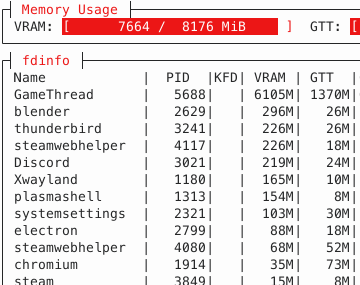
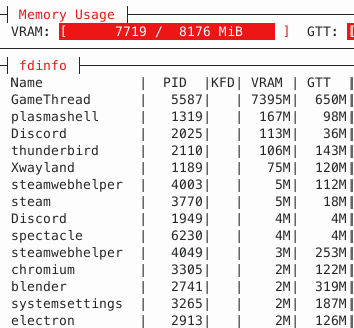
In simple terms, Vock has developed Linux kernel patches that will detect gaming applications and then prioritize giving them VRAM over other applications, such as web browsers. As you can see from the image on the left, VRAM usage is much more spread out among the applications, and GameThread is having to take 1370MB from the much slower GTT memory. Whereas on the right, the computer is piling almost all of its VRAM into the GameThread, meaning the game only needs to take 650MB of GTT memory.
Right now, the simplest way to access these patches is to use the CachyOS Linux distribution with the KDE desktop, as it already includes this patch. But hopefully, more Linux distributions will be looking into adding these patches or something similar to improve their gaming performance.
Whether or not such a patch would benefit devices like the Steam Deck remains to be seen, as the Steam Deck uses the same memory for both the CPU and GPU, meaning the GPU is always using GTT memory. For the Steam Machine, however, this could be a big boost; it shouldn't be a huge leap to get a patch like this working with SteamOS, and the 8GB of VRAM in the Steam Machine is a point of concern for many potential buyers.
This patch, of course, could benefit any Linux device that reaches its VRAM limit.
If you want to check out the full blog post Natalie Vock wrote on this method of optimization, you can do so here.
Source: Digital Foundry
If you enjoyed this article, check out the rest of the content on SteamDeckHQ! We have a wide variety of game reviews and news that will help your gaming experience. Whether you're looking for news, tips and tutorials, game settings and reviews, or just want to stay up-to-date on the latest trends, we've got you covered!

RECENT NEWS
Categories
Accessories
Anbernic
Android
ASUS ROG Ally
ROG Xbox Ally
Classics on Deck
Community
Cryobyte33
Deals
Deck Mods
Emulation
Events
Featured Post
Game News
Game News
General Game News
HandheldHQ
Hardware
Lenovo
Linux
MagicX
MSI
Nintendo
ONE-NETBOOK
Opinion
Other Reviews
Accessory Reviews
Handheld Reviews
PlayStation
Proton
Retro Handhelds
Anbernic
AYANEO
AYN
GPD
MagicX
MANGMI
Miyoo
Retroid
Rumors
TrimUI
SDHQ
Steam
Steam Controller
Steam Frame
Steam Machine
SteamOS
The Unsupported Report
Uncategorized
Uncategorized
VR
Recent Tips & GUIDES
recent reviews