


まだの方は、X(ツイッター)またはマストドンでフォローし、新しい記事の投稿をお知らせください。また、Redditに参加したり、YouTubeに登録して、私たちのコンテンツをチェックしたり、素晴らしいコミュニティと交流してください。応援ありがとうございます!
The SteamGridDB plugin is my favorite Decky Plugin so far. I am able to change the artwork for the games I have, and it's so easy to do, thanks to the plugin. Today, a new update came out for it that adds in some nice improvements, UI changes, and more, making it even better to use than before!
The biggest change is the ability to change the most recently played game capsule into a portrait or square. This can make it look just like all of the other games on the Steam Deck Carasoul list, which I really like since it will look flush with the rest of the games on the list. There were also some UI changes that improved using it with a mouse, and just some adjustments/fixes.
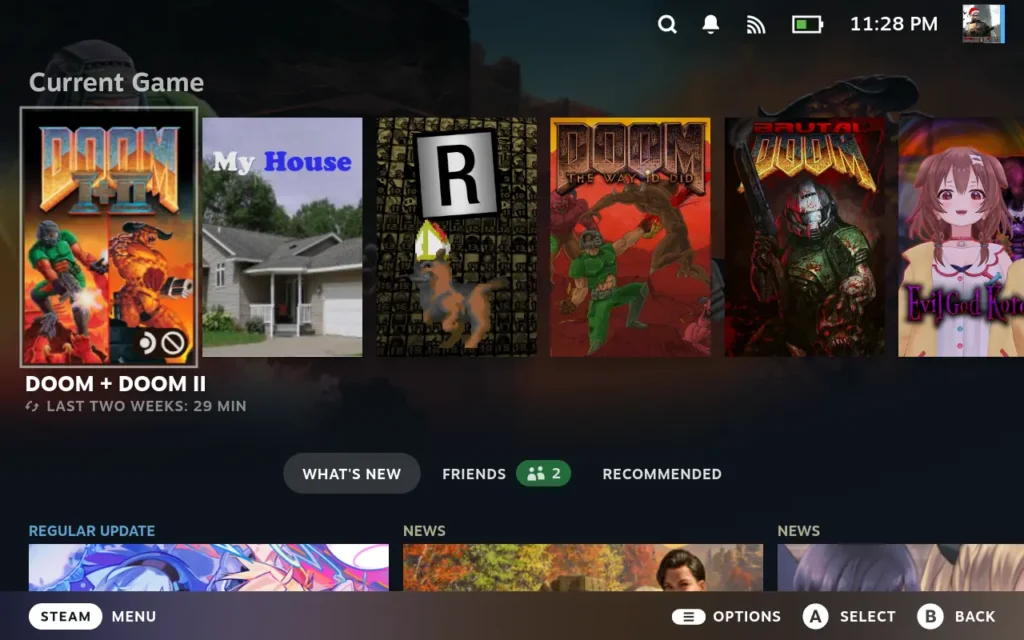
We also have a new announcement bar, which can be used for community/important announcements, though it won't be used much. We also have some drastically improved performance, Steam assets now use larger versions of artwork when available, and you can now see file type in the asset details modal and logo positioner button on the Hero tab.
You can find the SteamGridDB Decky Plugin on the Decky Loader store, but you need to have Decky Loader installed. If you don't, you can check out how to install it through our Decky Loader guide.
SteamGridDB Update 1.5.0 Changelog:
- Added ability to make most recently played game capsule a portrait/square.
- Drastically improved performance when browsing.
- Improved UX when using a mouse.
- Official Steam assets now use the larger versions of wide capsules, heroes, and logos where available.
- Show file type in asset details modal.
- Show logo positioner button on Hero tab.
- Various style and UX adjustments and fixes.
- Added an announcement bar. (used sparingly for community and important announcements)
- Fixed an issue where toggling square capsules would break Steam until restarted.
- Fixed more assets not loading when using a custom theme or when using certain filters.
- Fixed plugin causing a crash in Steam desktop mode.
- Fixed capsule glow setting not working.
- Updated localizations for Polish, Korean, Spanish-Latin America, Turkish, Japanese, Greek.
この記事を楽しんでいただけたなら、SteamDeckHQ の他のコンテンツもチェックしてみてください!あなたのゲーム体験に役立つゲームレビューやニュースを幅広く取り揃えています。ニュース、ヒントやチュートリアル、ゲーム設定やレビュー、最新のトレンド情報など、あらゆる情報をお届けします。 カバーしています!

最近のニュース
カテゴリー
Accessories
Anbernic
Android
ASUS ROG Ally
ROG Xbox Ally
Classics on Deck
Community
Cryobyte33
Deals
Deck Mods
Emulation
Events
Featured Post
Game News
Game News
General Game News
HandheldHQ
Hardware
Lenovo
Linux
MagicX
MSI
Nintendo
ONE-NETBOOK
Opinion
Other Reviews
Accessory Reviews
Handheld Reviews
PlayStation
Proton
Retro Handhelds
Anbernic
AYANEO
AYN
GPD
MagicX
MANGMI
Miyoo
Retroid
Rumors
TrimUI
SDHQ
Steam
Steam Controller
Steam Frame
Steam Machine
SteamOS
The Unsupported Report
Uncategorized
Uncategorized
VR
最近のヒント&GUIDES
新着レビュー


The one thing I miss is the ability to set all images for a game at once, be it the default, the most downloaded, or by creator.