まだの方は、X(Twitter)、Mastodon、Blueskyでフォローし、新しい記事が投稿されたらお知らせください。また、Redditに参加したり、YouTubeに登録して、私たちのコンテンツをチェックしたり、素晴らしいコミュニティと交流してください。応援ありがとうございました!
There have been tons of games that I’ve had the pleasure of reviewing and optimizing, but one of the things I dread doing is creating my own controller layout. I don’t actually mind creating it, but the process of having to continually go back and forth in and out of the game to make individual adjustments and test them is just annoying. However, a new tool that popped up to me solves that completely, and I have fallen in love with it.
Before I go into it, this tool was made with the help of AI-generated code. Specifically, Claude was used to help make it. I have not seen comments of the extent yet, but it’s worth mentioning that it was at least in part made by AI.
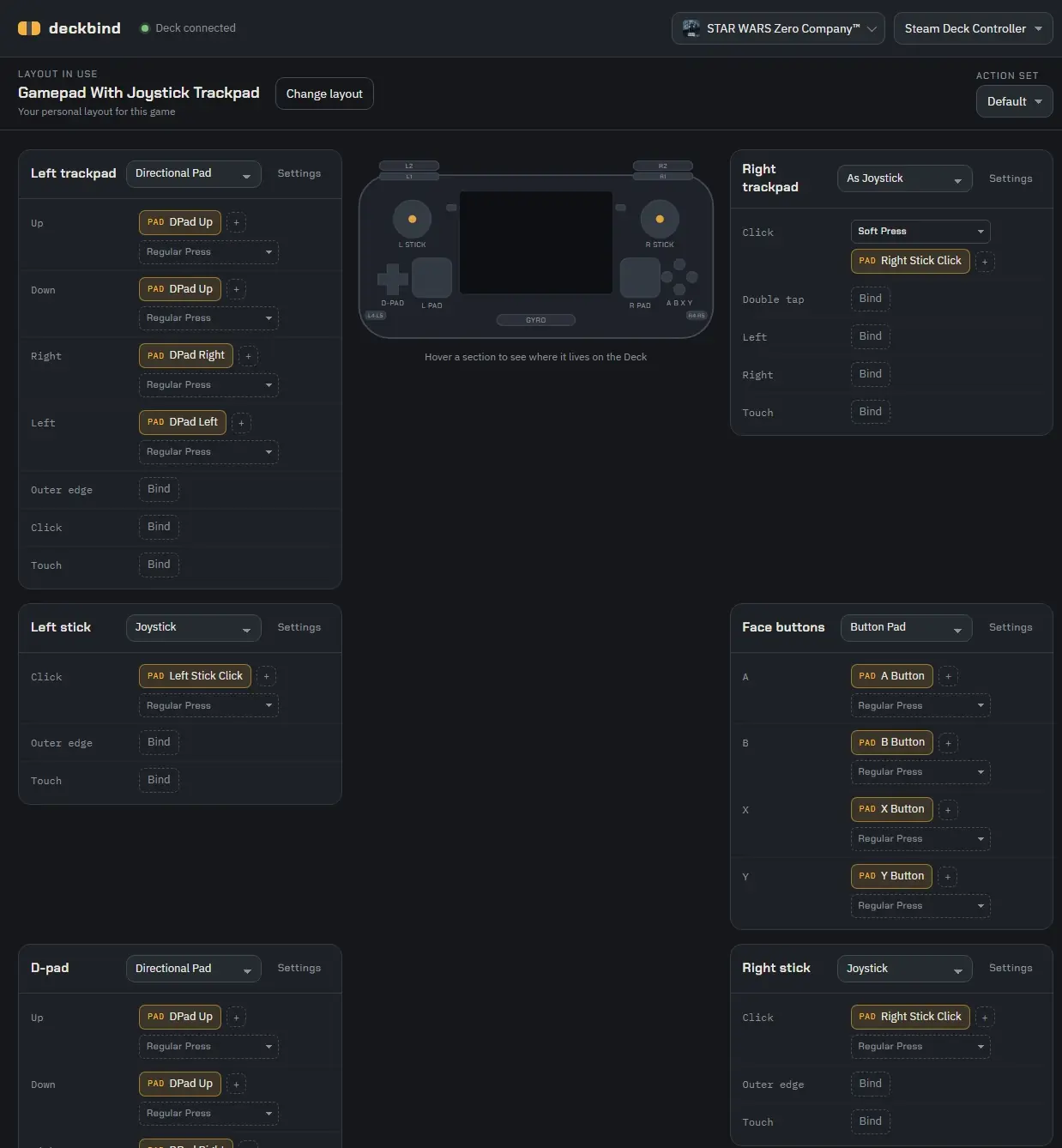
Deckbind is a new tool created by Lapin that completely solves the big issue I have with making controller layouts. After it’s fully set up, we can change controller bindings through a web page in real time. This completely eliminates having to go back and forth inside the menus and out of the game to change every single binding. It makes it significantly easier to just create our own layouts, since now we can do it all in real time.
It’s also quite easy to set up; however, we will need a second computer. On the second computer, we will have to clone/download the ZIP of the git and install the latest version of Node.js. After that, we will have to run the program. On the Deck, we will need Decky Loader installed and CEF Debugging enabled in the developer tab.
It sounds like a lot, but once it’s done, the program will automatically pick up whenever you’re using the Steam Deck in Game Mode. From there, you can choose which game and start changing configurations. This can be done while you are already in a game, so everything can be changed and modified on the fly.
No, going through the menus and selecting keys to create our own controller layout is a little cumbersome, but it works. I tested it out with multiple games using multiple different keys for the inputs on the gamepad, and they all worked. It takes a second to update, but it does change it in the game. It also changes the currently applied layout, which is great. Even though it is made with AI, it's a super useful tool that I can see myself using when I am creating controller schemes for games that don't have controller support.
Deckbind can be downloaded from GitHub for testing right now.
この記事を楽しんでいただけたなら、SteamDeckHQ の他のコンテンツもチェックしてみてください!あなたのゲーム体験に役立つこと間違いなしのゲームレビューやニュースを幅広く取り揃えています。ニュース、ヒントやチュートリアル、ゲーム設定やレビューをお探しの方も、最新のトレンドを知りたい方も、ぜひご利用ください。

最近のニュース
カテゴリー
Accessories
Anbernic
Android
ASUS ROG Ally
ROG Xbox Ally
Classics on Deck
Community
Cryobyte33
Deals
Deck Mods
Emulation
Events
Featured Post
Game News
Game News
General Game News
HandheldHQ
Hardware
Lenovo
Linux
MagicX
MSI
Nintendo
ONE-NETBOOK
Opinion
Other Reviews
Accessory Reviews
Handheld Reviews
PlayStation
Proton
Retro Handhelds
Anbernic
AYANEO
AYN
GPD
MagicX
MANGMI
Miyoo
Retroid
Rumors
TrimUI
SDHQ
Steam
Steam Controller
Steam Frame
Steam Machine
SteamOS
The Unsupported Report
Uncategorized
Uncategorized
VR
最近のヒント&GUIDES
新着レビュー