


If you haven't yet, follow us on X (Twitter), Mastodon, or Bluesky to know when we post new articles, and join our Reddit or Subscribe to us on YouTube to check out our content and interact with our awesome community. Thank you for supporting us!
The Atelier Ryza DX Trilogy was provided by Koei Tecmo. Thank you!
I play tons of JRPGs, and one of my favorite series is the Atelier games. I love crafting and synthesizing, and the Atelier games are all about that. Recently, there have been some great games in the series, but the Ryza games always stood out. I enjoyed Rorona and the Dusk trilogy, but Ryza is where my enjoyment of the series really jumped.
Today, the Ryza games got the deluxe edition (DX) treatment, repackaging each game into a brand new version with visual and UI enhancements, all the DLC, and even new content entirely. On top of that, it re-releases the entire Atelier Ryza trilogy in a brand new package together and gives it a price decrease, bringing each individual game down to $40 from the original $60.

If you are new to the series, this is easily going to be the best deal. However, if you already have the games, you may be thinking that getting the DX edition of each would be worthwhile. So, I want to go over the differences between the two versions and whether it would actually be worthwhile to upgrade and get these all-in-one versions of each game if you are playing on the Steam Deck.
Starting off, I want to go over the obvious. If you don’t own the Ryza games but want to get into them, then u would say yes, get the DX versions. They are cheaper and contain all the DLC with some solid, brand-new content. If you own the Ryza games but don’t own the DLC, and want to experience the new content, this will be a must-have. The DLC alone can add up to over $100, along with the season pass being more than $45, so getting the DX version for $40, coming with all the DLC and even new content, is a steal.

Still, the experience is different on the Steam Deck, whether it be visually or in performance, so I want to go over it.
Atelier Ryza 1-3 DX On The Steam Deck
Visuals
Visually, both Ryza 1 and Ryza 2 look more vibrant in the new DX version, with some adjustments to the overall lighting, shadow quality, and model detail. While I prefer the vibrant colors, it does look like the fine details in the original version are a little better than the DX. It looks like the shadow detail up close, specifically the resolution or AA, was better in the originals, as well as the lighting overall.
As for Ryza 3, there are some minor changes to some effects like dust particles, but they ultimately look very similar to each other. I will say that the DX version of 3 doesn't list improved graphics, just some additional options, while Ryza 1 and 2 do say improved graphics alongside new options. So, at least in the visual department, I would not expect Ryza 3 to be further improved.
However, some visual issues do remain from the original games. Ryza 1 and 2 have terrible glistening on the grass when running around, and this is still prevalent in the DX versions. Even on those highest settings, it is still extremely jarring, and I very much dislike it. I also noticed some bad anti-aliasing around our character and far-away objects, which can get better if we increase the resolution, but this kills performance, and I don't recommend it. Ryza 3 doesn't have these issues as much, but I did notice some white flickering when tutorials popped up and some light flickering on the ground.
It is all still playable, but it doesn't feel like enough has been done to make the game look better, and a lot of these issues are just across the PC version of the game and happened on my desktop.
Performance
To hit the Verified badge for each of these, it seems that the game defaults to the lowest possible settings for each game, which doesn't look great at all. I would say both Ryza 1 and 2 can stick to mostly High settings, with some areas and battles dropping below 30 FPS, but a mix of standard to high will be good. As for Ryza 3, I would say a mix of standard to low settings will be where you want to stick to. All of this will need a 30 FPS lock as well; none of the games will hit 60 at the lowest settings.
However, because of the visual changes, performance has been improved in Ryza 1 and Ryza 2 DX. The high-quality settings show a huge increase, going from the 20 FPS range into the mid-30s. Yes, the visuals have been downgraded a bit in some areas, but this is much more playable than the original releases. I did see some minor drops during fights at the highest possible settings, so I do recommend changing some to "Standard" or going to the Standard quality preset, but it's still ultimately more playable than the original versions.
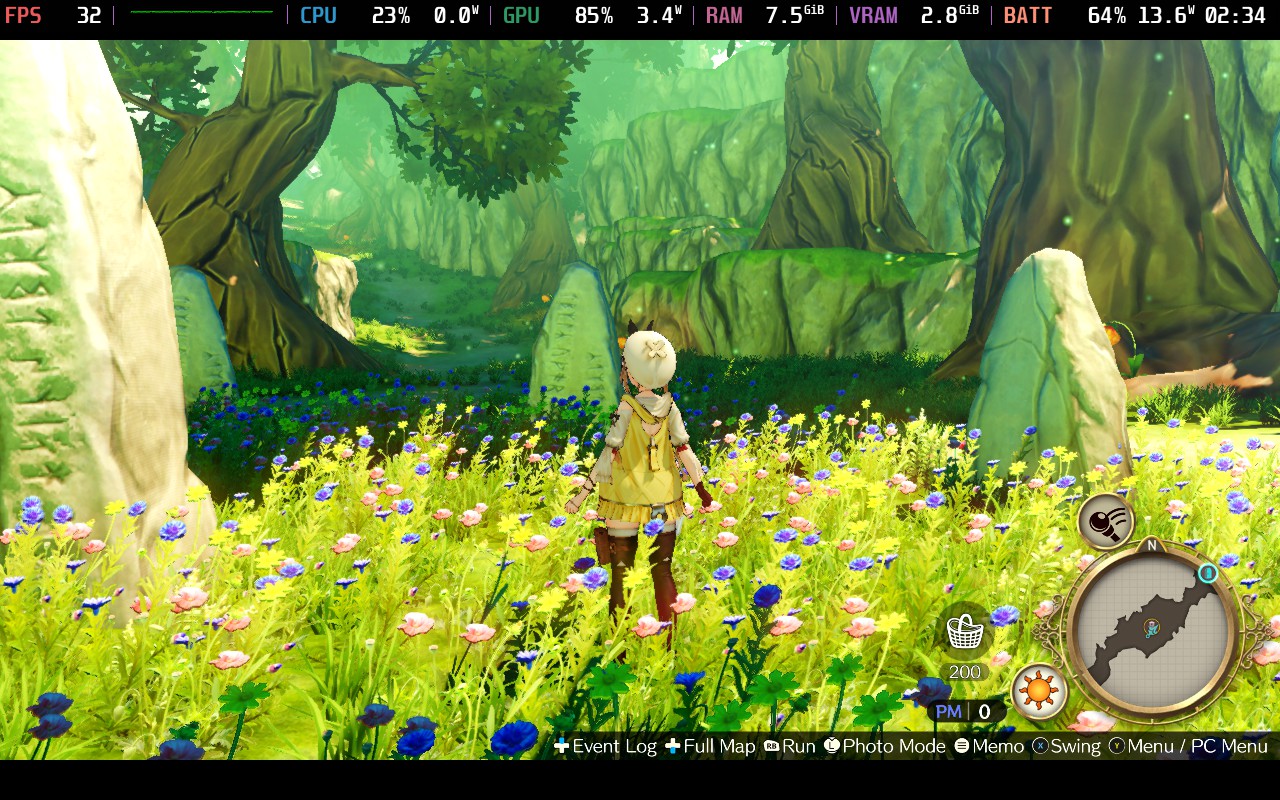
With Ryza 3, we won't see much performance improvement. With the visuals being so similar, the performance is nearly identical as well. Here, we will have to have a mix of standard and low settings for solid performance. And this will still require a 30 FPS lock, since we can't get close to 60. It's still decent and can be considered playable, but it doesn't feel like a huge improvement over the original.
Now, even with these changes, it's still pretty appealing to get the new DX versions. I wish we had some more improvements visually and with performance across the board, but it's still an improvement over the previous games. We also have all the $100+ of DLC for each game included, which is amazing, and there is some solid new content with each game, including new playable characters, new solid side stories, new modes, and much more. It's the definitive version of the game for sure, and even with just minor improvements, they still make playing on the Deck better, and with all the content we can hope for.
The Atelier Ryza DX games are $39.99 each, or $90 in a bundle containing all three. All of the games are rated Steam Deck Verified.
If you enjoyed this article, check out the rest of the content on SteamDeckHQ! We have a wide variety of game reviews and news that will help your gaming experience. Whether you're looking for news, tips and tutorials, game settings and reviews, or just want to stay up-to-date on the latest trends, we've got you covered!

RECENT NEWS
Categories
Accessories
Anbernic
Android
ASUS ROG Ally
ROG Xbox Ally
Classics on Deck
Community
Cryobyte33
Deals
Deck Mods
Emulation
Events
Featured Post
Game News
Game News
General Game News
HandheldHQ
Hardware
Lenovo
Linux
MagicX
MSI
Nintendo
ONE-NETBOOK
Opinion
Other Reviews
Accessory Reviews
Handheld Reviews
PlayStation
Proton
Retro Handhelds
Anbernic
AYANEO
AYN
GPD
MagicX
MANGMI
Miyoo
Retroid
Rumors
TrimUI
SDHQ
Steam
Steam Controller
Steam Frame
Steam Machine
SteamOS
The Unsupported Report
Uncategorized
Uncategorized
VR
Recent Tips & GUIDES
recent reviews



Heyy, I just tested the Ryza DX games these days and played around with all settings. Just wanted to say that in most areas Shadow Quality + Ambient Occlusion make up around 60-80% (depending on the area) of the performance difference between Standard and High settings. These 2 and ofc the resolution have by far the biggest impact on the performance.
I personally dont like playing without AmbOccl but it could be interesting for some people.
Atelierfix is not needed anymore (doesnt work for me anyway) but the Cpu usage is still a bit low. Tested it on my Claw 8Ai+ aswell and it had the same issue. Setting the Claw to Cpu Boost Enabled gave me a big Fps boost but much more power draw with still lower than usual Cpu usage. It just bruteforces but doesnt solve the core issue. Maybe someone smarter than me can solve this :p
Try adding atelier sync fix and retesting
When we tried it, it didn't work. GPU utilization was also working ok, which is usually what the sync fix is for.