まだの方は、X(Twitter)、Mastodon、Blueskyでフォローし、新しい記事が投稿されたらお知らせください。また、Redditに参加したり、YouTubeに登録して、私たちのコンテンツをチェックしたり、素晴らしいコミュニティと交流してください。応援ありがとうございました!
Titan Quest 2 was provided by THQ Nordic. Thank you!
Titan Quest has had an interesting development cycle. The game initially released in 2006 and had one expansion, but over 11 years later, it got an overhaul with fixes and more expansions. In 2023, after three more expansions for the game, Titan Quest 2 was announced. Seeing a sequel after all this time, and after what seemed like the original game's demise years and years ago, is pretty amazing. Now, with the sequel finally here, we can continue the journey that began over 19 years ago.
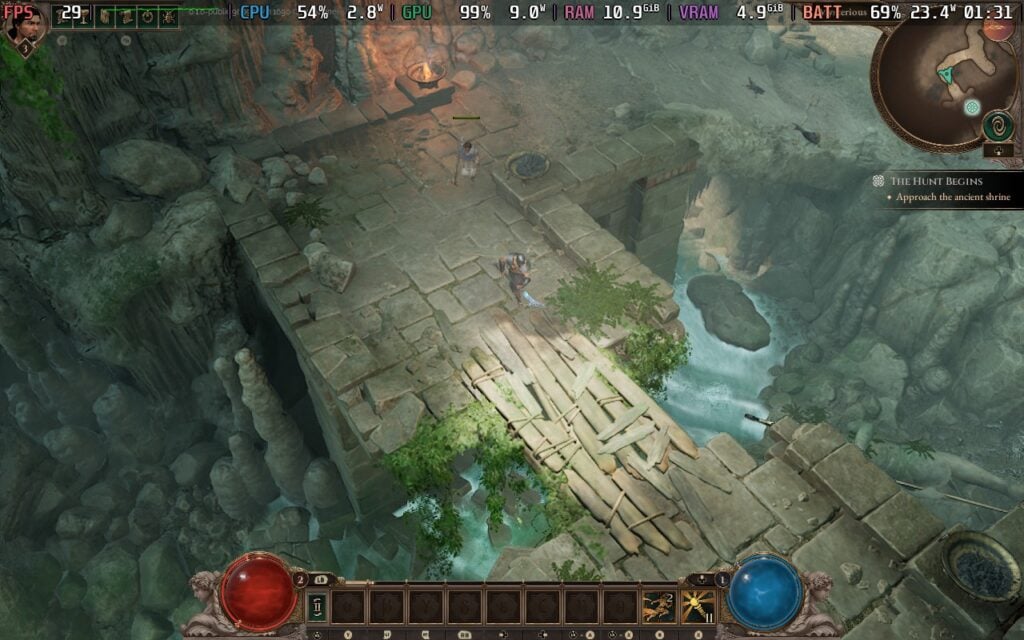
So, while I am working on a review for this early access launch, I wanted to take a quick look at how it performs on the Steam Deck. I was a little worried from the closed playtest, but there was some hope I saw from it. I went into the game with an open mind and lots of hope, and while it shows some promise, there are still some performance issues that keep it from being ready to play on the go.
Before I go into my findings, I want to reiterate that this is an early access game, which is still in active development. Because of that, content and optimization will most likely change throughout development. Keep in mind that this is just an evaluation of the initial launch.

The actual content of Titan Quest 2 is a lot of fun to play around with so far. It's a Diablo-like game, where you fight tons of enemies using skills, getting bunches of loot, and leveling up to increase stats. However, we have a lot of malleability with how we build our abilities out. We get two masteries, which give us both active and passive abilities, and as we upgrade them, we can modify them in different ways to provide different effects and change how the skills operate. It's an awesome system, and I will go over it more in my early access review, but I want to focus more on performance on the Steam Deck.
After playing around with the game for a bit, I can safely say this is going to be a mixed bag on the Steam Deck. There are some areas that run above 30 FPS on the lower settings with decent visuals, while some will tank the performance to an unplayable state, even when the game is on the extreme lowest possible settings with upscaling at a render scale of 25%.

Titan Quest 2 includes TSR, XeSS 2, and FSR 3 upscaling, which I appreciate. However, choosing between them isn't the easiest. The one I can easily single out is FSR 3, which creates this horrible glistening effect on the grass. No setting made the game playable or enjoyable with FSR 3, so I highly recommend not using it. This includes FSR 3 frame generation, which is in the game as well. It makes the game a stutter mess with heavy input lag, so I highly recommend not using it at all.
That leaves XeSS and TSR, which are both around the same visually. I decided to go towards TSR, which looks slightly better in my opinion and gives a bit more control over how specific the upscaling is. TSR at 65% render scaling was the sweet spot for me, giving above 30 FPS performance in some areas, while the area that drop don't drop as hard.

At this point, the best way to increase the framerate will be to zoom in on the camera. Zooming in can bring the framerate up by 4-10 FPS, depending on the area and how closely you zoom in. It's hard to recommend exactly how far to zoom in, because zooming in too close harms the overall experience, while staying too far out will kill the framerate. I would slightly zoom in to increase framerate by around 3-4 FPS, which puts it above 30 FPS more often than not.
Still, for the best performance, we are going to get from Titan Quest 2 is going to be on the lowest settings. Keeping TSR upscaling at 65% keeps the visuals looking decently sharp. We could move it further down and lower the rendering scale further, but it hits visuals much harder, and we will still get the same drops.
I also did experience a RAM usage crash after turning my Deck off while playing the game. It happened once, but still worth mentioning that it teeters on full RAM usage.
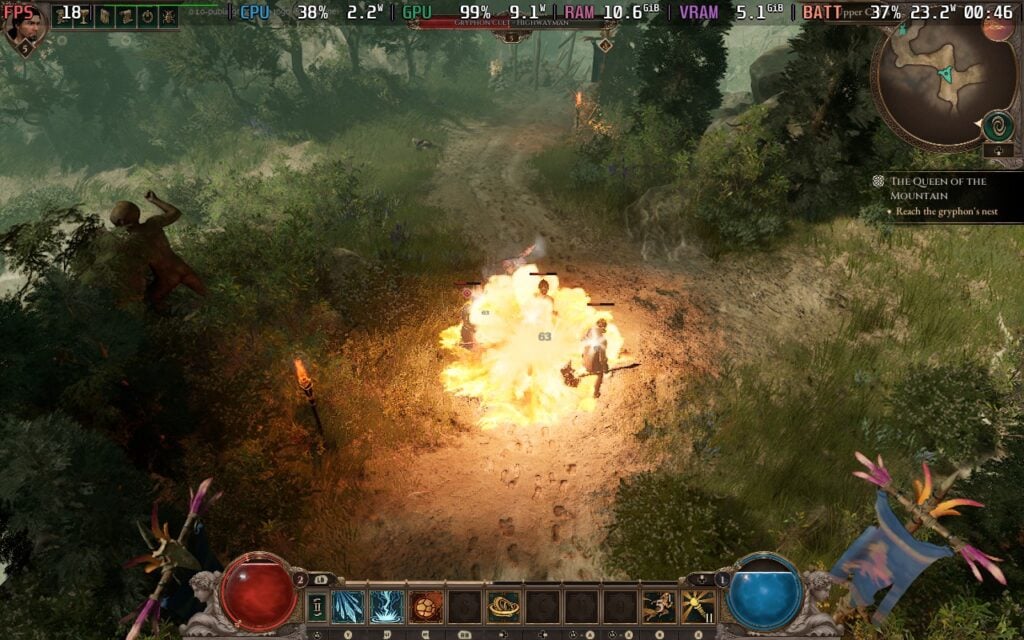
I would say this is the best way to play currently if you are playing on the Steam Deck. It is technically playable, especially since there is a good amount of areas that do perform at 30 FPS with these settings, but there will be drops no matter what right now. If you only have a Steam Deck to play PC games, I would say this is manageable, but if you have a more powerful handheld, laptop, or desktop PC, the best experience will be there.
Titan Quest 2 is on sale for $23.99 until August 8th to celebrate its release.
この記事を楽しんでいただけたなら、SteamDeckHQ の他のコンテンツもチェックしてみてください!あなたのゲーム体験に役立つゲームレビューやニュースを幅広く取り揃えています。ニュース、ヒントやチュートリアル、ゲーム設定やレビュー、最新のトレンド情報など、あらゆる情報をお届けします。 カバーしています!

最近のニュース
カテゴリー
Accessories
Anbernic
Android
ASUS ROG Ally
ROG Xbox Ally
Classics on Deck
Community
Cryobyte33
Deals
Deck Mods
Emulation
Events
Featured Post
Game News
Game News
General Game News
HandheldHQ
Hardware
Lenovo
Linux
MagicX
MSI
Nintendo
ONE-NETBOOK
Opinion
Other Reviews
Accessory Reviews
Handheld Reviews
PlayStation
Proton
Retro Handhelds
Anbernic
AYANEO
AYN
GPD
MagicX
MANGMI
Miyoo
Retroid
Rumors
TrimUI
SDHQ
Steam
Steam Controller
Steam Frame
Steam Machine
SteamOS
The Unsupported Report
Uncategorized
Uncategorized
VR
最近のヒント&GUIDES
新着レビュー