まだの方は、X(Twitter)、Mastodon、Blueskyでフォローし、新しい記事が投稿されたらお知らせください。また、Redditに参加したり、YouTubeに登録して、私たちのコンテンツをチェックしたり、素晴らしいコミュニティと交流してください。応援ありがとうございました!
The Steam Controller remains my go-to controller to play games on PC. It takes the fantastic layout of the Steam Deck and puts it into controller format, making it perfect for playing tons of different types of games that won’t normally be accessible or enjoyable with a traditional controller. We have also seen some pretty cool projects from the community that can change up how I use the controller, and a new one essentially allows the controller to charge itself. More specifically, the controller will find its puck automatically.
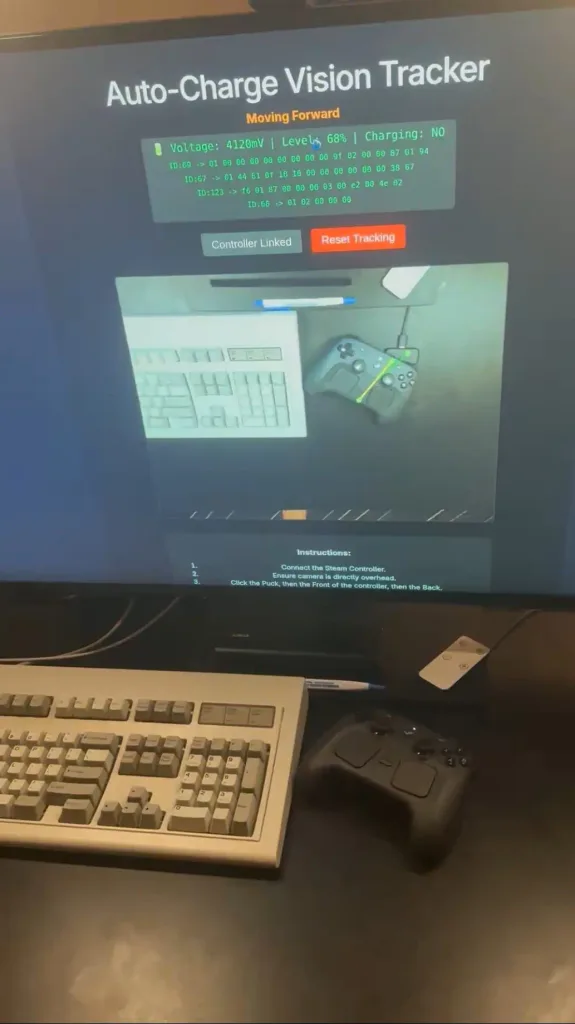
Created by Ray Foss, this project uses a camera that looks down and connects to your Steam Controller. From there, it will provide instructions to the Steam Controller to use its haptics to move it towards the puck. This allows your controller to essentially go back to its puck and automatically plug itself in. There’s a little bit of a process, where you have to connect your controller, make sure the camera is overhead, then click on a few points to allow the camera to track them. However, once the points are clicked, they will be auto-saved, and you will no longer need to do it again.
I can’t see myself using this on a normal day-to-day basis, but as a proof of concept, this is the coolest thing. The idea of just leaving your controller on your desk and walking away, and your controller automatically goes to its puck to charge, is awesome. It isn’t perfect, and Ray does mention that tracking points are finicky, and the haptics could make a good chunk of noise, depending on the surface they’re on, but it does work, and it’s extremely cool.
You can check out and try it for yourself and try it at Ray’s GitHub link.
この記事を楽しんでいただけたなら、SteamDeckHQ の他のコンテンツもチェックしてみてください!あなたのゲーム体験に役立つこと間違いなしのゲームレビューやニュースを幅広く取り揃えています。ニュース、ヒントやチュートリアル、ゲーム設定やレビューをお探しの方も、最新のトレンドを知りたい方も、ぜひご利用ください。

最近のニュース
カテゴリー
Accessories
Anbernic
Android
ASUS ROG Ally
ROG Xbox Ally
Classics on Deck
Community
Cryobyte33
Deals
Deck Mods
Emulation
Events
Featured Post
Game News
Game News
General Game News
HandheldHQ
Hardware
Lenovo
Linux
MagicX
MSI
Nintendo
ONE-NETBOOK
Opinion
Other Reviews
Accessory Reviews
Handheld Reviews
PlayStation
Proton
Retro Handhelds
Anbernic
AYANEO
AYN
GPD
MagicX
MANGMI
Miyoo
Retroid
Rumors
TrimUI
SDHQ
Steam
Steam Controller
Steam Frame
Steam Machine
SteamOS
The Unsupported Report
Uncategorized
Uncategorized
VR
最近のヒント&GUIDES
新着レビュー