
Are you someone who likes to take screenshots of your games on the Steam Deck? I know I am. I take hundreds of them for our reviews and I love to capture some awesome moments that I would like to immortalize. Unfortunately, some of the screenshots I need to take include the Steam user interface, but I have since not been able to easily capture it with the interface elements. But, with the newest Steam Deck Beta Client update, that is about to change!
The new update comes with a couple of bugfixes, which include the interface elements now being included, as well as an option in settings to hide it, fixing swapped A and B buttons on GameCube controllers, and an error that came up when launching some games after the last beta update.
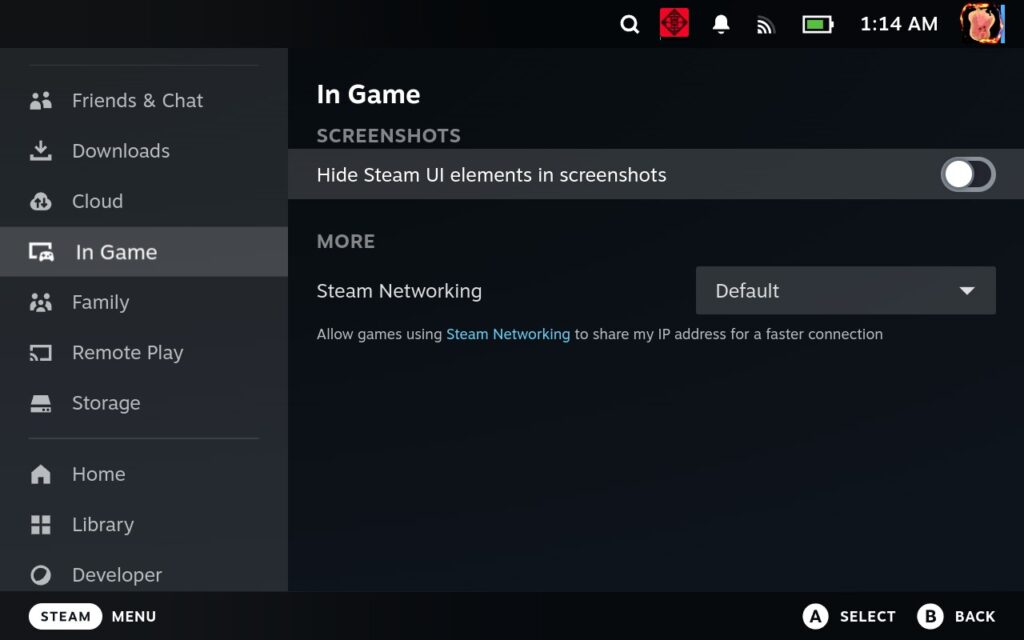
You can try out the update for yourself by heading to your system settings and switching over to the "Steam Deck Beta" update channel. I tried it out for myself, and it is great to see MangoHUD appear in screenshots again. This will make it significantly easier to show stats when playing the game for our reviews!
Steam Deck Beta Client 3/11/24 Update Changelog:
一般
- Fixed a bug that prevented the framerate limiter from applying changes.
- Fixed screenshots not including Steam user interface elements.
- Added an option to Settings->In Game to hide Steam user interface elements from screenshots.
- Fix an error when launching some games that was introduced in the previous beta
蒸気入力
- Fixed swapped A/B buttons when using Nintendo GameCube controllers
- Reset Camera Horizon: Increase maximum delay to allow for a more consistent behavior on lower/less consistent frame-rates.
この記事を楽しんでいただけたなら、SteamDeckHQ の他のコンテンツもチェックしてみてください!あなたのゲーム体験に役立つゲームレビューやニュースを幅広く取り揃えています。ニュース、ヒントやチュートリアル、ゲーム設定やレビューをお探しの方も、最新のトレンドを知りたい方も、ぜひご利用ください!

最近のニュース
カテゴリー
Accessories
Anbernic
Android
ASUS ROG Ally
ROG Xbox Ally
Classics on Deck
Community
Cryobyte33
Deals
Deck Mods
Emulation
Events
Featured Post
Game News
Game News
General Game News
HandheldHQ
Hardware
Lenovo
Linux
MagicX
MSI
Nintendo
ONE-NETBOOK
Opinion
Other Reviews
Accessory Reviews
Handheld Reviews
PlayStation
Proton
Retro Handhelds
Anbernic
AYANEO
AYN
GPD
MagicX
MANGMI
Miyoo
Retroid
Rumors
TrimUI
SDHQ
Steam
Steam Controller
Steam Frame
Steam Machine
SteamOS
The Unsupported Report
Uncategorized
Uncategorized
VR
最近のヒント&GUIDES
新着レビュー