まだの方は まだの方は、X(Twitter)、Mastodon、Blueskyでフォローし、新しい記事が投稿されたらお知らせください。また、Redditに参加したり、YouTubeに登録して、私たちのコンテンツをチェックしたり、素晴らしいコミュニティと交流してください。応援ありがとうございました!
The Proton compatibility layer is what allows us to play Windows games on the Steam Deck, and it's an amazing tool for all Linux users, but it actually isn't the only one out there. Proton is open-source, which allows other developers to make a fork of the layer and put their own spin on it. That's how we have Proton GE, a version of Proton made by GloriousEggroll that has extra codecs and more updated components that Valve either can't or hasn't implemented in their version yet.
To get Proton GE, we use a nifty tool called ProtonUp-QT, created by DavidoTek, which allows us to download Proton GE, and other community-made compatibility layers, directly onto our Steam Decks. I would consider ProtonUp-QT essential to have on the Deck, since getting the community-made Proton GE can actually fix some issues with certain games. A couple of days ago, ProtonUp-QT got a new update that changes how it looks on the Steam Deck!
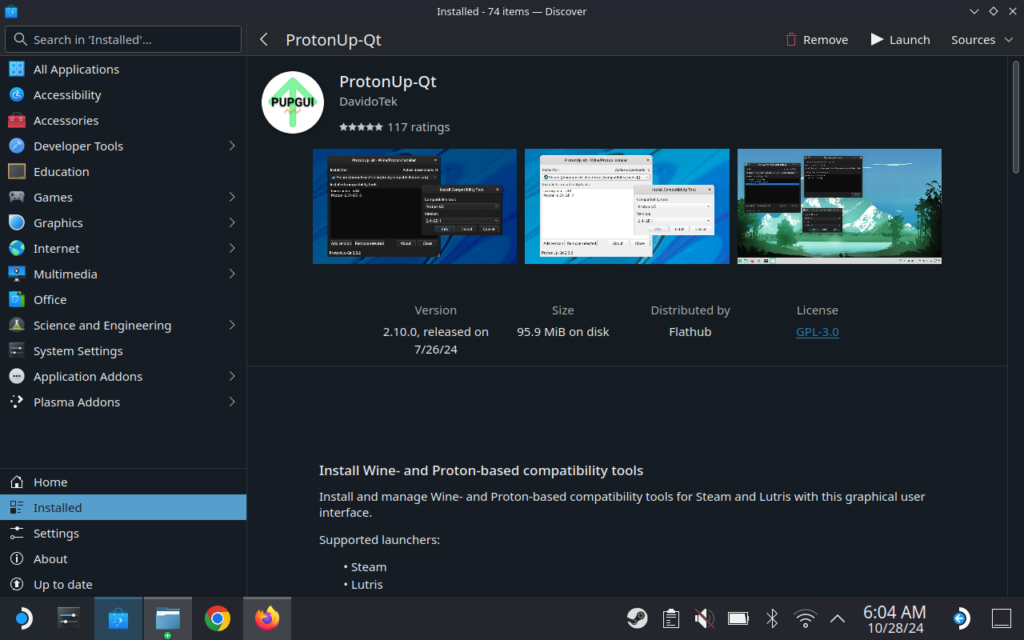
One of the new features that's part of the new 2.12.0 update is a brand new theme just for the Steam Deck. I have a love/hate relationship with the theme. I really like the darker color scheme and al the buttons are bigger to make it easier to click on, but it also blows up the screen showing all the installed layers. As someone who has multiple versions of each layer for testing, I don't like having to scroll through as much. Still, the pros outweigh the cons, and I like the new look overall.
The new update also adds in a new compatibility tool for CachyOS, which is something us Steam Deck users can ignore, and Wine-GE has been removed entirely from the tool. This is due to Proton GE and UMU existing, so there's no need for Wine-GE in the tool right now. There's also a new dialog added for configuring GitHub and GitLab API access tokens.
You can check out the full changelog for the update via their GitHub Release page.
ProtonUp-QT can be downloaded onto your Steam Deck via the Discover Store. The new update hasn't arrived there at the time of writing, but it should be there within the next few days.
この記事を楽しんでいただけたなら、SteamDeckHQ の他のコンテンツもチェックしてみてください!あなたのゲーム体験に役立つゲームレビューやニュースを幅広く取り揃えています。ニュース、ヒントやチュートリアル、ゲーム設定やレビュー、最新のトレンド情報など、あらゆる情報をお届けします。 カバーしています!

最近のニュース
カテゴリー
Accessories
Anbernic
Android
ASUS ROG Ally
ROG Xbox Ally
Classics on Deck
Community
Cryobyte33
Deals
Deck Mods
Emulation
Events
Featured Post
Game News
Game News
General Game News
HandheldHQ
Hardware
Lenovo
Linux
MagicX
MSI
Nintendo
ONE-NETBOOK
Opinion
Other Reviews
Accessory Reviews
Handheld Reviews
PlayStation
Proton
Retro Handhelds
Anbernic
AYANEO
AYN
GPD
MagicX
MANGMI
Miyoo
Retroid
Rumors
TrimUI
SDHQ
Steam
Steam Controller
Steam Frame
Steam Machine
SteamOS
The Unsupported Report
Uncategorized
Uncategorized
VR
最近のヒント&GUIDES
新着レビュー