まだの方は、X(Twitter)、Mastodon、Blueskyでフォローし、新しい記事が投稿されたらお知らせください。また、Redditに参加したり、YouTubeに登録して、私たちのコンテンツをチェックしたり、素晴らしいコミュニティと交流してください。応援ありがとうございました!
I love seeing new Decky Loader plugins being developed for the Steam Deck, especially when they offer something that no other plugin does in a unique way. Most recently, I covered a plugin that makes it easy to download and install mods from Nexus Mods, which is not something we could easily do otherwise. However, a new plugin was brought to my attention that I think is very interesting and does something that I haven’t seen any other plugin do.
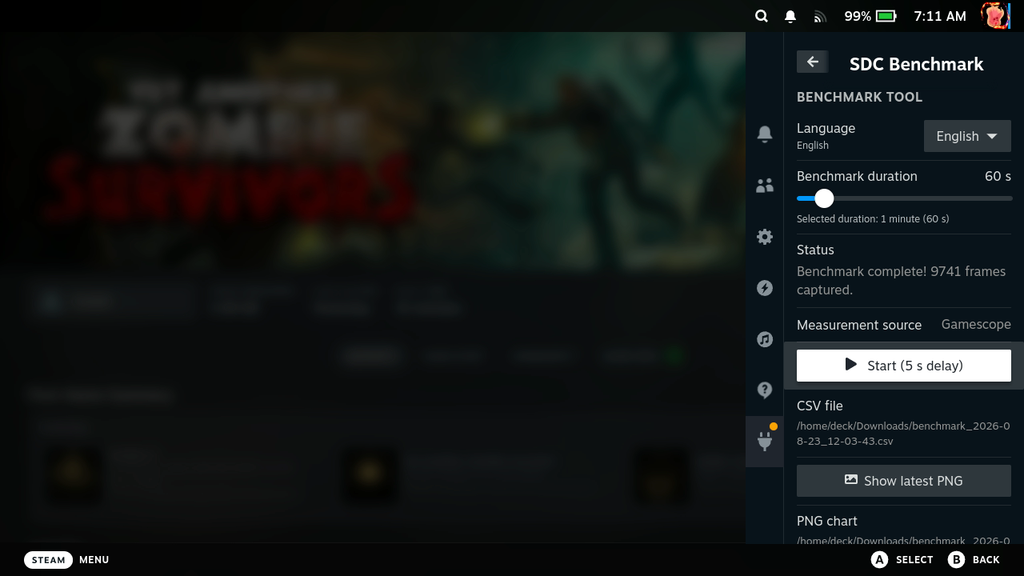
SDC-Benchmark is a new plugin that will actually allow you to record an export framerate data directly from your device. Created by Steam Deck Checker, with the help of AI, it utilizes information from Gamescope and compiles it into a readable CSV and a PNG graphic that are saved to your Downloads folder. And thanks for this being a plugin; it’s quite easy to use right in the quick access menu with 30-second increments of capture between 30 seconds and 6 minutes max.
I’ve also talked with the developer, and he confirmed that the plugin is 50% AI-generated. He used a combination of ChatGPT and Google Gemini to build it. He specifically mentioned that it was used for “eliminating some issues and performing the code”, while Gemini optimized PNG generation.
I like the idea a lot, and it works well. It accurately captures the current information and frame time, and I appreciate that it displays it in a PNG to show others. It’s similar to the internal tool that we use, albeit with less data shown. However, there are a few things I would like to see that could really improve usability.
Within the plugin, I would like to see some sort of identifier or countdown when it starts and stops recording. Right now, there’s no notification that has started or stopped other than opening the quick access menu manually. I would like to see this streamlined so we will know when it stops, to make it easier to plan our testing route.
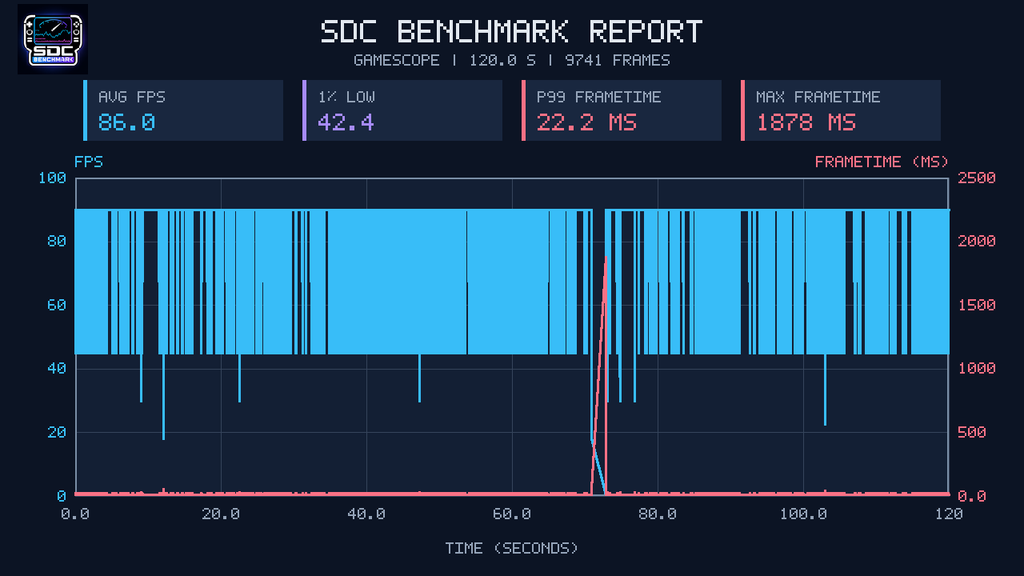
As for the PNG export, I like the color scheme in an aesthetic style, but I’m not the biggest fan of how the information is presented. It has the essentials, like the average framerate and 1% lows, but the way it’s shown on the graph isn’t as friendly to those who may not understand it. For me, I’m someone who prefers seeing it visualized in a simpler way that is easily comprehensible, like using bar graphs.
Still, I like that this is an option. I can see it being a great tool to use for those who just wanna show a little snippet of how a game could be performing. It’s not perfect, but it does what it set out to do, and I haven’t seen any other plugins like it.
If you want to try it for yourself, you can install the plugin by downloading the latest release and either extracting the downloaded folder to the homebrew/plugins folder or using the developer tab in Decky to install it via the ZIP.
この記事を楽しんでいただけたなら、SteamDeckHQ の他のコンテンツもチェックしてみてください!あなたのゲーム体験に役立つゲームレビューやニュースを幅広く取り揃えています。ニュース、ヒントやチュートリアル、ゲーム設定やレビュー、最新のトレンド情報など、あらゆる情報をお届けします。 カバーしています!

最近のニュース
カテゴリー
Accessories
Anbernic
Android
ASUS ROG Ally
ROG Xbox Ally
Classics on Deck
Community
Cryobyte33
Deals
Deck Mods
Emulation
Events
Featured Post
Game News
Game News
General Game News
HandheldHQ
Hardware
Lenovo
Linux
MagicX
MSI
Nintendo
ONE-NETBOOK
Opinion
Other Reviews
Accessory Reviews
Handheld Reviews
PlayStation
Proton
Retro Handhelds
Anbernic
AYANEO
AYN
GPD
MagicX
MANGMI
Miyoo
Retroid
Rumors
TrimUI
SDHQ
Steam
Steam Controller
Steam Frame
Steam Machine
SteamOS
The Unsupported Report
Uncategorized
Uncategorized
VR
最近のヒント&GUIDES
新着レビュー