まだの方は、X(Twitter)、Mastodon、Blueskyでフォローし、新しい記事が投稿されたらお知らせください。また、Redditに参加したり、YouTubeに登録して、私たちのコンテンツをチェックしたり、素晴らしいコミュニティと交流してください。応援ありがとうございました!
One of the few things I always wondered about the Steam Deck was whether we could use it as a controller for our other devices. I always thought it’d be a cool idea if Steam implemented a feature like this, where we could turn the Deck into a Bluetooth controller so we could play on other devices, including the Steam Machine. While Valve didn’t do that, a new plug-in was released that does, and it works like a charm.
Deck as Controller is a new Decky plugin created by jmedina21 that does exactly this. It turns the Steam Deck into a Bluetooth controller that can connect to other devices. We can choose three different controller types, and once it connects, it will turn off the screen. We can turn it back on by tapping the quick access menu button or holding that same button down if you want to disconnect from a device.
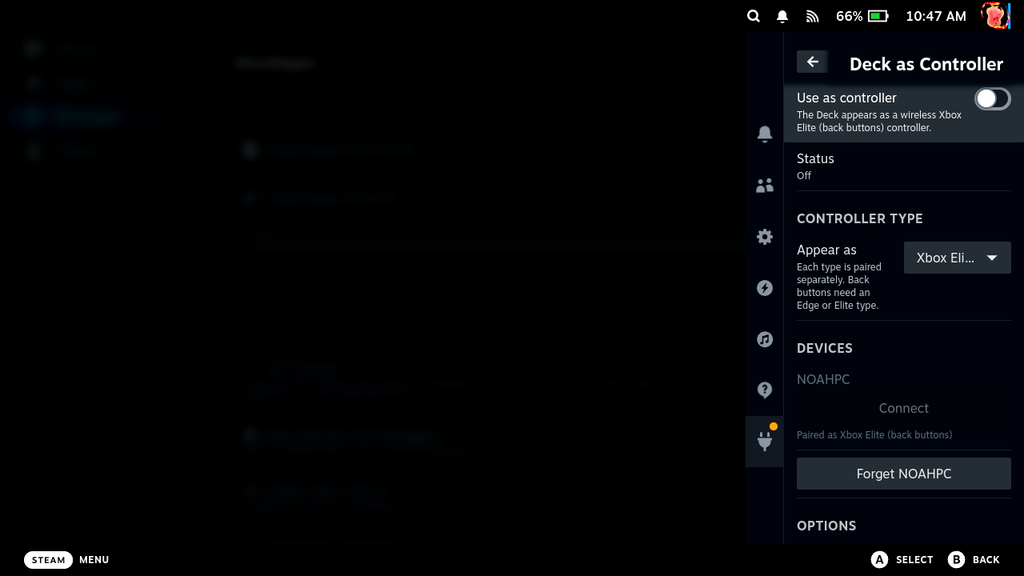
It isn’t on the Decky store directly, so after installing the Decky Plugin Framework, head over to the Deck as Controller GitHub page. Once there, head to the newest release and download the deck-as-controller zip file. Once done, you can either extract that zip file to your homebrew/plugins folder manually, or install it through the zip from Decky directly if you have developer mode on. I recommend doing the latter as that’s significantly easier.
From the GitHub page, it seems this was primarily made and tested for use with Mac or Apple devices, but I tried it myself, and I can’t confirm that it worked perfectly fine with my Windows PC. Since it is registered as a Bluetooth controller, I see no issue with compatibility with other devices. The page also notes that this is a beta, so it’s still very new and fresh, which means issues may pop up or more features may be added in the future.
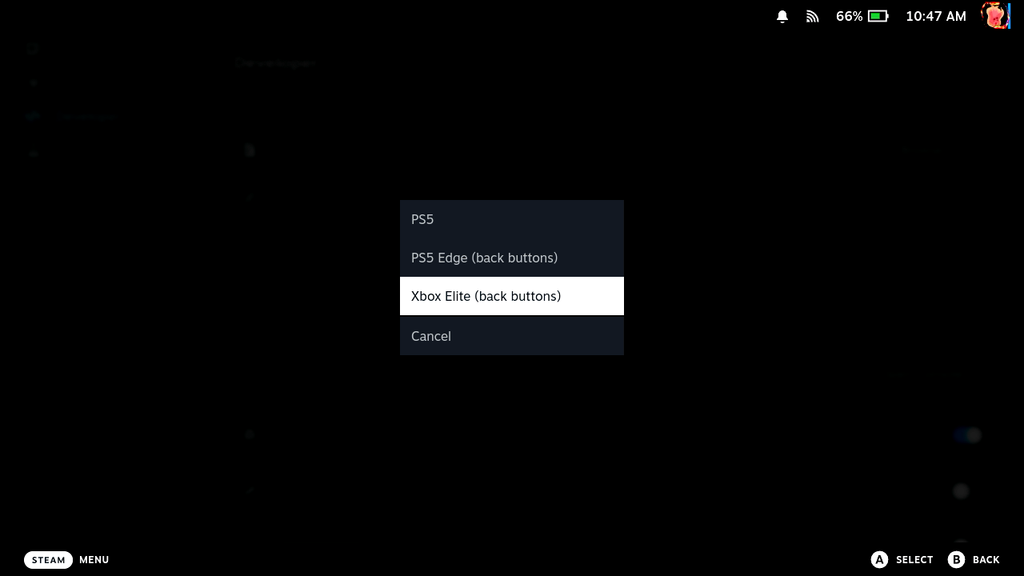
However, for what it does right now, it’s exactly as I thought a service or plugin like this could work. I have a plethora of controllers, so I don’t see myself using this constantly, but it’s an intriguing option that could serve as an extra controller if a friend doesn’t have one and you need to bring your own.
You can download the Deck as Controller plugin directly from the GitHub page.
この記事を楽しんでいただけたなら、SteamDeckHQ の他のコンテンツもチェックしてみてください!あなたのゲーム体験に役立つこと間違いなしのゲームレビューやニュースを幅広く取り揃えています。ニュース、ヒントやチュートリアル、ゲーム設定やレビューをお探しの方も、最新のトレンドを知りたい方も、ぜひご利用ください。

最近のニュース
カテゴリー
Accessories
Anbernic
Android
ASUS ROG Ally
ROG Xbox Ally
Classics on Deck
Community
Cryobyte33
Deals
Deck Mods
Emulation
Events
Featured Post
Game News
Game News
General Game News
HandheldHQ
Hardware
Lenovo
Linux
MagicX
MSI
Nintendo
ONE-NETBOOK
Opinion
Other Reviews
Accessory Reviews
Handheld Reviews
PlayStation
Proton
Retro Handhelds
Anbernic
AYANEO
AYN
GPD
MagicX
MANGMI
Miyoo
Retroid
Rumors
TrimUI
SDHQ
Steam
Steam Controller
Steam Frame
Steam Machine
SteamOS
The Unsupported Report
Uncategorized
Uncategorized
VR
Xbox
最近のヒント&GUIDES
新着レビュー