


The Anbernic RG G01 was provided by Anbernic for review. Thank you!
When it comes to retro handhelds, Anbernic has been one of the big names in the scene. They’ve released lots of different handhelds, coming in all sorts of shapes and sizes. It’s a name that has become synonymous with handhelds meant to play older games, and recently, they have even been releasing handhelds that are inspired by other classics like the Nintendo DS and PSP. However, one of their newest releases went against the usual, bringing forth a controller to be used on a multitude of devices. The RG G01 is odd. It has a weird design, and it’s a little heavy. However, it may actually be one of my favorite gamepads to use, and it still surprises me that it came from Anbernic.
Build Quality
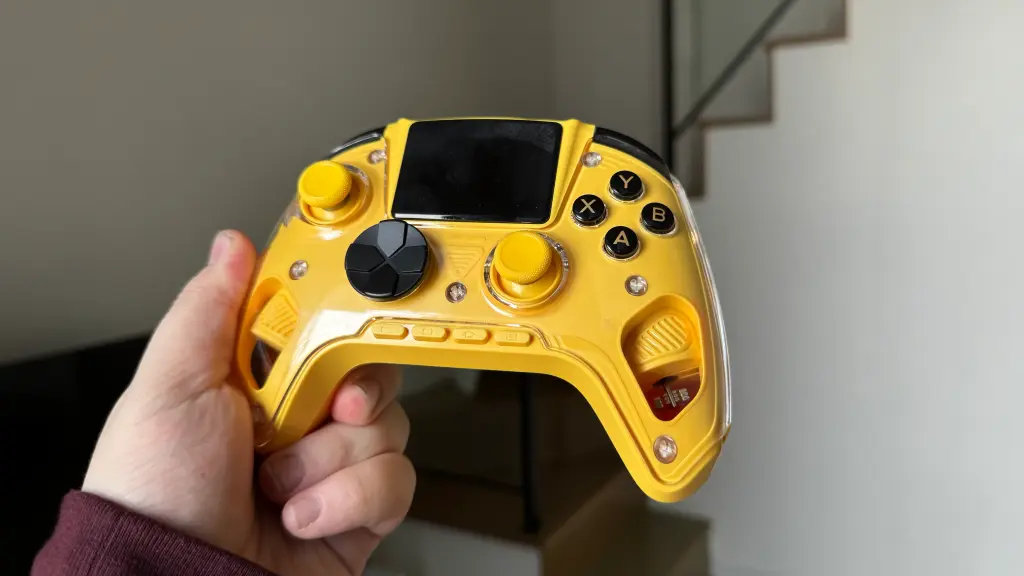
When looking at the build quality of the RG G01, I came away impressed. This is a solidly built controller. The entirety of it is encased in plastic, with the back having an exposed feel and the front having this clear plastic protection. Both the front and the back are plastic, but they have completely different textures. The front has a smooth coating, and the back is slightly rougher with some extra toughness around the handles to make it easier to grip. It also weighs a little bit more than I’d like. This is most likely due to the extra tech inside the controller, mainly the screen, so it’s understandable. Still, if I’m gonna be playing with a controller, I want something that doesn’t weigh as much so my hands don’t hurt.
The buttons and joysticks all feel great as well. They all feel like they have great quality to them, with the exception of the Dpad. The Dpad doesn’t feel great, and while the other buttons feel solid, it feels a little bit on the cheaper side. Part of that is the design of the Dpad, which I will go into more in the next section, but I just wasn’t a fan of it.
Design
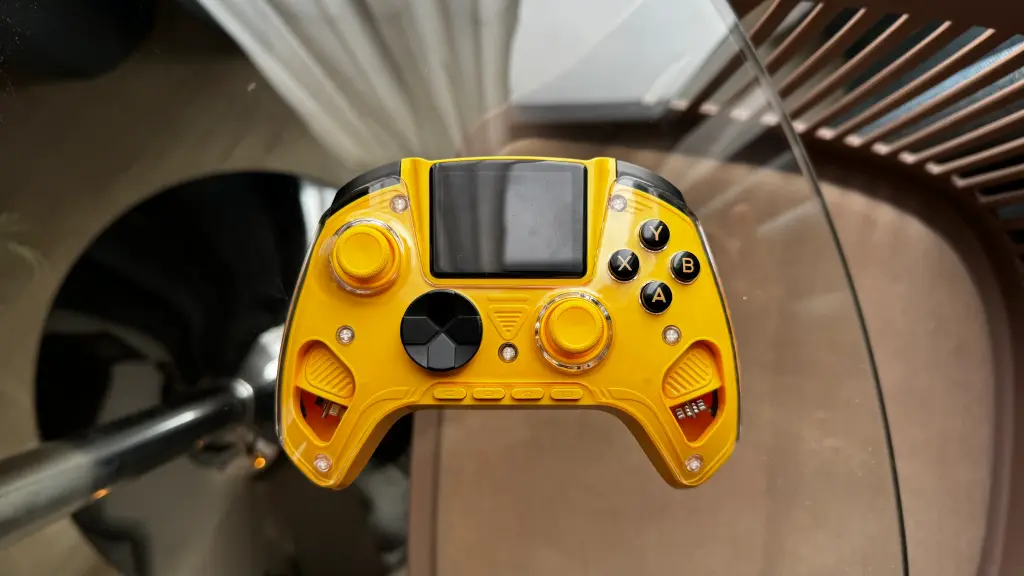
Overall, I like the design of the controller. There are a few issues here and there that I do have, especially when it comes to the back buttons and Dpad, but I would say these issues could be avoided or negligible in the big picture. However, it also depends on whatever game you’re playing with it, so mileage may vary.
Now, I want to touch on the literal design of the controller. I’m not a huge fan of the clear plastic cover on the front. To me, it looks ugly and doesn’t help make the controller look appealing to use. This could be, in part, because of the color that was sent to me. I’m not a huge fan of yellow, and I think the clear plating makes it look worse.
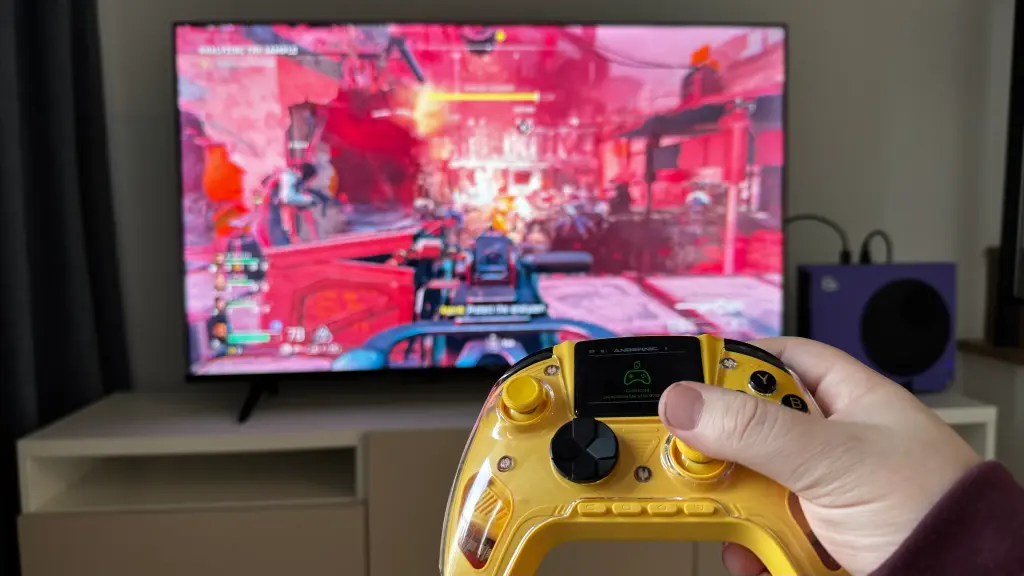
The RG G01 is very comfy to hold, which I was wonderfully pleased by. The handles fuse into the back of the controller very organically. This allowed my fingers to rest on the back naturally, instead of needing to bend them at an odd angle (which is a problem I found with the GuliKit ES Pro). It’s also small enough that I can easily hit all of the buttons with my thumbs without stretching them. The only exception to that is using the buttons at the bottom to control the screen, but I can give it a pass since I’m not using those buttons during gameplay.
On top of that, nearly all of the buttons feel great to press. The ABXY buttons can be pushed in enough to feel impactful, the joysticks have a slight indent to keep my thumb on it without sliding off, and none of the shoulder buttons or triggers feel digital. The triggers especially feel great, and can be toggled from digital to analog at any time. There’s enough resistance on the triggers to feel good when pushing them down as well.
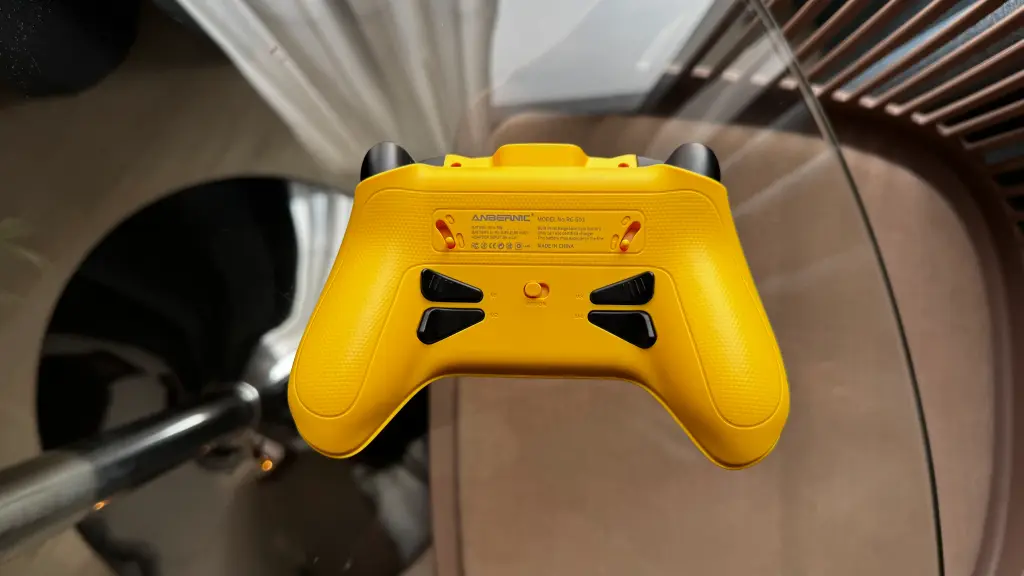
However, this brings my two biggest problems with the controller itself: the back buttons and the Dpad. We have four back buttons that can be modified with different inputs, and I like having the option. One of my favorite things about the Steam Deck is the back buttons. However, these buttons are way too small and close together to feel comfortable using. Holding the controller normally, my middle finger covers both buttons on their respective sides, and trying to use either of them individually isn’t great. And if I try to put my middle and ring finger on each button individually, it scrunches my hand together into an awkward position. I appreciate having multiple options, but I would have rather seen one big back button on each side that is more comfortable to use.
Then, there’s the Dpad. Compared to the other buttons, the Dpad feels out of place. It feels completely digital, with almost no feeling of it being actually pushed down. This is a little weird because the Dpad is also raised higher than the ABXY buttons. It also has a circular eight-directional design, which is okay, but it was very easy for me to accidentally hit a different direction. In all honesty, in almost every game I tested this with, I tried to avoid using the Dpad completely.
The silver lining here is that most games don’t need either of these. The back buttons are purely optional, so they can be almost completely ignored. As for the Dpad, there are some games that need it or benefit most from it, but most of the games I tested have joystick support, which feels much better. This also comes down to personal preference; some prefer using the Dpad over the joysticks, but for me, it never felt necessary.
I will also say the placement of the Start and Select buttons can be a little jarring as well. They are pretty small and at the bottom of the device in the middle, which just feels like a weird placement. It's not the end of the world, but they weren't that comfortable to use.
Features and Compatibility
The Anbernic RG G01 is one of the most unique controllers I have ever used, with features that I feel are both useful and quite random. Along with all the normal buttons, the RG G01 has a screen in the middle of the gamepad, housing its own list of features. There are eight menu options from the menu that we can play around with at will:
- Mode - This is where we can switch how we use the controller to connect to other devices. There are five options: Xinput (PC), Dinput (PC), Switch (Switch 1/2), Android (Android Phones), and iOS (iPhones). The first four can be paired with a device either using the USB Receiver or Bluetooth, while iOS can only be connected via Bluetooth.
- Pairing - Going to this option will unpair the device and start the pairing process again. It will default to whatever the last chosen pairing mode was.
- Settings - This is where all the controller settings are. There are 5 configuration profiles, with 1 of them dedicated to the Switch. As for what settings we can change, we can modify all the button inputs and whether they can be used for Turbo mode, attach macros to the four back buttons, modify trigger deadzones and stroke percentages, change joystick behavior and deadzone, change the motion control settings, and modify vibration intensity.
- Calibration - In this option, we can calibrate the joysticks, triggers, and motion sensors.
- Brightness - Here, we can change the brightness of the screen.
- Language - Here, we can change the language of the UI between 5 different options.
- Testing - In this, we can test our inputs with a visual record of all the buttons we press.
- Health - This is probably the weirdest option here. Going here can start the heartbeat sensor on the right handle and show your heartbeat. It tracks it with a graph and keeps data for over 12 hours.
The fact that all of these changes can be made via a screen on the controller is just fantastic. Having a visual representation of what we can change directly on the controller, and making it easy to access, is just perfect. I've never thought of having a controller do this before. With the previous one I reviewed, the ES Pro from GuliKit, we could change settings, but there's no representation of what the current settings are, and there are only a few defined modifications we can make. The screen fixes that entirely, and being able to go change settings at any time with a great interface is just a treat.
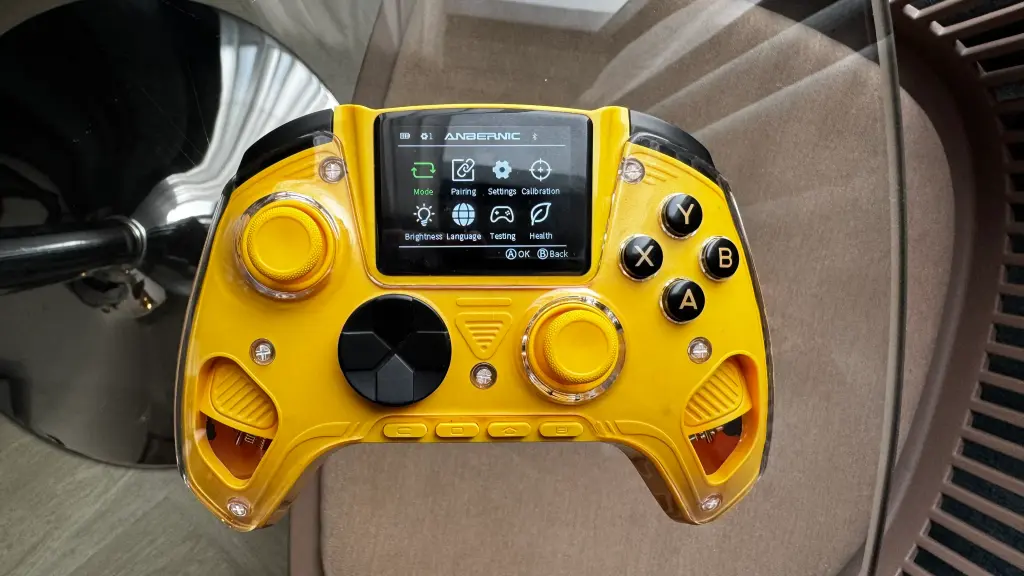
The screen is the best part of this controller by far, and is going to be the biggest reason I would recommend getting the RG G01. There aren't any other controllers I know that have something like an integrated screen to use, and I am going to find it hard to use any gamepad without it. It just makes modifying settings and pairing so much easier, not needing to discern how long to hold a pairing button and read a blinking light is just great. And even though the heartbeat sensor is quite random, it does work, and it's a nice option to have.
On top of that, pairing the controller to the multitude of devices it supports is easy. With two PC options and a dedicated option for Switch 1/2, iPhone, and Android, we can really use the controller with almost any device we want. I can confirm it works well with desktop PCs, my Steam Deck, Switch 2, and iPhone, and that's just wonderful.
However, that's not the only unique feature the RG G01 has. There's a switch on the back to change the triggers to analog or digital, and we have the four programmable back buttons that can be hit at any time. There's also an attachable phone stand, which is perfect to use when using the controller to play games on phones, or if you want to pull up a guide for whatever is being played. This is most likely specifically used for when the controller is connected to an iPhone or Android phone, but it has more than just one use case.
結論
The Anbernic RG G01 is probably one of the more surprising products I have been sent. This is a controller made by a company that primarily makes retro handhelds, and it's definitely one of my favorites that I have used so far. The screen is by far my favorite aspect, allowing easy configuration, pairing, and control with crystal clarity on what is happening. It's comfortable to hold, easy to reach all the buttons, and has great compatibility. It's a little on the heavy side, and I dislike the programmable back buttons and Dpad, but the pros definitely outweigh the cons. This is a great controller through and through, and one I can happily recommend.
If you enjoyed this review, check out the rest of the content on SteamDeckHQ! We have a wide variety of game reviews and news that will help your gaming experience. Whether you're looking for news, tips and tutorials, game settings and reviews, or just want to stay up-to-date on the latest trends, we've got you covered!

最近のニュース
カテゴリー
Accessories
Anbernic
Android
ASUS ROG Ally
ROG Xbox Ally
Classics on Deck
Community
Cryobyte33
Deals
Deck Mods
Emulation
Events
Featured Post
Game News
Game News
General Game News
HandheldHQ
Hardware
Lenovo
Linux
MagicX
Nintendo
ONE-NETBOOK
Opinion
Other Reviews
Accessory Reviews
Handheld Reviews
PlayStation
Proton
Retro Handhelds
Anbernic
AYANEO
AYN
GPD
MagicX
MANGMI
Miyoo
Retroid
Rumors
TrimUI
SDHQ
Steam
Steam Controller
Steam Machine
SteamOS
The Unsupported Report
Uncategorized
Uncategorized
最近のヒント&GUIDES
新着レビュー




I own 3 of the Manba One controller. Biggest flaw is that it is impossible to bring up the Steam side bar menu with them. Also would be great to be able to bind non-controller buttons like keyboard keys, but I digress. Other than that, they are solid controllers. The first version dock lacks USB pass-thru for connecting the dongle, but the v2 has the capability so you can plug the dongle into the hidden compartment in the base of the charger dock.
The other comment guy is correct, with the bare minimum amount of research you could see that this controller is a clone of several others. I bought this one. It’s nice. The weight is fine. Only reason I’m commenting is because your hands shouldn’t be hurting from playing video games unless you’re 65 with severe arthritis or you’re in one of those power chairs that moves when you blow a straw. Jesus Christ man, do some basic exercise. I never want to hear another adult man say a controller is too heavy for his hands. It shouldn’t be a paid gig to write articles like this.
Thank you for your comment! However, I stand by my weight comments. Comparing this controller to the Hori Steam controller, it's clear how much more it weighs. And it makes a difference over time.
It DOES look a lot like a ManbaOne, which is a shame because it otherwise looks like a really good controller for much less. I know it's trying to stand out but considering that I'm seeing this glossy, cyberpunk style more, it's already beginning to feel a little old.
Did you test polling rate and latency? How does it compare against say the cyclone 2 that comes with tmr sticks, 1000hz and 2-3ms latency?
It looks like a ‘90s Sony Walkman.
https://www.amazon.com/ManbaOne-Interactive-Wireless-Controller-PC-Remappable/dp/B0CY83CL2D
The original controller is the manba one. The controller being reviewed is indeed a knock off. I have had the manba controller for almost two years and it still does good with PC and Nintendo switch.
Yes they've copied the manba one but there are a few small differences in detail like the shape of back buttons back buttons material as well as ui layout and design
Whoever wrote this is a complete idiot & is trying to profit from misinformation. Anbernic does not make this controller. This is a generic Chinese controller that has been around for the last couple of years. Anbernic simply slapping their name on it does not mean they make it, because again, they do not. This controller can be bought on Amazon, Ebay, Temu, Aliexpress etc. for about $40 & it won't be ugly like that yellow turd in the pictures.
Hi there. I’m the person who wrote the article. If there’s any copies of this controller out there, please send over some links. I’ll be happy to investigate. However, please don’t make baseless accusations about our intentions. We were sent the controller, we reviewed the controller, and it is a controller coming from Anbernic. I stand by my review and thoughts on it.
Have you ever heard of a mamba one?
Look into the Manba One. The user you're replying to is correct. I have the exact same controller. https://a.co/d/06fAOqms
As someone who's reviewed both the RG G01 and Mamba One, I can tell you with certainty they are different controllers. Controls and QC are different, but the big differentiator is the Anbernic's Heart Rate sensor that the Manba Lacks. They're similar controllers yes. But not identical.