


まだの方は、X(ツイッター)でフォローし、新しい記事が投稿されたらお知らせします。また、Redditに参加したり、YouTubeに登録して、私たちのコンテンツをチェックしたり、素晴らしいコミュニティと交流してください。応援ありがとうございました!
Kingdom Hearts has been my favorite video game series of all time for the longest time, and it has been a dream to get the games running on the Steam Deck. It is actually one of the main reasons I got a Steam Deck in the first place! Sadly, none of the games worked without a lot of troubleshooting, and it took months to get them working...only for old methods to be broken in later patches. Well, luckily, that wait no longer exists because all the games can work on the Steam Deck!
Recently, we created a guide that covers how to get Kingdom Hearts 1.5 + 2.5 ReMIX and Dream Drop Distance running on the Deck. In this guide, we will also cover how to get 0.2 Fragmentary Passage, Kingdom Hearts 3, and Melody of Memory running. The guides are split because both need two separate fixes, and some EXE moved for 0.2, making it easier to organize overall.
So, let's get right into it!
How to Play Kingdom Hearts 3, 0.2, and Melody of Memory on the Steam Deck
Just like our last Kingdom Hearts guide, I want to go over a couple of things. We will be using the Heroic Launcher, which you can get from the Discover Store, with purchased Epic Games copies of these games. We will also be using ProtonUp-QT to download the layer we will be using. There should be ways to get this working on Lutris and plugins like Junk Store, and we will update the guide accordingly as we uncover exactly how to do it. The games can't be started offline, but you can turn off WiFi after starting one of the games, and you should be able to play without a connection.
While Kingdom Hearts 3 and Melody of Memory work well, 0.2 Fragmentary Passage has an issue. Because it is part of the 2.8 collection, we will need to make some changes to play it. This will essentially disable the rest of the 2.8 collection, making you unable to access Dream Drop Distance, but you can also change it back when desired. So, let's go into exactly what you will do and then how to change up 2.8!
ステップ1:
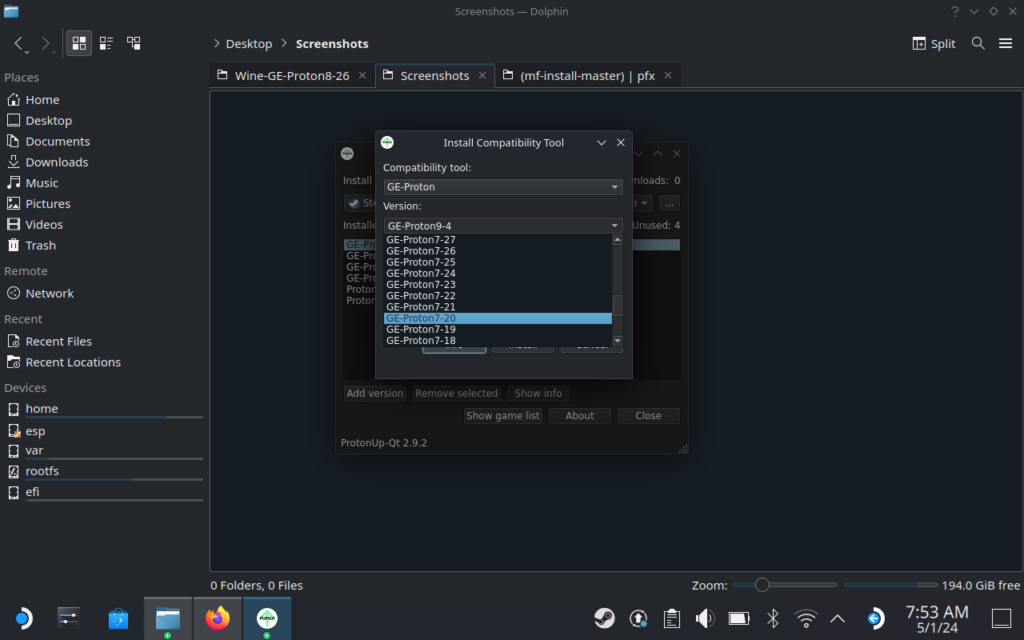
Head to Desktop Mode and start ProtonUp-QT, which is a program you can find in the Discover Store that downloads Proton GE versions. Find and install Proton GE 7-20.
ステップ2:
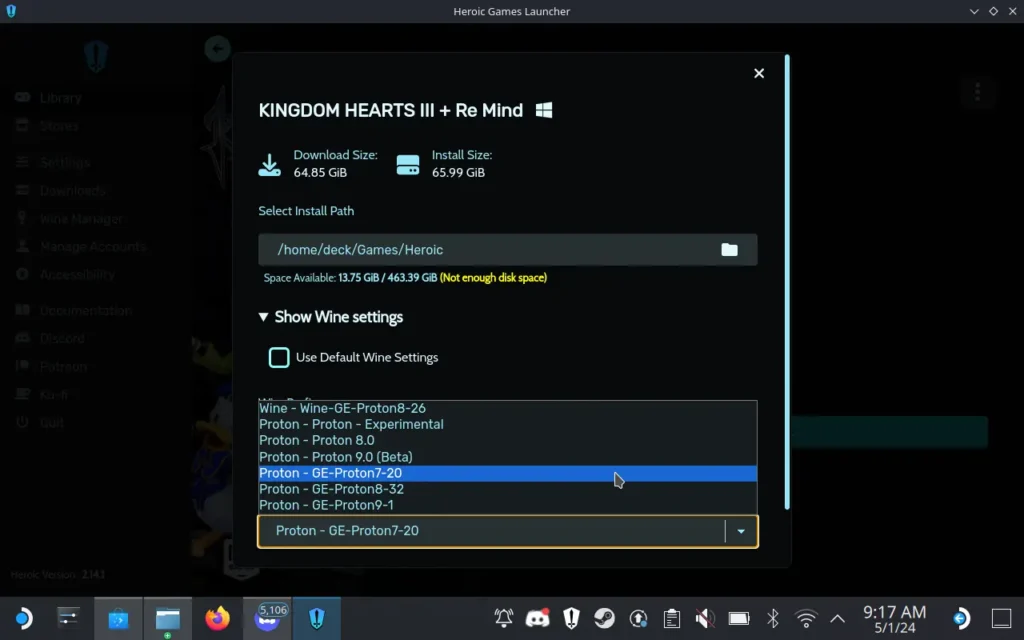
Once that is downloaded, you can exit the program and open Heroic Launcher. Once you are logged into your Epic account, you can go ahead and download Kingdom Hearts 2.8, 3, and Melody of Memory. To make things easier later, when you install the game, click on Wine settings and change the Proton version to Proton GE 7-20.
ステップ3:
After they are downloaded, launch them once each. This will generate a specific folder we will need to access later to install some files that are missing. You can just launch and immediately close the game as soon as you can.
ステップ4:
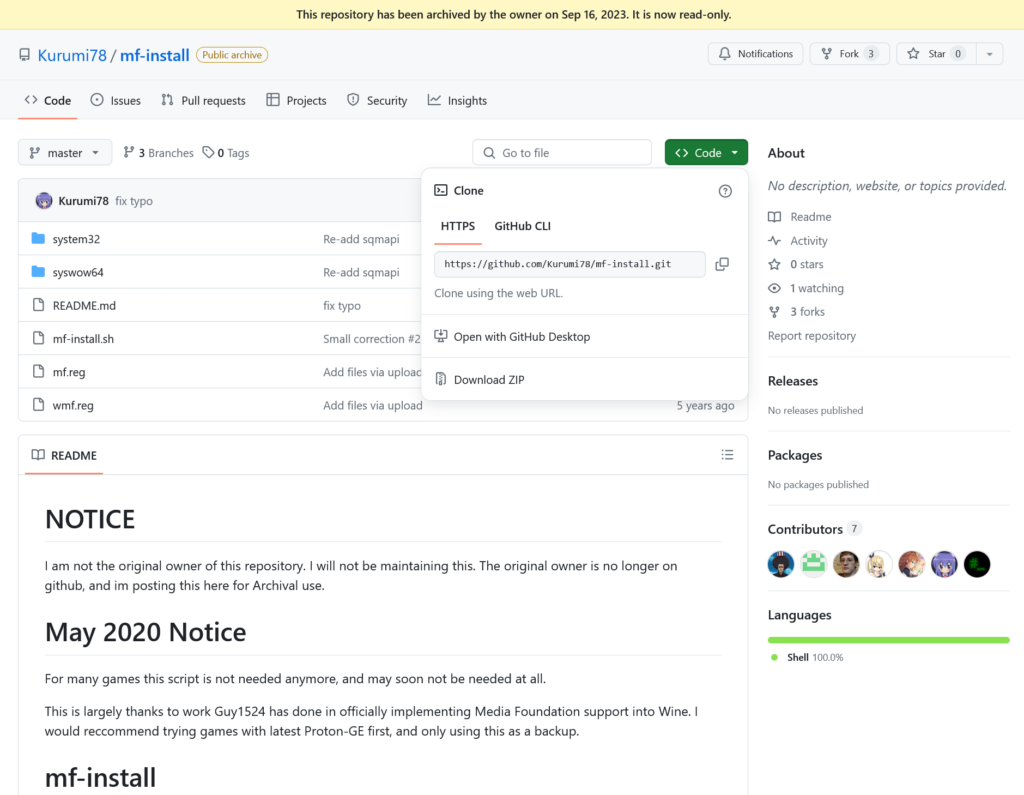
Now, we need to install the files that are missing. The script we will be using is called MF-Install. Head over to the Github link, click on the green "Code" button, and then click on "Download ZIP."
ステップ5:
Once that is downloaded, move the MF-Install Master folder to your Desktop.
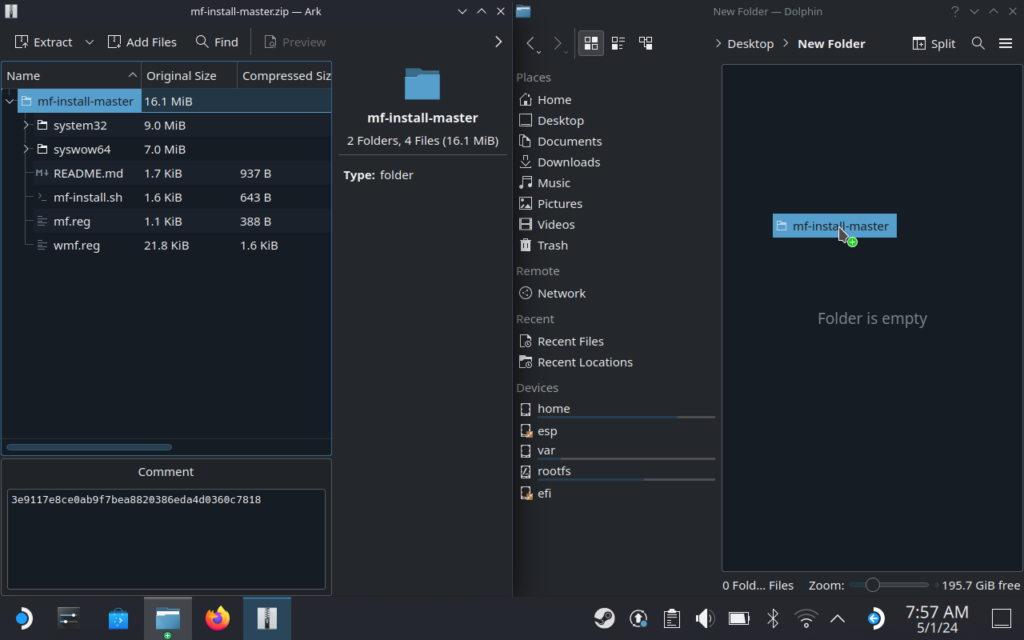
ステップ6:
Open the folder, right-click on an empty spot, and then click on "Open Terminal Here." This will open a new Konsole window that can easily access the script file we need to use.
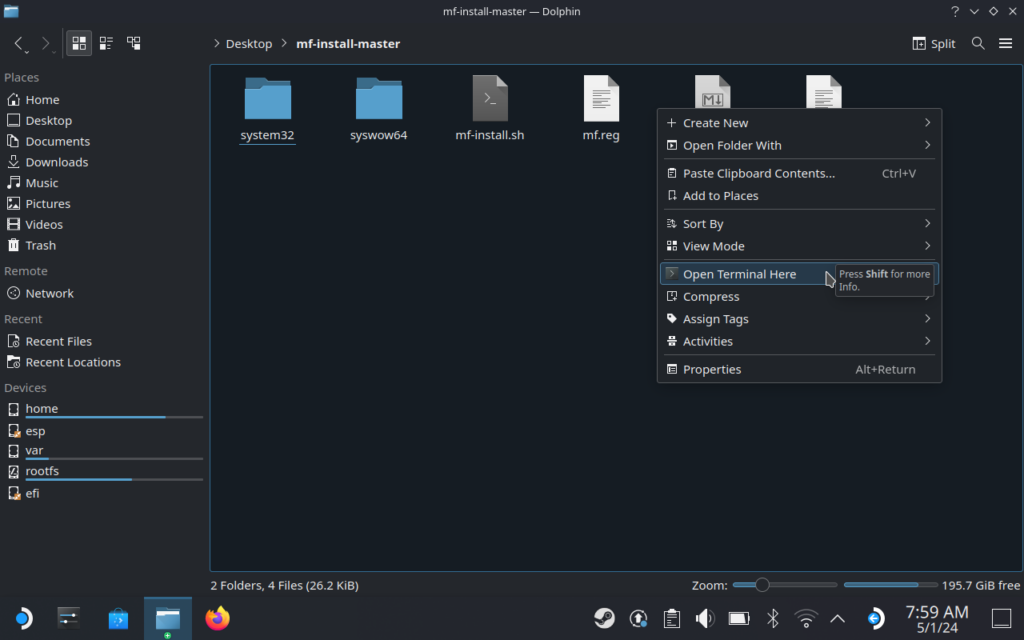
ステップ7:
If you are using the default installation directory for each of the games, all you have to do is copy-paste this code into the Konsole and press enter:
WINEPREFIX="/home/deck/Games/Heroic/Prefixes/default/KINGDOM HEARTS HD 2.8 Final Chapter Prologue/pfx/" PROTON="/home/deck/.local/share/Steam/compatibilitytools.d/GE-Proton7-20" ./mf-install.sh -protonWINEPREFIX="/home/deck/Games/Heroic/Prefixes/default/KINGDOM HEARTS III Re Mind/pfx/" PROTON="/home/deck/.local/share/Steam/compatibilitytools.d/GE-Proton7-20" ./mf-install.sh -protonIf you installed to a MicroSD or changed the install directory, then you just need to change the "WINEPREFIX" to whatever directory your prefix is installed. You can find this by clicking on the three horizontal bars and scrolling down to the WinePrefix folder. Just make sure you manually add a "/pfx" at the end of the folder path.
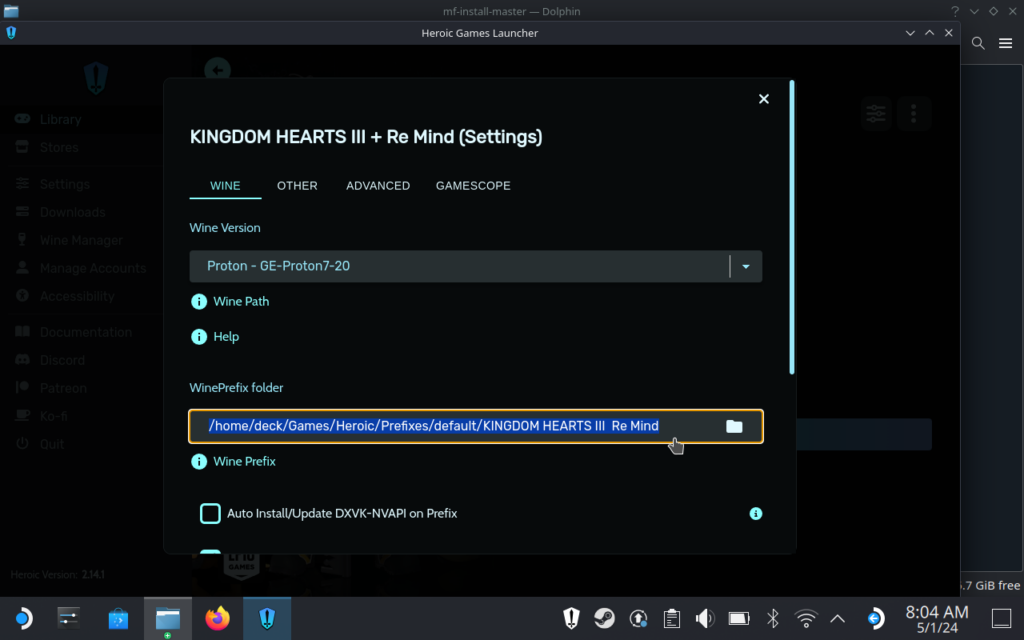
ステップ8:
Once that is done, you should be able to play both Kingdom Hearts 3 and Melody of Memory! You should be able to add them both to Steam and play them when in Game Mode. You can do this by pressing the 3 vertical circle icon and clicking "Add to Steam."
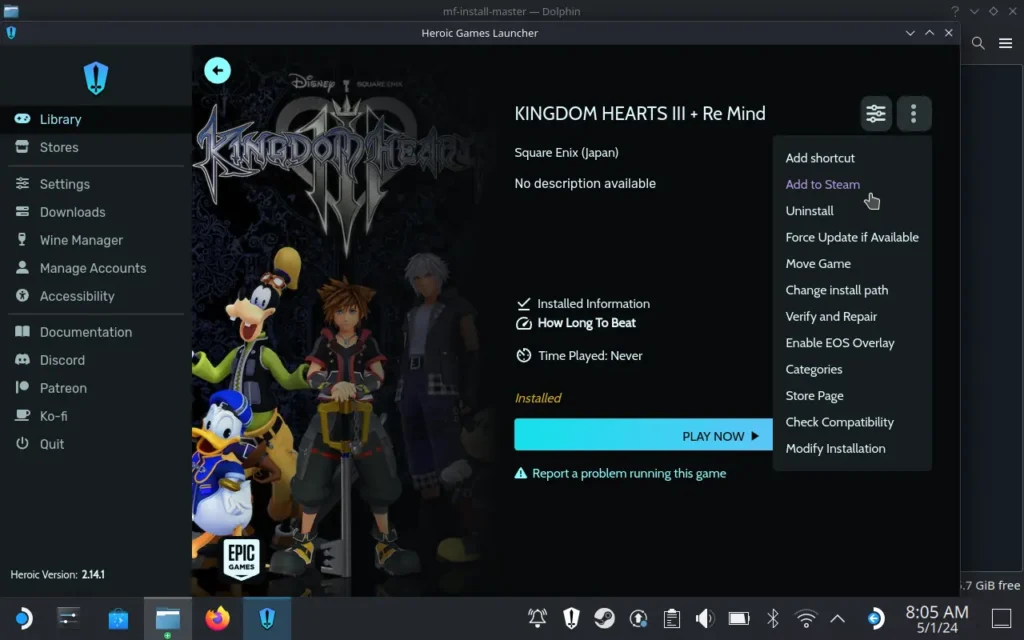
0.2 Fragmentary Passage should work, too, but we do need to change a couple of things to make it run.
How to Switch 0.2 Fragmentary Passage EXE
To play 0.2 Fragmentary Passage, we actually need to change which EXE is launched from the 2.8 Final Chapter Prologue entry in Heroic. I did try adding a custom entry that links to the EXE directly, but would get an "Unable to Log In" error from Epic that would stop me from playing. This was the only way I could get it working currently, and if there is another way, I will update this guide.
ステップ1:
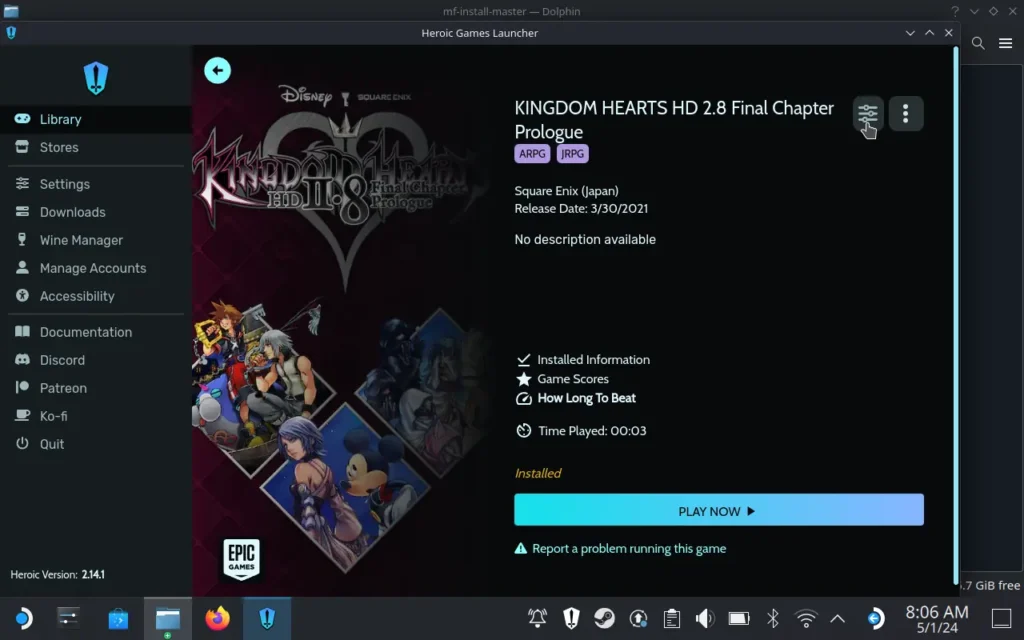
Go to the Kingdom Hearts HD 2.8 Final Chapter Prologue entry on Heroic and click on the three Horizontal Bars icon in the top right.
ステップ2:
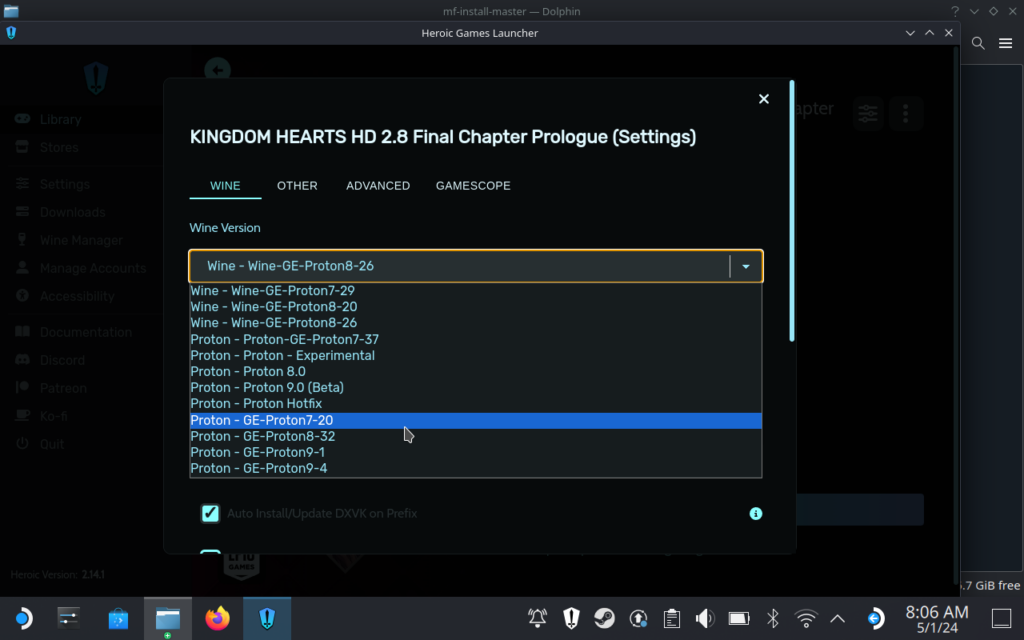
Once you are there, make sure the Wine Version is "Proton - GE-Proton7-20." If you installed the game with this guide, it will already be selected. But, if you installed with our previous guide to play Dream Drop Distance, you will need to change this.
ステップ3:
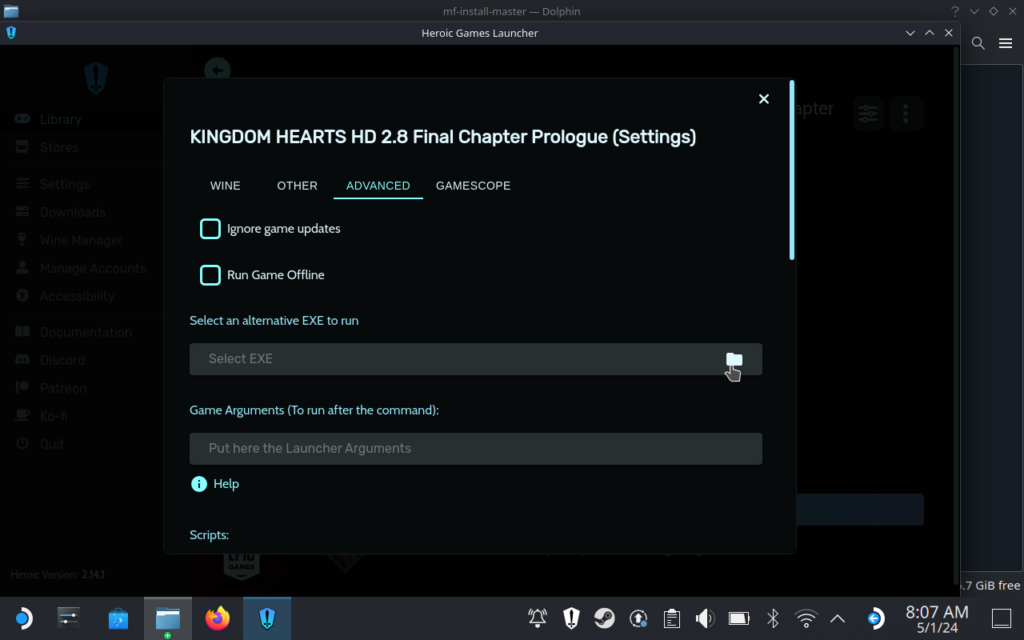
Now, click on the "Advanced" tab and select the folder icon for the "Select an alternative EXE to run" box.
ステップ4:
Once the new window pops up, you will have to navigate to where the game is installed and select the 0.2 EXE. If you installed to the default directory, this is where the exe will be:
/home/deck/Games/Heroic/KH_2.8/KINGDOM HEARTS 0.2 Birth by Sleep/Binaries/Win64/KINGDOM HEARTS 0.2 Birth by Sleep.exeAnd that is all! You should be all set to go and play each of these games now. Melody of Memory plays quite well at default, but for Kingdom Hearts 3, I noticed playing at low settings and 1152x720 resolution seems to be working well so far. Most areas hit 60 FPS while some large groups of enemies, big areas, and lots of effects (like the attractions) can tank framerate. For the most part, it looks great and sticks above 40 FPS, so playing with a 40 lock should be wonderful.
And don't forget to check out our previous guide, which goes over getting Kingdom Hearts 1.5+2.5 and Dream Drop Distance working on Steam Deck!
この記事を楽しんでいただけたなら、SteamDeckHQ の他のコンテンツもチェックしてみてください!あなたのゲーム体験に役立つゲームレビューやニュースを幅広く取り揃えています。ニュース、ヒントやチュートリアル、ゲーム設定やレビューをお探しの方も、最新のトレンドを知りたい方も、ぜひご利用ください!




So I don't know if this is the same for everyone but none of this seems necessary for 0.2. I Installed 2.8 with the previous guide and 0.2 just works with no issues.
Will report back if something changes but for now it plays fine including the into cutscene.
I love my deck, but stuff like this is why it's never going to be a mainstream platform. At least not for a few iterations.
I have tried following this guide three separate times now. Reinstalling KH3 completely each time. I was finally able to get the konsole command to actually run but it didn't seem to do anything as the game still hangs on a black screen after the opening splash logo stuff. I swear I followed this guide to the letter. So either this method straight up does not work or its missing a crucial step.
Are you by chance in our Discord server? I would be happy to directly talk to and help get it working!
Doesn't work. Followed the guide, installed all the things, renamed what needed renaming and KH3 still hangs on a black screen after the opening credits.
Are you by chance in our Discord server? I would be happy to directly talk to and help get it working!
THANK YOU Almost two years later I have finally gotten KH III to finally work on steam deck (has a catch it has epic online DRM). It even has sound playing and the controls work almost natively on the steam deck. It was straight forward and no added unnessary steps like install lutris and extra commands et.
I had a different workaround for me.
I still have a year or 2 subscription for my PS+.
What i did then is:
- go to lutris
- search PSNow latest version
- install it trough lutris
- add the shortcut to steam trough lutris right click program
- log in with your credentials trough steam game mode
Voila. Games like KH and more (Uncharted) in the cloud.
Lutris also have Xbox cloud wich also works nicely.
So I followed this guide, it worked except there's a problem where there is zero sound. Is there a way to fix it so the sound works?
Which game are you experiencing the issue in? I had sound for all of them, so I will try to replicate on my end.