Well we knew this was coming, and thankfully it has! The Steam Deck Game Mode UI is becoming the new Big Picture mode for all Steam Clients, and now it is in testing!
This controller-first interface was designed for Steam Deck in handheld and docked mode, and is perfect for all the scenarios Big Picture mode currently handles. The updated Big Picture mode includes features like:
- New Home Screen, where you can continue playing recent games, and see what’s new with the games in your library.
- New Universal Search, that searches across Library, Store, and your friends
- New controller configurator, designed for ease-of-use of picking, adjusting, or creating custom controller configurations
- Optimized Steam Store for controller navigation
- Updated in-game overlay, with access to achievements and guides
- Press Steam / Guide / PS button while in game
- New system menu, for quick navigation to different parts of the interface
- Access this with the Steam / Guide / PS button
- New quick access menu, for access to notifications, friends list, quick settings, and more.
- Access this with Steam + A
If you want to test this out yourself, you can opt into the Steam Client Beta on your computers! You can also view the changelog on Steam! I personally love this UI, so it is wonderful seeing it come to everyone and replace Big Picture.
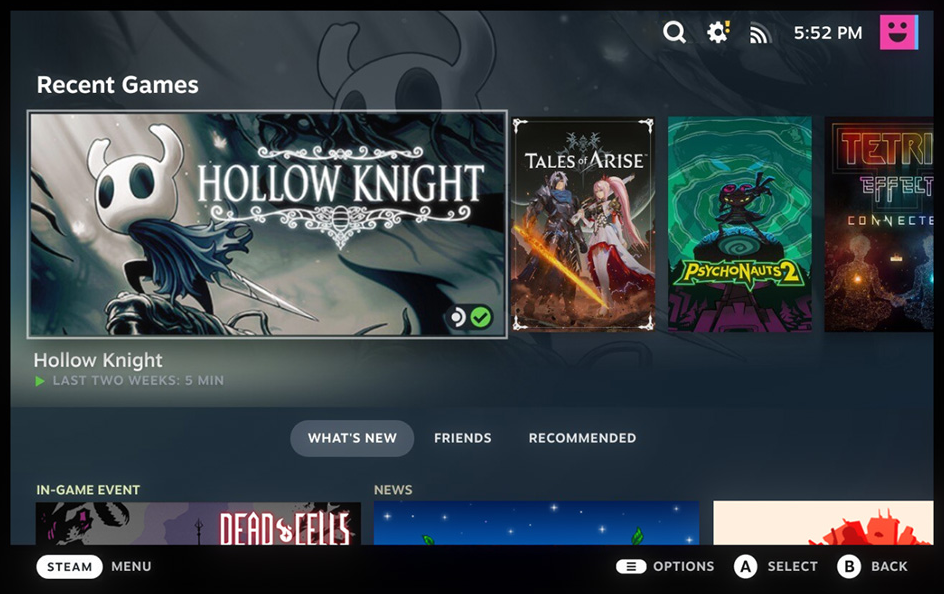
Example of the new Big Picture mode interface. Those with a Steam Deck may see some similarities 🙂

最近のニュース
カテゴリー
Abxylute
Accessories
Anbernic
Android
ASUS ROG Ally
ROG Xbox Ally
Classics on Deck
Community
Cryobyte33
Deals
Deck Mods
Emulation
Events
Featured Post
Game News
Game News
General Game News
HandheldHQ
Hardware
Lenovo
Linux
MagicX
Nintendo
ONE-NETBOOK
Opinion
Other Reviews
Accessory Reviews
Handheld Reviews
PlayStation
Proton
Retro Handhelds
Anbernic
AYANEO
AYN
GPD
MagicX
MANGMI
Retroid
TrimUI
SDHQ
Steam
Steam Machine
SteamOS
The Unsupported Report
Uncategorized
Uncategorized
Accessories
Anbernic
Android
ASUS ROG Ally
ROG Xbox Ally
Classics on Deck
Community
Cryobyte33
Deals
Deck Mods
Emulation
Events
Featured Post
Game News
Game News
General Game News
HandheldHQ
Hardware
Lenovo
Linux
MagicX
Nintendo
ONE-NETBOOK
Opinion
Other Reviews
Accessory Reviews
Handheld Reviews
PlayStation
Proton
Retro Handhelds
Anbernic
AYANEO
AYN
GPD
MagicX
MANGMI
Retroid
TrimUI
SDHQ
Steam
Steam Machine
SteamOS
The Unsupported Report
Uncategorized
Uncategorized
最近のヒント&GUIDES
新着レビュー