まだの方は、X(ツイッター)またはマストドンでフォローし、新しい記事の投稿をお知らせください。また、Redditに参加したり、YouTubeに登録して、私たちのコンテンツをチェックしたり、素晴らしいコミュニティと交流してください。応援ありがとうございます!
It was pretty awesome to get a chance to replay Tony Hawk's Pro Skater 1 and 2 in the new remake, and I was happy to take any reason to dive back into the game. It was awesome being able to skate around the reimagined locations of the original two games, and it made me so excited for the next entry to come out. It may not have the free-roaming campaign, but Tony Hawk's Pro Skater 3+4 gives me more of the same feeling I experienced with 1+2, and I couldn't be happier.

With this release, I wanted to take a moment to see if it would be as playable as the previous release on the Steam Deck, so I went ahead and bought the game to test it out. For the most part, I was quite happy about performance, though if you want to play with a higher framerate, there will be some sacrifices to make.
After testing every level initially, I found that San Francisco and the Waterpark from Pro Skater 4's campaign were the toughest areas to play in, with the most drops in performance. I first wanted to find the highest performance possible with the least amount of sacrifices to visuals needed. In this case, I found that FSR on Balanced mixed with Shadows on Low and Ambient Occlusion turned Off gave a solid 55 FPS in every level. It wasn't 60 FPS, but it still feels extremely smooth and is my preferred way to play.


I also wanted to see what the highest-quality settings in the game could do and if they were playable, so I cranked everything to the highest, and I found it to be decent. With almost everything at the highest setting (Shadows were at High instead of Highest), and TAA upscaling with render resolution at 100, it's possible to play at a solid 30 FPS. It's not as enjoyable as playing at a higher framerate, but it's definitely playable and looks the best it possibly can.

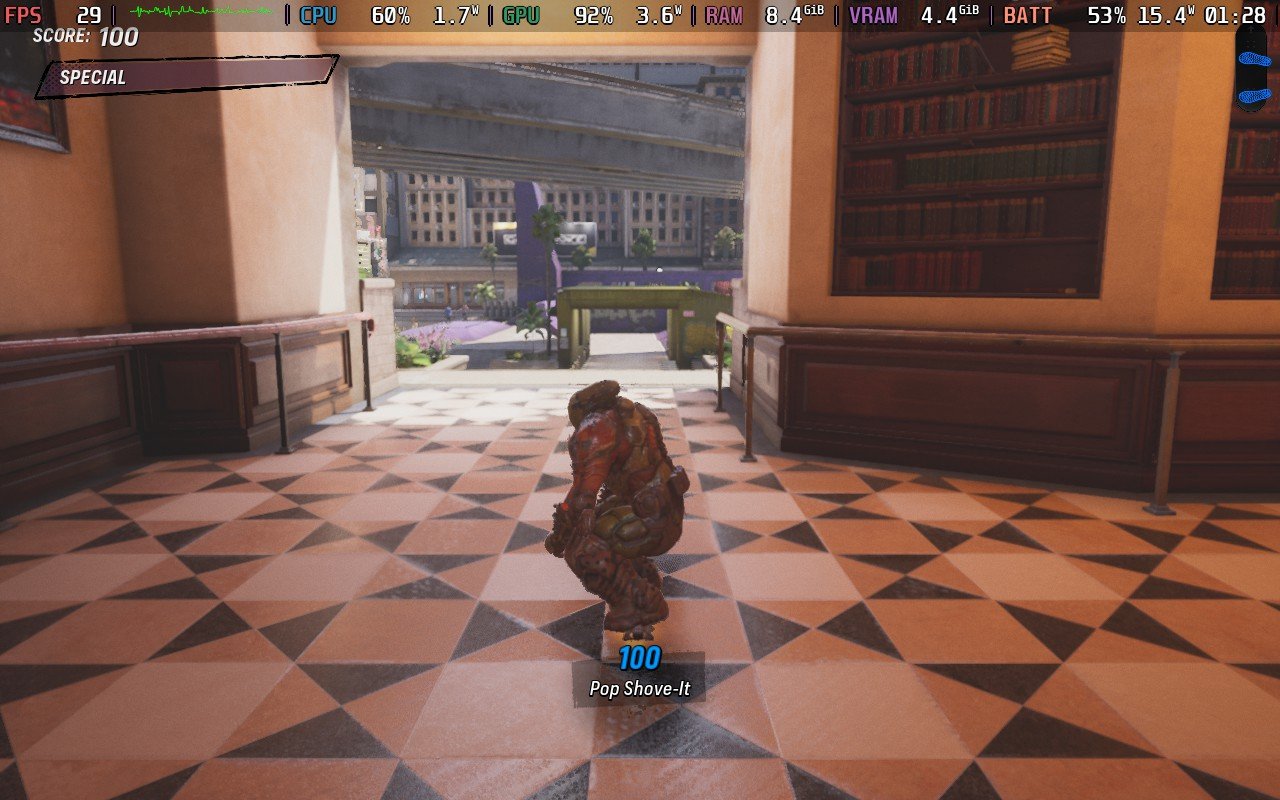

There are some odd drops here and there that could happen as I was skating, but these happened regardless of the framerate, and it appears to be the game itself. There was no shader cache that was downloaded with the game, most likely due to it not being fully released yet, so this could help those small stutters here and there.
I didn't focus much on battery drain for this initial test, but it really depends on the level. For larger levels with more open areas and tons of models, like San Francisco and Waterpark, it could go up to 21W battery drain. However, on other levels like Tokyo and Los Angeles, I have seen it dip from 14W to 15W. This is consistent with both the high framerate and high-quality settings.
I can also confirm that both Photo Mode and Create-A-Park mode work well with a gamepad. They feel natural to use, and there should be no problems playing throughout the entirety of the game on the Steam Deck with a controller.
Overall, from this initial look, the game is very playable on the Steam Deck. I do wish we had the free roam campaign from Pro Skater 4, but we can use all the features of the game with a gamepad, and it's all great to play on the go. The little bumps here and there will most likely be ironed out, so I am excited to play it soon when those are figured out.

Tony Hawk's Pro Skater 3+4 can be pre-purchased for $49.99 ahead of its release, but if you want to play right now, you will have to buy the $69.99 Deluxe Edition.
この記事を楽しんでいただけたなら、SteamDeckHQ の他のコンテンツもチェックしてみてください!あなたのゲーム体験に役立つゲームレビューやニュースを幅広く取り揃えています。ニュース、ヒントやチュートリアル、ゲーム設定やレビュー、最新のトレンド情報など、あらゆる情報をお届けします。 カバーしています!

最近のニュース
カテゴリー
Accessories
Anbernic
Android
ASUS ROG Ally
ROG Xbox Ally
Classics on Deck
Community
Cryobyte33
Deals
Deck Mods
Emulation
Events
Featured Post
Game News
Game News
General Game News
HandheldHQ
Hardware
Lenovo
Linux
MagicX
Nintendo
ONE-NETBOOK
Opinion
Other Reviews
Accessory Reviews
Handheld Reviews
PlayStation
Proton
Retro Handhelds
Anbernic
AYANEO
AYN
GPD
MagicX
MANGMI
Miyoo
Retroid
TrimUI
SDHQ
Steam
Steam Machine
SteamOS
The Unsupported Report
Uncategorized
Uncategorized
最近のヒント&GUIDES
新着レビュー