まだの方は、X(Twitter)、Mastodon、Blueskyでフォローし、新しい記事が投稿されたらお知らせください。また、Redditに参加したり、YouTubeに登録して、私たちのコンテンツをチェックしたり、素晴らしいコミュニティと交流してください。応援ありがとうございました!
NonSteamLaunchers is a great way to play games from your third-party launchers. This is a script created to easily install other launchers outside of Steam, like Epic Games and GOG, updates Proton GE, and adds them to Steam so you can use them in Game Mode on your Steam Deck. It's a nice little script, and it just got a new update that I am a fan of.
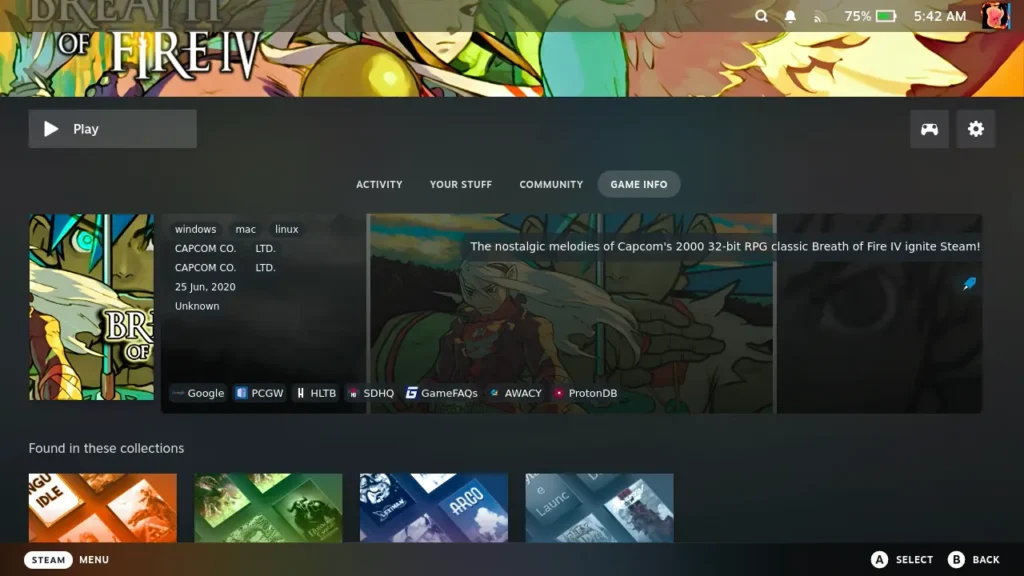
Hot off the heels of the last update that re-adds SD Card support, we have a brand new one that adds a nice new feature. It adds a new metadata box for Non-Steam games in your library directly into Steam, giving some information on the game in a nice, colorful box. The box contains some great information, including a summary and release information, but there are also some quick links below to sites that could be helpful, like How Long To Beat, PCGamingWiki, ProtonDB, and even us (SteamDeckHQ).
The feature is available both in Desktop and Game Mode, which is very nice. I expected this to only be available in Desktop mode, but having it here in Game Mode is a nice touch. It does require using the touchscreen to actually interact with the links, but I still enjoy having it there. Developer moraroy did mention that some metadata may be incorrect, but he is working on fine-tuning it.

The update also fixed a couple of issues with the scanner feature and some Proton update changes, but the big improvement here is going to be the metadata.
You can check out the full patch notes for V4.2.86 here. If you already have NonSteamLaunchers installed, simply running it should update you to the latest version.
You can also see our guide to installing NonSteamLaunchers if you haven't got it installed on your Linux device yet.
この記事を楽しんでいただけたなら、SteamDeckHQ の他のコンテンツもチェックしてみてください!あなたのゲーム体験に役立つゲームレビューやニュースを幅広く取り揃えています。ニュース、ヒントやチュートリアル、ゲーム設定やレビュー、最新のトレンド情報など、あらゆる情報をお届けします。 カバーしています!

最近のニュース
カテゴリー
Accessories
Anbernic
Android
ASUS ROG Ally
ROG Xbox Ally
Classics on Deck
Community
Cryobyte33
Deals
Deck Mods
Emulation
Events
Featured Post
Game News
Game News
General Game News
HandheldHQ
Hardware
Lenovo
Linux
MagicX
Nintendo
ONE-NETBOOK
Opinion
Other Reviews
Accessory Reviews
Handheld Reviews
PlayStation
Proton
Retro Handhelds
Anbernic
AYANEO
AYN
GPD
MagicX
MANGMI
Miyoo
Retroid
TrimUI
SDHQ
Steam
Steam Machine
SteamOS
The Unsupported Report
Uncategorized
Uncategorized
最近のヒント&GUIDES
新着レビュー