Update 11/3/22: It seems Valve has updated the patch notes to include this. It was not in the original posting, but it is there now on Steam!
I definitely didn't expect to see this option available, but hot damn. Valve's last Client Beta update seemed to do forget one little addition in their changelog...being able to swap your A and B buttons to match the Nintendo Switch, as well as the X and Y! This means that your A button will react as if you are pressing the B button and vice versa when enabled. This does happen immediately and translates over to games as well!
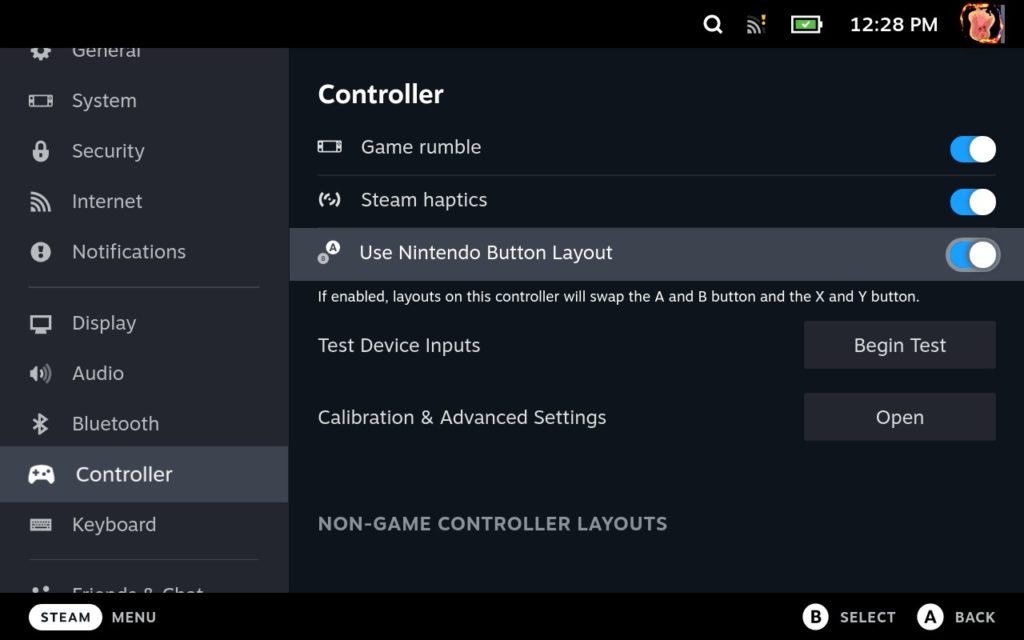
To enter the Steam Deck Client Beta, go to your System settings > Steam Client Update Channel > then choose Steam Deck Beta.
In our testing, this will also swap whatever is assigned to those buttons in your controller configurations. So, if you are playing a game using a custom controller configuration where the Spacebar is set to the A button and Ctrl is set to B, if the Nintendo layout is enabled, these will be swapped! Still, if you are someone coming over to the Deck from a Switch, or just use the Switch a lot, this could make things significantly easier!

最近のニュース
カテゴリー
Accessories
Anbernic
Android
ASUS ROG Ally
ROG Xbox Ally
Classics on Deck
Community
Cryobyte33
Deals
Deck Mods
Emulation
Events
Featured Post
Game News
Game News
General Game News
HandheldHQ
Hardware
Lenovo
Linux
MagicX
Nintendo
ONE-NETBOOK
Opinion
Other Reviews
Accessory Reviews
Handheld Reviews
PlayStation
Proton
Retro Handhelds
Anbernic
AYANEO
AYN
GPD
MagicX
MANGMI
Miyoo
Retroid
TrimUI
SDHQ
Steam
Steam Machine
SteamOS
The Unsupported Report
Uncategorized
Uncategorized
最近のヒント&GUIDES
新着レビュー