Dp you have too many games in your Heroic Launcher library and want to organize them a bit more cleanly? Well The Heroic Launcher just got a new update that brings in a wealth of improvements and fixes, as well as a way of adding your own user-defined categories and a re-designed filter selector.
The Heroic Games Launcher is a community-made, open-source launcher that connects to Epic, GOG, and Amazon Prime and allows you to access and play your games through it. You can find the launcher on the Discover Store and install it through Desktop Mode.
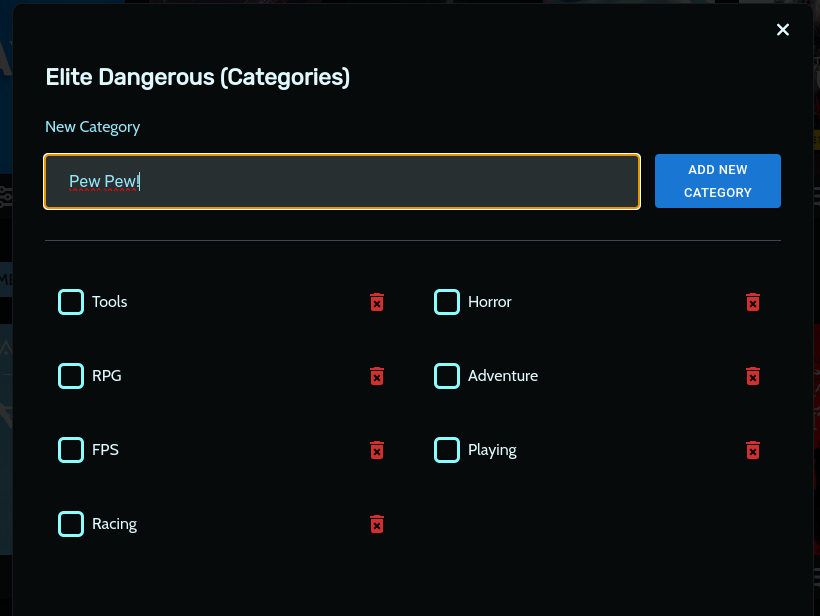
Adding New Categories
In Heroic Games Launcher's 2.11.0 update, codenamed Kumachi, the focus seems to have been on making it easier to organize your library, which is especially nice as the selection of games grow with each new free Epic and Amazon Prime game offered. With each game, you will be able to assign a category where, if you choose, you are able to add a new one to select from.
Filter Improvements
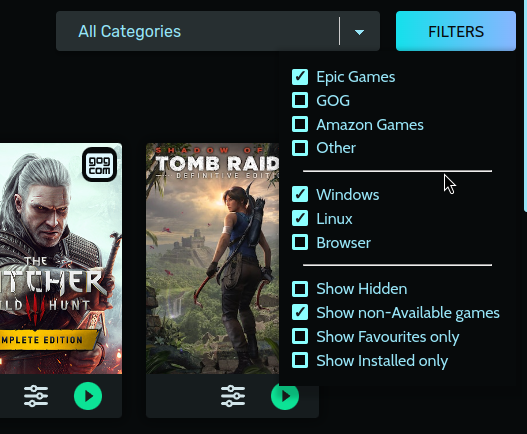
As for organization, the team has updated their filtering to make it easier to not only see which games you own, but also your defined categories. You can filter by library, supported operating system, and even show favorites or installed games only.
There were also a good chunk of visual issues that were fixed, as well as anti-cheat runtimes now being enabled by default. There's also a little improvement added for the Heroic Launcher to detect if the system is a Steam Deck OLED. Overall, this is a nice, welcome update that I welcome with the growing library of Epic Games to play on the Steam Deck.
Heroic Games Launcher 2.11.0 Update Changelog:
- [Fix]
AppSettingstype mismatches by @CommandMC in #2718 - [FIX] Wine Stuck sometimes at adding registry key by @K900 in #3210
- [i18n] Update Language selector with two more languages by @flavioislima in #3217
- [Tech] Deduplicate our Workflows by @CommandMC in #3198
- [Fix] Prevent storing external urls for stores by @arielj in #3208
- [UI/UX] Fix some visual issues related to logs, dialogs, and RTL layout by @arielj in #3207
- [FIX] Enable anti cheat runtimes by default by @Etaash-mathamsetty in #3103
- [FIX-macOS] Wine Downloader fails to extract files by @flavioislima in #3227
- [Fix/Tech] Fixup Snap publishing in
build-baseworkflow by @CommandMC in #3223 - [Tech] Truly ignore
flatpak-buildby @CommandMC in #3219 - [Fix] Workflows: Disable publishing when building the AppImage by @CommandMC in #3253
- [UI] Fix height of install and settings dialogs by @arielj in #3254
- [UI] Improve download speed chart by @RawToast225 in #3244
- [Fix] Issue #2466 GamePage image is missing logo when available by @hashkar123 in #3245
- [UI] Fix regression of missing background image in game page by @arielj in #3269
- [UI] Some small game page fixes by @arielj in #3270
- [UI/UX] Filters dropdown in Library. Show only installed by @arielj in #3266
- [UI] Fix style of Filters button in some themes by @arielj in #3278
- [Fix] WINEPREFIX ignored when using GPTK by @Mrredstone5230 in #3277
- [Feature] Add custom user-defined game categories #1428 by @lgcavalheiro in #3115
- [Mac] Allow setting the prefixes folder on Mac too by @arielj in #3275
- [Fix] SystemInfo: Detect the Steam Deck OLED by @CommandMC in #3273
- [i18n] Updated Translations by @weblate in #3265
この記事を楽しんでいただけたなら、SteamDeckHQ の他のコンテンツもチェックしてみてください!あなたのゲーム体験に役立つこと間違いなしのゲームレビューやニュースを幅広く取り揃えています。ニュース、ヒントやチュートリアル、ゲーム設定やレビューをお探しの方も、最新のトレンドを知りたい方も、ぜひご利用ください。

最近のニュース
カテゴリー
Accessories
Anbernic
Android
ASUS ROG Ally
ROG Xbox Ally
Classics on Deck
Community
Cryobyte33
Deals
Deck Mods
Emulation
Events
Featured Post
Game News
Game News
General Game News
HandheldHQ
Hardware
Lenovo
Linux
MagicX
Nintendo
ONE-NETBOOK
Opinion
Other Reviews
Accessory Reviews
Handheld Reviews
PlayStation
Proton
Retro Handhelds
Anbernic
AYANEO
AYN
GPD
MagicX
MANGMI
Miyoo
Retroid
TrimUI
SDHQ
Steam
Steam Machine
SteamOS
The Unsupported Report
Uncategorized
Uncategorized
最近のヒント&GUIDES
新着レビュー