まだの方は、X(Twitter)、Mastodon、Blueskyでフォローし、新しい記事が投稿されたらお知らせください。また、Redditに参加したり、YouTubeに登録して、私たちのコンテンツをチェックしたり、素晴らしいコミュニティと交流してください。応援ありがとうございました!
There are tons of different handhelds out there now, and each has their own software to help manage it. The Steam Deck uses SteamOS, ROG Ally uses Armoury Crate, Legion Go uses Legion Space, AYANEO uses AYASpace, and GPD uses the Motion Assistant. GPD's Motion Assistant is a great tool in particular, and one of my favorites despite its UI, and it just got a new update that changes up a lot more than I expected.
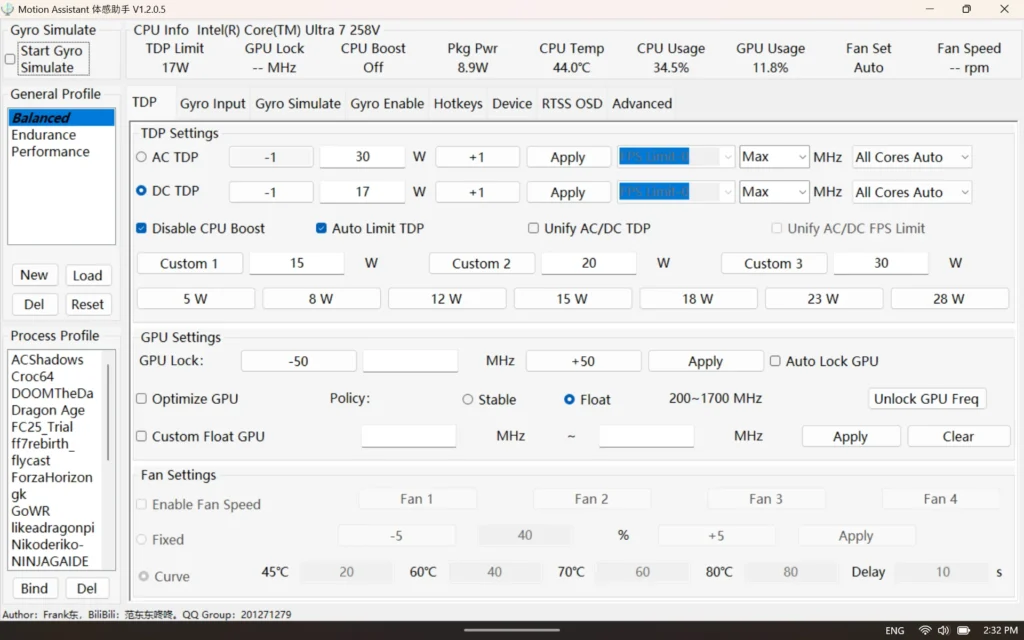
Interestingly, the new update for Motion Assistant added support for more devices than I expected. While it makes sense it adds support for their new GPD WIN 5, it also adds support for the ROG Xbox Ally X, making it usable on another handheld outside of GPD's line. There was also expanded support for the Lenovo Legion Go 2, special new settings for the GPD WIN 5 models like optimizing CPU frequency and modified TDP quick-set values, and a new battery power display has been added to the status bar.
There was also an increasing to the CPU frequency locking range, an improved sleep/wake process, support for the WIN 5's removable battery and optical mouse toggle, compatibility for AMD H260 models, and a customizable screenshot storage folder.
It's interesting seeing all of these updates for software I never thought to try using on another handheld other than my GPD WIN 4. UI really like the software and its features, though I wouldn't mind a UI overhaul. Currently, it just looks ugly and difficult to navigate and understand at first. I would love to see this improved, but for now, a new update is still great to see.
You can download the new Motion Assistant update for yourself over from Mega.nz.
Motion Assistant V.1.2.0.8 Update Changelog:
- Added support for GPD Win5, including TDP, CPU settings, fan control, rear key detection, toggle key detection (short press), and gyroscope emulation. GPU frequency locking is temporarily unsupported.
- Added support for ROG Xbox Ally X, including TDP, CPU settings, GPU settings, fan control, function key detection, and gyroscope emulation.
- Optimized GPU support for the Lenovo Go2 engineering unit.
- Special settings for 385/390/395 models:
(1) Added a "Optimize CPU Frequency" option. When enabled, CPU frequency locking is automatically set based on the current TDP—higher TDP corresponds to higher frequencies, and lower TDP corresponds to lower frequencies—to meet GPU demands. Note: Intel Turbo Boost must be enabled. This option is ineffective for other CPUs.
(2) Modified TDP quick-set preset values (for 385/390/395 only), with a range of 8-75W.
(3) Disabled GPU settings, as GPU frequency locking is temporarily unsupported for 385/390/395 models. - Added battery power display to the status bar: positive values indicate charging power, negative values indicate discharging power.
- Increased CPU frequency locking range to 5000MHz.
- Fixed an issue where the assistant would report errors when using older versions of Intel drivers.
- Added a global setting "IntelPL2Delta" to adjust the PL2 increase for Intel CPUs, with a minimum value of 0 and a default value of 1. This can be configured in Profiles/Global.ini.
- Optimized battery plug/unplug detection and periodically reset battery status to support Win5's removable battery.
- Improved sleep/wake process, prioritizing TDP settings.
- When Win5 is powered only via USB-C without a battery, the maximum TDP is limited to 65W to ensure stable operation, using the unplugged TDP settings (treated as power bank supply).
- OSD monitoring optimizations: Adjusted frame generation curve range to 5-45ms, fine-tuned default color scheme, and reduced saturation. Fixed occasional issues with undetected memory and battery.
- Added compatibility for AMD H260 and other rebranded models.
- Added high-speed mode for gyroscope reporting rate, increased to 1000Hz (including virtual controller reporting rate). The default reporting rate remains 250Hz.
- When "Dedicated Configuration Lock" is enabled, if the process of the currently applied dedicated configuration exits, it will switch back to the generic configuration.
- Simplified shortcut key display, added trigger keys as shortcuts (including NS and PS controllers), and added NS controller Home key as a shortcut.
- Customizable screenshot storage folder. If an invalid path is set, the default folder will be used.
- Fixed an issue where the assistant would report errors when running on Windows 7.
- Added an optical mouse toggle for Win5.
この記事を楽しんでいただけたなら、SteamDeckHQ の他のコンテンツもチェックしてみてください!あなたのゲーム体験に役立つゲームレビューやニュースを幅広く取り揃えています。ニュース、ヒントやチュートリアル、ゲーム設定やレビュー、最新のトレンド情報など、あらゆる情報をお届けします。 カバーしています!

最近のニュース
カテゴリー
Accessories
Anbernic
Android
ASUS ROG Ally
ROG Xbox Ally
Classics on Deck
Community
Cryobyte33
Deals
Deck Mods
Emulation
Events
Featured Post
Game News
Game News
General Game News
HandheldHQ
Hardware
Lenovo
Linux
MagicX
Nintendo
ONE-NETBOOK
Opinion
Other Reviews
Accessory Reviews
Handheld Reviews
PlayStation
Proton
Retro Handhelds
Anbernic
AYANEO
AYN
GPD
MagicX
MANGMI
Retroid
TrimUI
SDHQ
Steam
Steam Machine
SteamOS
The Unsupported Report
Uncategorized
Uncategorized
最近のヒント&GUIDES
新着レビュー