My favorite way to access and play emulated games on the Steam Deck, using SteamOS, has been with Emulation Station. I love having a dedicated graphical frontend specifically tailored to my emulated games, separating them in aesthetically pleasing ways by the console the game is associated with. Now, EmulationStation DE (ES-DE) got a new update that expanded a lot of the systems already in place, including the theme engine, and added in support for new emulators.
To get this update, all you have to do is open ES-DE and download the update. It will prompt you to download, install, and then manually re-open the program. You can also update through EmuDeck, but either way works the same! If you haven't yet, you can get this and other emulators easily using our EmuDeck setup guide.

The theme above is "Coinops".
New Systems, Emulators, and Expanded Linux/Wine Emulation Support
First up, we have new systems and emulators that are now supported on the system. Some of these include Commodore Plus/4, LaserDisc Games, Nokia N-Gage, Coleco Adam, Acorn Electron, Sega NAOMI 2, Taito Type X, and the Microsoft Windows 3.x and 9x systems. There are also some standalones that were added for alternatives to different consoles like MAME, Mesen, SkyEmu, ares, and FS-UAE.
There was also added supprort for Windows-only emulators that are running through Wine or Proton. Now, if you are running an emulator this way, ES-DE will support it and it will show up. This is great for emulators that don't have official Linux support yet. These include Xenia, Atari Jaguar CD, 3dSen, and the Flatpak release of Cemu and PCSX2.
New Theme Engine Functionality
There have been some new theme engine functionality added to not only create new ways to utilize themes, but also make what you see much more clear. Themes can now have rounded corners for different elements like images, videos, animations, scrolling text, and other stationary elements. Rendering accuracy has also been improved, which will make everything you see much clearer. Font rendering has been especially improved to keep it in higher quality across resolutions and devices.
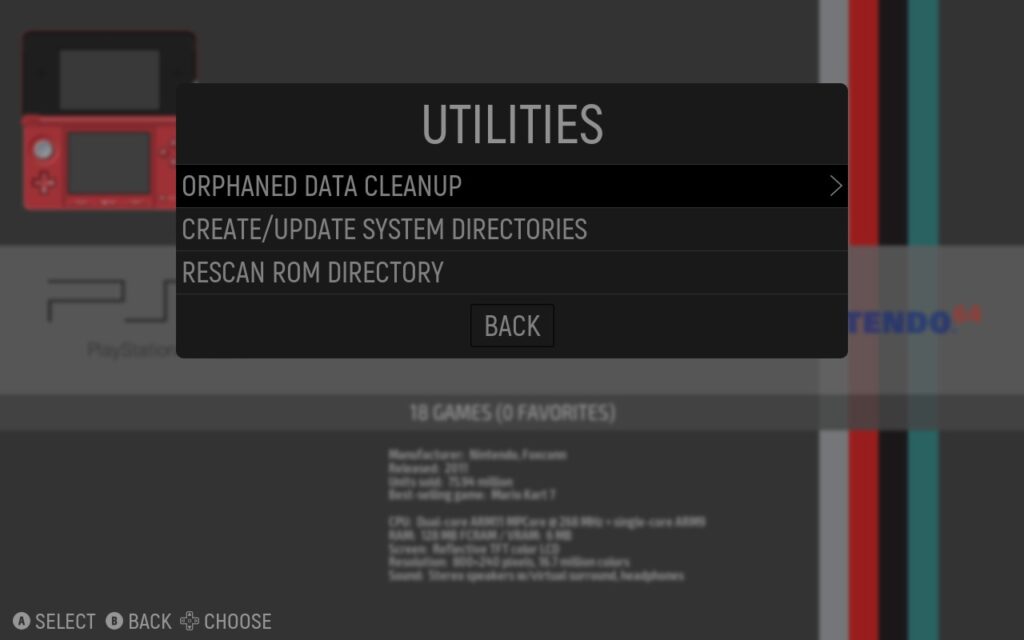
New Utilities Menu with ROM Directory Rescanning
Another new element to the update is the new utilities menu. From here, you will have a new set of settings to play around with, including the ability to rescan ROM directories and update or create the ROM directory tree, without needing to restart the application. You can also do an "Ophraned Data Cleanup", which will move Media, Gamelists, and Collections that have no matching files into a new folder that you can delete manually. This is done so nothing is accidentally deleted and you can double check.
There are also some other new features and quality of life changes, including file hash searching for the scraper, clipboard paste support, changing system sorting from GUI, and support for deleting installed themes from the downloader interface!
There's a lot more to love from this update, but there is still more to come! The upcoming update, 2.2.1, has some aweosme features already being worked in, including variants to the modern theme and updated components. You can check out the full changelog on EmulationStation's gitlab page!
この記事を楽しんでいただけたなら、SteamDeckHQ の他のコンテンツもチェックしてみてください!あなたのゲーム体験に役立つこと間違いなしのゲームレビューやニュースを幅広く取り揃えています。ニュース、ヒントやチュートリアル、ゲーム設定やレビューをお探しの方も、最新のトレンドを知りたい方も、ぜひご利用ください。

最近のニュース
カテゴリー
Accessories
Anbernic
Android
ASUS ROG Ally
ROG Xbox Ally
Classics on Deck
Community
Cryobyte33
Deals
Deck Mods
Emulation
Events
Featured Post
Game News
Game News
General Game News
HandheldHQ
Hardware
Lenovo
Linux
MagicX
Nintendo
ONE-NETBOOK
Opinion
Other Reviews
Accessory Reviews
Handheld Reviews
PlayStation
Proton
Retro Handhelds
Anbernic
AYANEO
AYN
GPD
MagicX
MANGMI
Miyoo
Retroid
TrimUI
SDHQ
Steam
Steam Machine
SteamOS
The Unsupported Report
Uncategorized
Uncategorized
最近のヒント&GUIDES
新着レビュー