まだの方は、X(ツイッター)またはマストドンでフォローし、新しい記事の投稿をお知らせください。また、Redditに参加したり、YouTubeに登録して、私たちのコンテンツをチェックしたり、素晴らしいコミュニティと交流してください。応援ありがとうございます!
Some of my favorite games growing up were tower defense games, with Bloons TD taking the cake. Later, I migrated to playing Sanctum, which allowed me to interact more and actually build the maze that the units would have to go through. Emberward is another evolution of that, adding in roguelike elements and using Tetris-like blocks to create the path they will go through. In the game's newest update, we have some new improvements to make playing on the Steam Deck a bit easier.
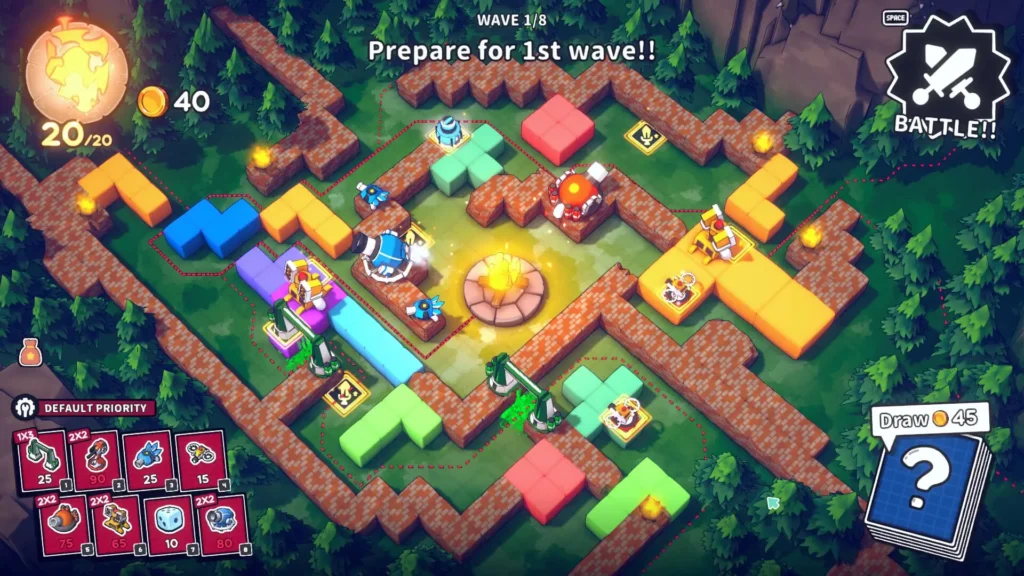
In the 0.3.1 update, we have a couple of new hotkeys specifically added for the Steam Deck:
- Draw Card: O
- Decrease Game Speed: K
- Increase Game Speed: L
These hotkeys can be customized, but they are only available on the Steam Deck. I am not sure why it's only configurable on the Steam Deck, and not every controller or gamepad, but that's what the log says! There is no controller support formally available yet, so these changes should make using Steam Input and creating a controller scheme much easier.
The hotkey changes are a small part of the update overall, though! We have a new character, four new towers, six new relics, and a new Electric Element mechanic. This means when monsters take electric damage, they will accumulate a charge that will stun them if it builds up enough. We also have less complicated math paths; you can now see the relics you own when you are in the shop, and poison damage speed is doubled to three seconds.
You can view the full changelog over on the Steam Community Post.

Emberward is available on Steam for $14.99 and is rated Playable due to showing incorrect controller icons, small in-game text, and needing to set the display resolution manually.
この記事を楽しんでいただけたなら、SteamDeckHQ の他のコンテンツもチェックしてみてください!あなたのゲーム体験に役立つゲームレビューやニュースを幅広く取り揃えています。ニュース、ヒントやチュートリアル、ゲーム設定やレビュー、最新のトレンド情報など、あらゆる情報をお届けします。 カバーしています!

最近のニュース
カテゴリー
Accessories
Anbernic
Android
ASUS ROG Ally
ROG Xbox Ally
Classics on Deck
Community
Cryobyte33
Deals
Deck Mods
Emulation
Events
Featured Post
Game News
Game News
General Game News
HandheldHQ
Hardware
Lenovo
Linux
MagicX
Nintendo
ONE-NETBOOK
Opinion
Other Reviews
Accessory Reviews
Handheld Reviews
PlayStation
Proton
Retro Handhelds
Anbernic
AYANEO
AYN
GPD
MagicX
MANGMI
Miyoo
Retroid
TrimUI
SDHQ
Steam
Steam Machine
SteamOS
The Unsupported Report
Uncategorized
Uncategorized
最近のヒント&GUIDES
新着レビュー