God of War (2018) is the first game in the rebooted-ish God of War series. You play as angry man Kratos who, with his son Atreus, must honor his partner’s dying wish. Along the way, you will travel across the land, encountering the gods of the norse mythology, all while training his son to be an angry boy. This game detracts from its predecessors heavily, focusing on telling a compelling story in a third person view over a beat-em-up style game. The game is phenomenal all around and is easily one of the greatest games to have ever been made. Saying this was a worthwhile experience is an understatement, so I was praying this would run well on the Steam Deck.
Knowing how this would turn out, I started my benchmarking with everything set to max. Lo and behold, it was horrible. Everything set to max with native resolution and no caps resulted in a 20 FPS average with a 24W+ battery drain and temps that were rising up to the high 80s. And this was in one of the less heavy areas of the game. I had no intention of using max settings though and here is where the review gets a bit tricky.
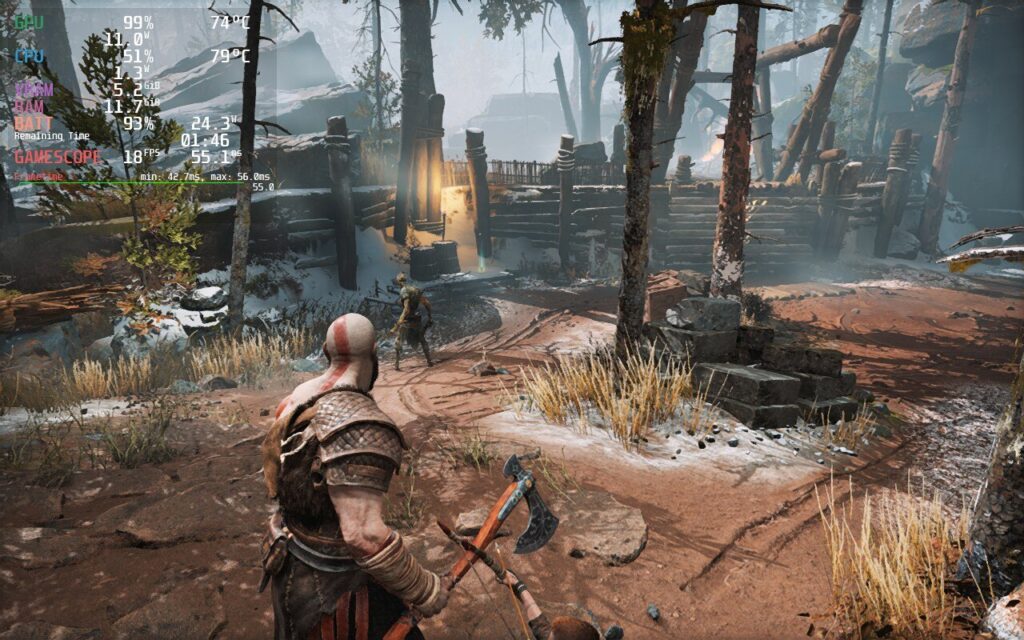
While God of War looks beautiful, battery drain and temps are high, as well as the framerate hanging around 20 FPS or lower.
God of War is a super intensive game and I feel there are two ways to play this: 30 FPS with a battery/quality focus and 40 FPS with a performance focus. In my testing, having a specific quality-focus build results in battery drain that hits a bit too hard, though it is possible to play.
Seeing as how draining God of War is, I wanted to see how far I could get the drain and temps down while keeping a stable 30. Thankfully, God of War does have FSR 2.0 integration, so I didn’t have to turn the resolution down as much to save battery. I set the TDP to 9 and started reducing some quality settings to make sure the stable framerate was hit. I ended up with a nice mix of original and high settings, with 3 of them being low. With those settings and a 1152x720 resolution with FSR 2.0 set to quality, we get a fairly nice picture with a mostly stable 30 FPS. There are some framerate spikes, but I don’t feel they are noticeable in general play without the graph there. I have seen some minor slowdowns too, but these tend to happen in cutscenes or entering new areas, which don’t impact gameplay as much. Turning up TDP could mitigate some of these, but will also drain everything much faster. Even when all the settings are set to low, I still experienced some form of spike, so while these settings may cause a little more, they still don’t feel noticeable and give more to the game while saving a significant amount of battery drain.
When it comes to 40 FPS, it is possible to achieve it while still looking quite good, though at a cost to stability. I would say overall, the game is 80% stable at 40 with these settings, though there are still mini spikes which are much more noticeable due to the increased framerate. On top of that, battery drains significantly more and temps get up to 80c, which in itself is still not that bad. It is also slightly blurrier as the resolution is changed down to 960x600, and FSR 2.0 set to balanced, but the smooth framerate does make up for this. It is still decent looking, though personally, the upgrades to quality and less noticeable spikes win out for me.
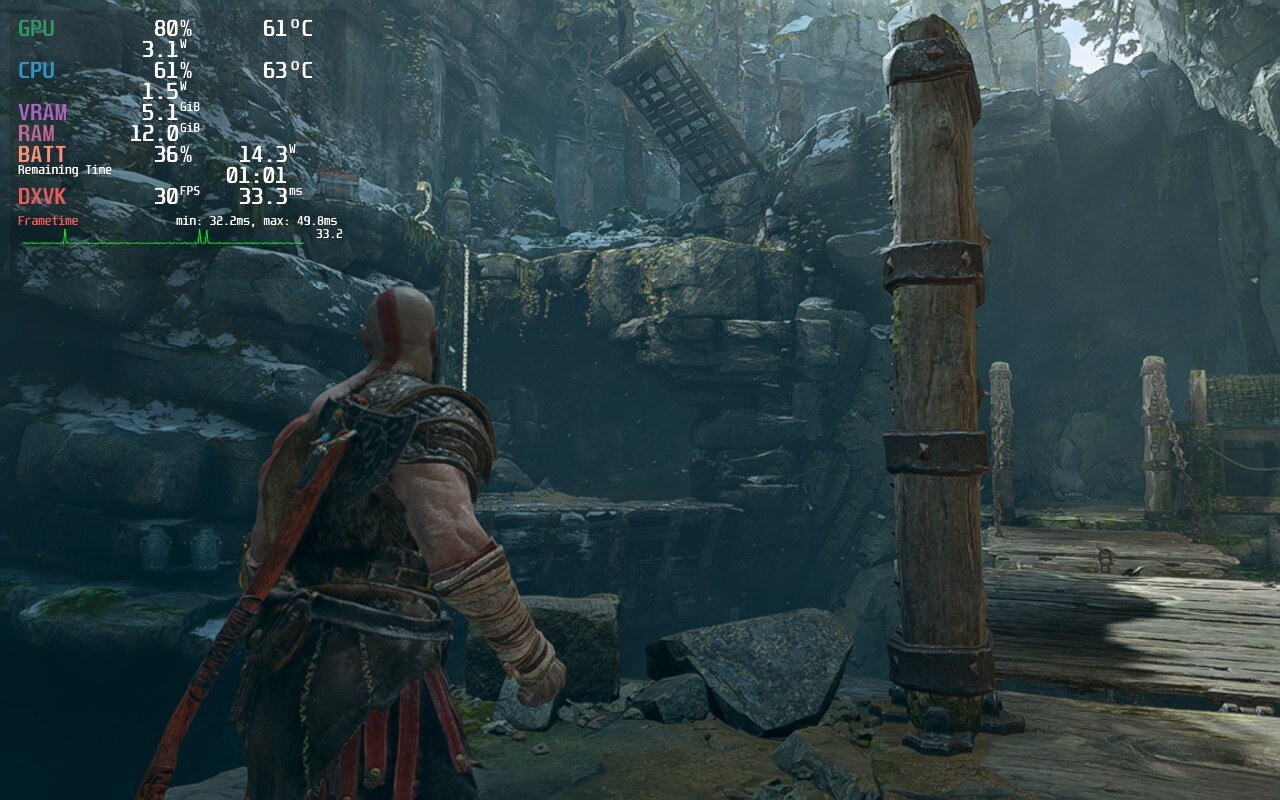
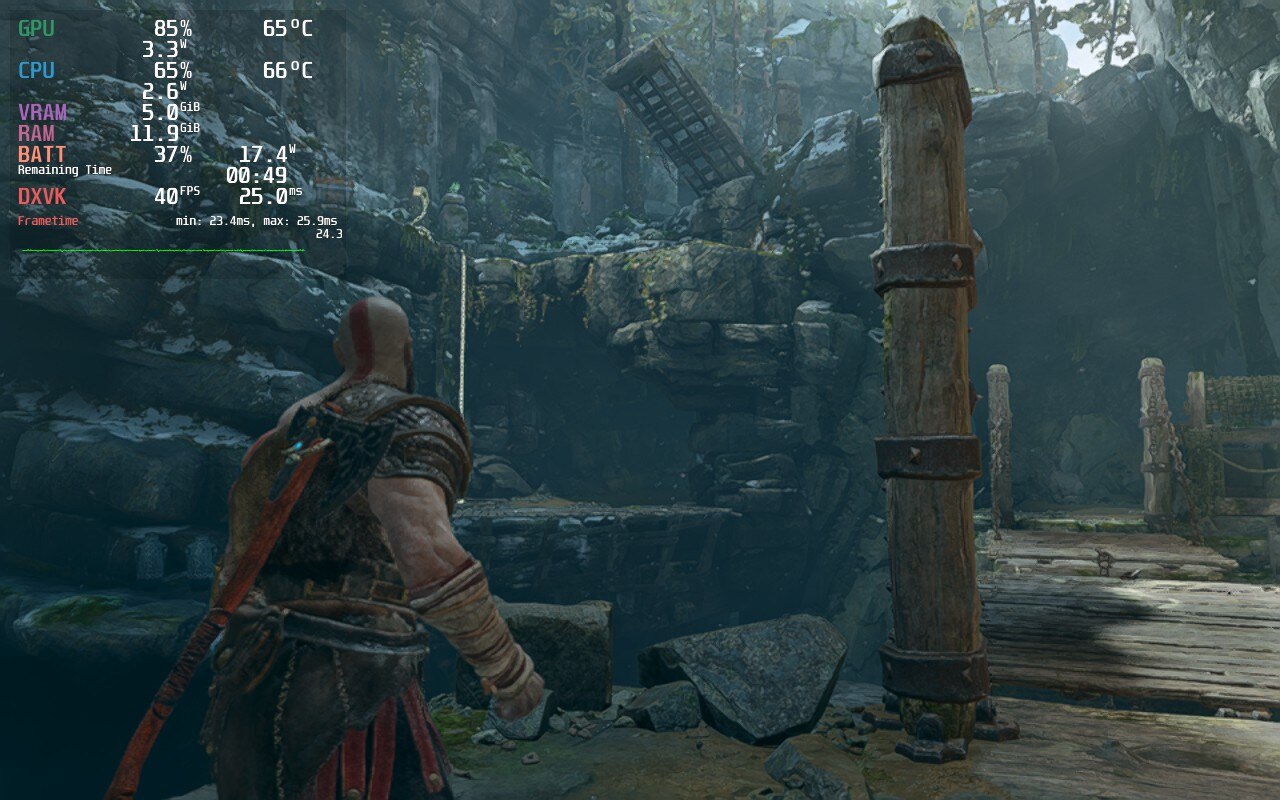
The difference in quality is clear and while 40 FPS can be hit, the temps and battery drain are massive.
There were no clear differences when using a different Proton version for God of War, so you can pick and choose which one you would like to use. I prefer using Proton GE when I can. If you don't know about it or want to install, you can follow our guide for it!
I did also encounter a couple bugs with the Deck. I noticed that after some cutscenes in God of War, my controls would stop working. This was easily fixed by hitting the "Steam" button and then going back into the game, but it was a bit annoying to deal with. I also did notice that moving the left analog stick has a very slight delay. I tested to see if this was due to SteamOS's cap, though even when Vsync in game was on with no cap, there was still that delay. It wasn't really noticeable when getting into the game though, just when I specifically stopped to test it.
I still am in shock as I tested and wrote this review, I was playing God of War on a handheld device. This game is so good and I was pleased with the performance. Of course, in terms of technicality, it could be better. It does still have framerate spikes and some bugs, but overall, this is a huge AAA game that has no business running as well as it does on Deck. If you haven't played the game before, or on the fence about it, do yourself a favor and grab the game. The compromises are well worth it.
このレビューはPC版に基づいています。
このレビューをお楽しみいただけたなら、SteamDeckHQ の他のコンテンツもぜひご覧ください!私たちはあなたのゲーム体験に役立つこと間違いなしの様々なゲームレビューやニュースを取り揃えています。ニュース、ヒントやチュートリアル、ゲーム設定やレビューをお探しの方も、最新のトレンドを知りたい方も、ぜひご利用ください!
Star Wars: Jedi Fallen Order」は、スター・ウォーズというゲームジャンルの新たな試みとして2019年にリリースされた。ダークソウル」風の戦闘、アクションRPGの要素、「アンチャーテッド」風のプラットフォームをミックスしたこのAAA作品は、新キャラクターを含むグラフィックの詳細な環境にプレイヤーを没入させ、過去のスター・ウォーズゲームとは明らかに異なるゲームプレイスタイルを追求した。発売時にプレイステーション4で最初のプレイを終えた私は、Steamのサマーセールでこのゲームを手に入れ、Steamデッキでこのゲームがどのようにプレイできるかを評価するのが楽しみだった。
最初にゲームを起動したとき、私はDeckを限界までプッシュするつもりだった。内蔵SSDにゲームをインストールし(私のデッキには256GBのNVME SSDが搭載されている)、Steam OSを60fpsに設定し、すべてのゲーム内設定を最高画質に設定して起動した。ゲームは確かにプレイできたが、最大40fps台前半で、激しい戦闘やカットシーンでは25fpsまで落ちることが頻繁にあった。
これらの設定を使用すると、ゲームは常にデッキから25ワット以上を消費し、GPU温度は80℃を超え、全体的にバッテリー駆動時間は1.5時間しかありませんでした。TDPを変更すると、ゲームは実質的にプレイできなくなり、15~20 FPSの範囲でしか動作しなくなった。このため、私はすぐに40 FPSのビルドを構成することにしました。
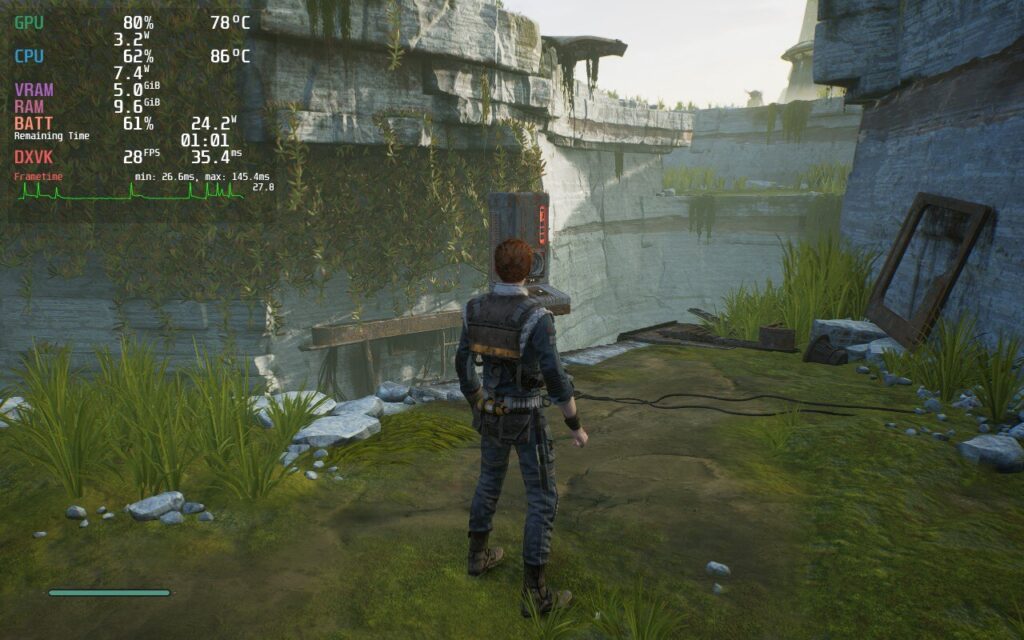
設定を最大にすれば見栄えは良くなるが、バッテリーの消耗、温度、フレームレートの不安定さによって、プレイできるレベルではない。
SteamOSのリフレッシュレートを40hzに下げ、フレームレートの上限をそれに合わせました。全体的に、Micro SDカードからであっても、60FPSに設定したときよりもゲームのパフォーマンスが向上した。ロード時間が若干長くなり、ロード中や敵が4~5体以上いるエリアに入ったときに10~15FPSほどフレームレートが低下するのが気になった。
しかし、そのエリアに戻ると、ラグはなかった。このスタッターは、デッキのハードウェアそのものというよりも、マイクロSDカードの読み書き速度に関係しているのではないかと思われた。さらに調べてみると、Fallen OrderのPC移植版は「マイクロスタッター」に悩まされているようで、私が経験したのもそれかもしれない。また、注目すべき点として、メニューは私が試した各構成で20~35FPSの範囲で動作していたようだ。
スター・ウォーズ』のフレームレートは、この40fps構成で平均35~40fps程度で、ロード中に1~2秒だけ25fpsまで落ち込んだが、私にとっては十二分に遊べるものだった。バッテリーは平均20ワット程度で約1時間半持ちました。
40FPSビルドをさらに最適化し、ゲーム内解像度を1152x720に下げ、ディスプレイをフルスクリーンに設定し、シャープネス0でFSRスケーリングを適用し、TDPを10ワットに下げ、GPUクロックを1000hzに手動設定し、設定を「中」に下げた。全体的なパフォーマンスやビジュアルに違いは感じなかったが、バッテリー駆動時間が30分延び、デッキが低温で動作するようになった。
40hzでの問題は軽微だったが、最終的には60hzで30FPSまで落とした。これらの設定で苦しかったのは、最後のカットシーン(ネタバレなし)とメニューのときだけで、フレームレートは20FPSまで落ち込んだ。
解像度、FSR、GPUクロック設定は40 FPSビルドのままだが、TDPをさらに8まで下げた。このビルドは圧倒的にバッテリー駆動時間が長く、TDPの低下はパフォーマンスへの影響は最小限だった。一部のビジュアルが高設定時ほど鮮明でないことに気づいたが、バッテリー駆動時間の延長は私にとっては価値があった。
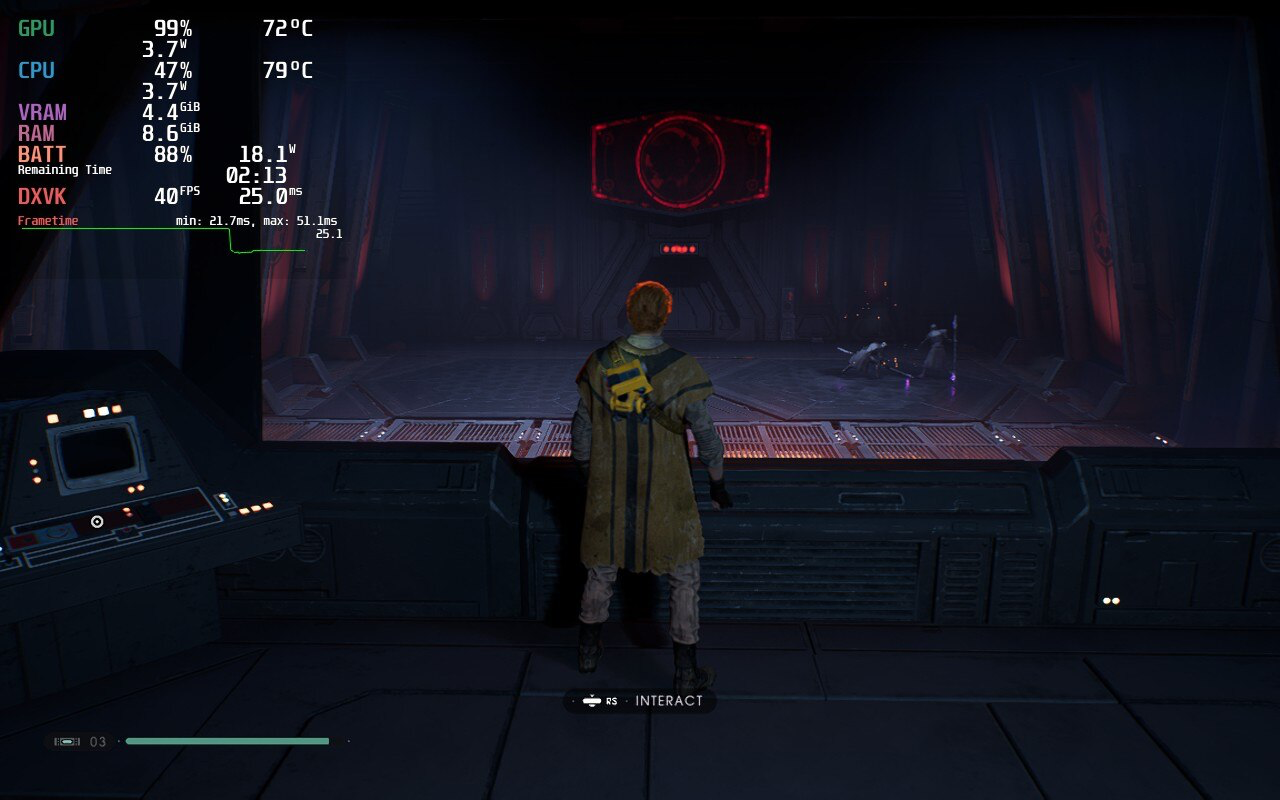
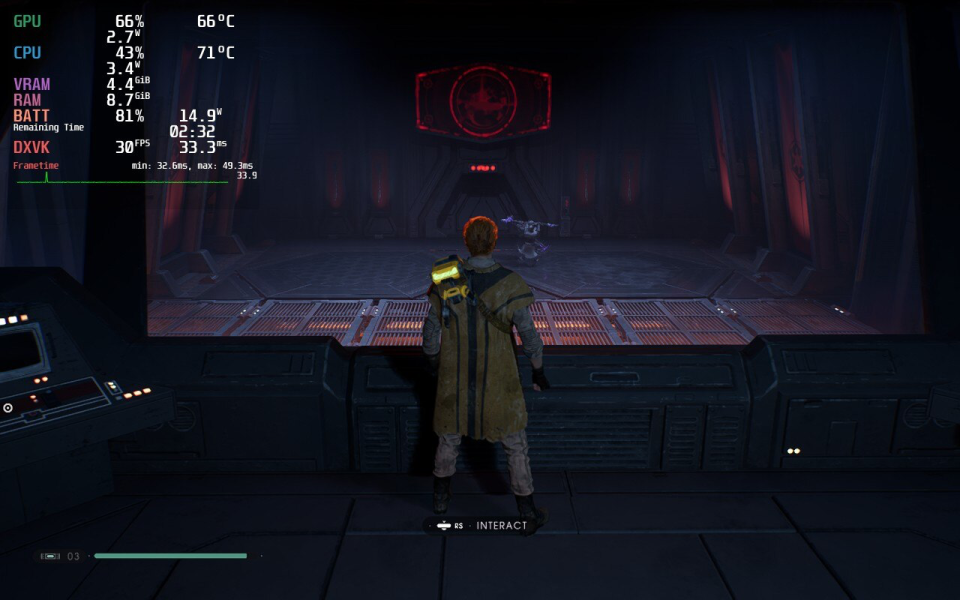
40 FPSビルドと30 FPSビルドの両方が良好なパフォーマンスを示したが、バッテリー駆動時間、温度とGPU使用率の低さ、そして全体的なパフォーマンスから、私は40 FPSビルドを推奨する。充電器から長時間離れるのであれば、30 FPSビルドが優れた選択肢となる。また、テストしたすべてのビルドで若干のスタッターが発生したが、これはPCポートによるものかもしれず、デッキだけでなくデスクトップPCでもスタッターが発生したという報告がある。
操作に関しては、デフォルトの設定で問題なく使える。スティムを使ったり、ライトセーバーの構成を切り替えたりするようなアクションでは、Dパッドよりも左のトラックパッドの方がいいことに気づいた。私の手はかなり大きめだが、普通に握ったほうがトラックパッドに手が届きやすかった。
その可能性は探っていないが、背面ボタン(L4-5とR4-5)は、ジャンプ攻撃(A→X)、ダブルパワーストライク(Y→Y)、ライトセーバー投げ(LB+Y)など、いくつかのライトセーバーコンボにマッピングするとうまく機能すると思った。結局ゲームでは試さなかったが、コントローラーのレイアウトを作成した。詳細はレビューの下にあります。
全体的に、このようなグラフィックの激しいAAAゲームを扱うSteam Deckの能力に徹底的に感銘を受け、プレイ中に何度も驚かされた。1280x800の画面でもビジュアルは見事で、カラーバランスに新たな価値を見出した。
特筆すべきは、黒が「より黒く」なったことで、ライトセーバーを懐中電灯として使う必要がある部分がよりリアルになった。戦闘やプラットフォームはスムーズで、温度やバッテリーの持ちにはばらつきがあったが、全体的に楽しい体験だった。今度の続編「Star Wars: Jedi Survivor」がデッキでこれだけ遊べるなら、私のゲームライブラリーの「必須アイテム」になるだろう。
なぜこのようなスコアになったのか、理解するのに助けが必要ですか?スチームデッキHQのガイドをご覧ください。
このレビューはPC版に基づいています。
このレビューをお楽しみいただけたなら、SteamDeckHQ の他のコンテンツもぜひご覧ください!私たちはあなたのゲーム体験に役立つこと間違いなしの様々なゲームレビューやニュースを取り揃えています。ニュース、ヒントやチュートリアル、ゲーム設定やレビューをお探しの方も、最新のトレンドを知りたい方も、ぜひご利用ください!
Special thank you to Mr Doc Jones for helping with this review!
Resident Evil 3 Remake (RE3) is…well…a remake of the third game in the Resident Evil series as well as the third Resident Evil game Capcom released using the RE Engine. It follows the continuing adventures of our master of unlocking, Jill Valentine, after the events of RE1 and overlaps with the events of RE2. In addition to the stylistic and graphical changes from the original, there are a considerable number of content changes, including cut-content.. Despite this issue the game Capcom released follows suit with the RE2 remake. RE3 is another updated classic for the modern age of action survival horror. Oh, and it plays really well on Steam Deck.
RE3 Remake has no issues running at a solid 60fps, but does tend to run hot (consistent 84*C) while at max settings. Thankfully, with some tinkering to settings and TDP, we can push that down immensely. Through the testing, I was able to get a solid 60 FPS build with a slightly lower resolution (Performance) and a 45 FPS build with crisp-looking resolution (Quality). I was also able to put together a battery focus build that does add about an hour to battery life, but the quality is a little unbearable at times and I would recommend against it. Personally, I would recommend the Quality build over the other two.
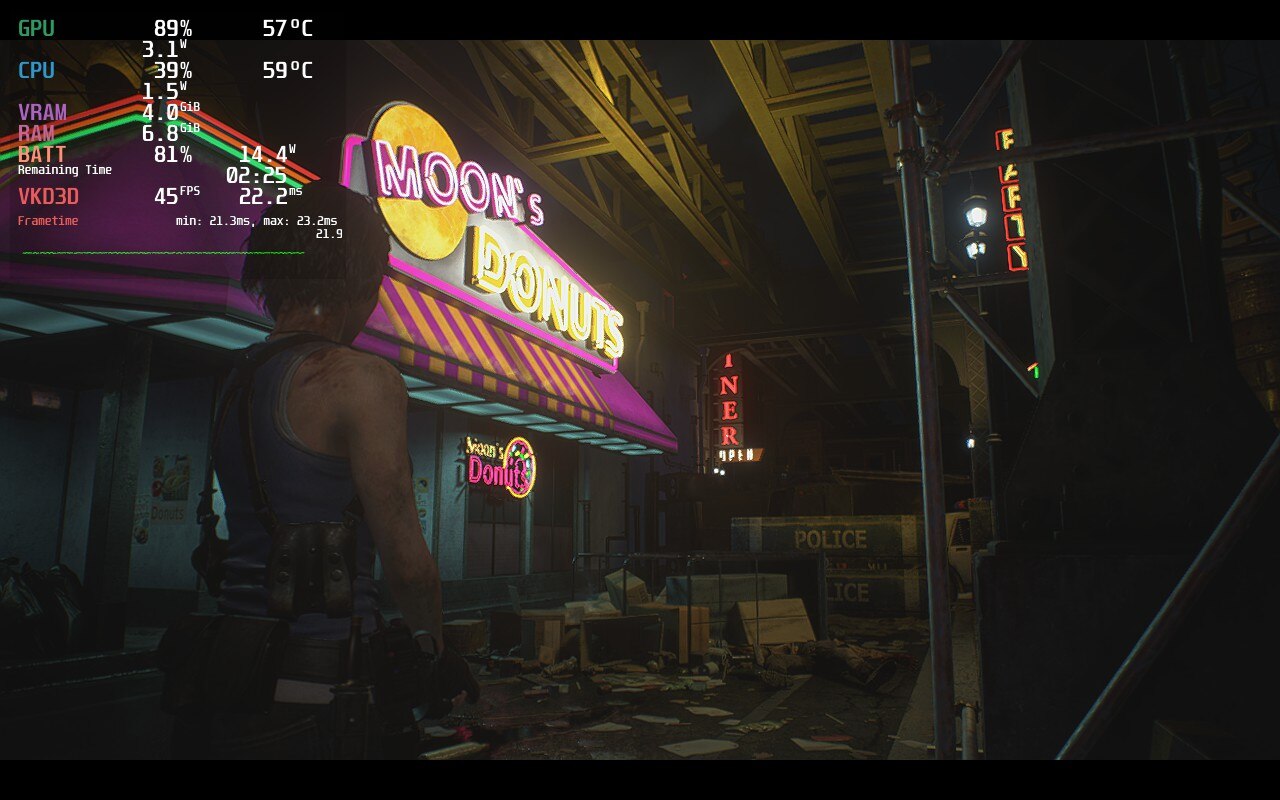
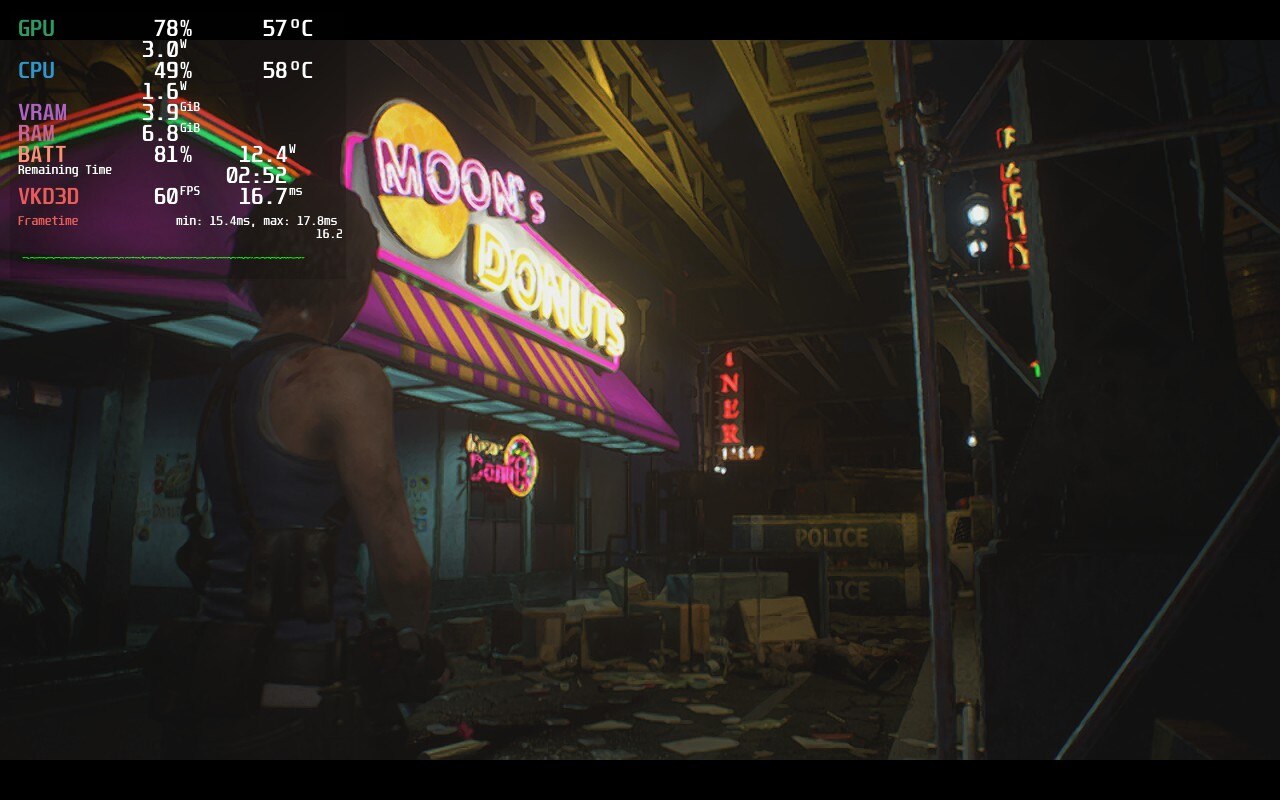
While there is a dip in battery usage, there is also a noticeable blurry downgrade in visuals.
Both of the Performance and Quality builds thankfully come with vast improvements on stability, battery, and temps. Both builds tend to stay around similar temperatures and decently stable frame rates between the two. There is about a 1W-2W difference in battery usage between each other. The RE3 remake has proven to be quite optimized and plays wonderfully on Deck. The biggest differences between the two are resolution (how crisp it is) vs frame rate.
While having a 60 FPS stable experience is always a treat, the tradeoff for having it with good temps and battery is some blurry visuals. Up close, it is still very clear, but the distance gets noticeably blurry. It isn’t too bad where it actually hinders gameplay, but it can be a little annoying after a bit of time. Compare this to the Quality build and you start to see what you are really missing out on. A stable 45 FPS doesn’t feel like anything is being compromised, and with the lowered frame rate, allows us to increase resolution and still keep stability. The meshes are more detailed, shadows look nicer, and lights just pop a bit more. The benefits here definitely outweigh the sacrifices.
The Battery build does save shave off some more temps and battery to keep things going longer and cooler, but these tradeoffs don’t justify it. The resolution is even more blurry and becomes heavily noticeable when playing. Again, it doesn’t deteriorate gameplay, but it does take away some enjoyment from it. All of this really adds on about an hour of gameplay and drops temps by about 5c, but since temps are already quite low in both the other builds, I would say it isn’t necessary at all.
The controls translated well to the Steam Deck and rebinding any keys was easy thanks to SteamOS. I decided to rebind due to personal preference, the default controls for RE3 work very well too. The biggest change I made was enabling gyro controls when holding the L Trigger down so I could more precisely kill zombies. Otherwise, the controls largely remained the same.
While many complained about this particular remake cutting corners when it came to content, the performance and fun factor on Steam Deck are still there. RE3 is so well optimized that it took very little adjusting to get the near-perfect cocktail for some zombie-killing! It’s action packed, atmospheric world entranced me and it has me extremely excited for the RE4 Remake. Fingers crossed that it will be optimized well as this one!
このレビューはPC版に基づいています。
このレビューをお楽しみいただけたなら、SteamDeckHQ の他のコンテンツもぜひご覧ください!私たちはあなたのゲーム体験に役立つこと間違いなしの様々なゲームレビューやニュースを取り揃えています。ニュース、ヒントやチュートリアル、ゲーム設定やレビューをお探しの方も、最新のトレンドを知りたい方も、ぜひご利用ください!
Call of Duty: Black Ops 2 is the sequel of Black Ops and the predecessor of Black Ops 3 from the popular First Person Shooter franchise and is full of nostalgia for those of us raised on all the earlier COD titles. BO2 comes with a somewhat lengthy campaign that goes back and forth between modern and futuristic combat, a gratifying multiplayer experience filled with iconic maps, and the evolution of the well-received zombie gamemode introduced from World at War, Black Ops 2 gives players an incredible experience.
The 45 FPS build for me was the smoothest of them all, which is why it is my recommended build. I used native resolution since lower resolution with FSR was causing micro-stutters for me (1-2 fps drops consistently), but I had it tested with another person who didn’t get the micro-stutters so take it with a grain of salt.
The reasoning behind not capping the wattage is mainly due to the game not using a high wattage 90% of the time anyways, except for certain cinematics that require the wattage to not stutter throughout. For the setting used in this build the game would reach up to 68fps at times if not capped which does give the player wiggle room if you prefer better shadows or something of that nature.
Fair warning though, there will be select heavy parts of the game where you might get around 40 instead of 45 fps due to this. If shadows are necessary for you, I would lower the 8x MSAA to 4x MSAA. But for me, the 8 times was easily worth the shadow loss. I felt the scopes on turrets or snipers would look blocky, but in 8x that was not the case. With this build, the battery length is 4.5 hours depending on the mission at hand.
I didn’t encounter any big issues in Black Ops 2 except on some cinematics where the game will not have a stable fps, likely due to the game’s cinematics not optimized for Linux. If you are looking to play multiplayer and zombies, you are going to need Proton GE 7-22 or above installed. For zombies and multiplayer, all the settings will need to be on low all, while leaving the TDP Limit at 15W to try to help against the lag/stuttering. With that, it is currently possible to get a stable framerate if you change the refresh rate and cap to 40 FPS. Playing solo works well, but I experienced a lot of lag during any connection to a server in multiplayer and zombies, so I can't recommend playing them at this current state.
In the end, Black Ops 2's game’s campaign worked perfectly and it was great to re-experience it, but any multiplayer modes left something to be desired. While I could play Zombies alone without issues at 40 FPS, it was not enjoyable to play online, which I believe will deter a lot of players. If you are wanting to play through the Bo2 campaign, the deck would be a great way to do so. Otherwise, I would put more hope on the other CoD games for a better multiplayer and zombies experience. While I could play Zombies alone without any issues whatsoever at 40 FPS, it was not enjoyable to play online due to overwhelming connection issues.
なぜこのようなスコアになったのか、理解するのに助けが必要ですか?スチームデッキHQのガイドをご覧ください。
このレビューはPC版に基づいています。
このレビューをお楽しみいただけたなら、SteamDeckHQ の他のコンテンツもぜひご覧ください!私たちはあなたのゲーム体験に役立つこと間違いなしの様々なゲームレビューやニュースを取り揃えています。ニュース、ヒントやチュートリアル、ゲーム設定やレビューをお探しの方も、最新のトレンドを知りたい方も、ぜひご利用ください!
Hitman 3 is the newest game in the rebooted hitman franchise. Taking the role of Agent 47, a man with a barcode slapped on the back of his bald head, you head to exotic places to assassinate elusive targets however you can. Feel like shooting them? Go ahead. Poison them? Be my guest. Throw a can of spaghetti? Oh you’ll be making Chef Boyardee proud. Using their new engine, each location is beaming with beautiful vistas and creative gameplay. And if you own Hitman 1 and 2, you can import the missions and campaigns into Hitman 3 for no extra charge! With all 3 games in 1 package, this is an incredibly fun game to screw around in.
Reviewing Hitman 3 was tough. This game actually runs really well on the deck out of the box, but there are a few caveats like high temps and battery usage. Through my testing, I found two efficient ways to play the game, a focus on temp/battery and one on quality. The main difference for these ways is the in-game FSR settings. Turning FSR on ultra quality blurs the resolution a little, but saves on battery a LOT while turning it off keeps everything sharp at the cost of battery.
The game can run 40 FPS pretty consistently at medium settings, 30 FPS lock actually kept temps and battery life down a chunk. This was most apparent when there are crowds of people. At 40, crowds could bring temps up to 80c and battery to 22W, while 30 would spike it to 70c and 17W generally. Medium in-game settings felt like a good balance of quality while still keeping temps and battery in check. I also found limiting TDP can mitigate some spikes, but it comes in most handy when shooting for higher framerates.
I didn’t experience any audio issues, but there were a few glitches I encountered. The mildest one would be some random black boxes appear when turning the camera too quickly, but they also disappear near immediately. When the in-game FSR is turned on, there is sometimes a visible halo around Agent 47 and there’s some ghost trails when walking.
I also have been noticing some framerate lag, but it isn’t picked up in the system so I believe it is the game’s engine and not the frames it brings out. I see this much more when FSR is turned off as well. I also noticed that, even though the game is verified, some steam deck button icons don’t show up in game.
There is a launcher for this game as well. You have to either use the touchscreen or set one of the trackpads to control the mouse. Though all of the settings from the launcher can be changed in-game, so I would just hit play and change settings after the game is launched.
Overall, the game runs surprisingly well. This is a new-ish release that still takes a lot to run, but the Steam Deck handles it like a champ. Being able to play Hitman 3 in a stable environment on the go, albeit with some compromises, still astounds me. This was a game I never imagined I could play on a portable device, yet here we are.
Need some help understanding how we got to our score? Check out our Guide to Steam Deck HQ.
このレビューはPC版に基づいています。
このレビューをお楽しみいただけたなら、SteamDeckHQ の他のコンテンツもぜひご覧ください!私たちはあなたのゲーム体験に役立つこと間違いなしの様々なゲームレビューやニュースを取り揃えています。ニュース、ヒントやチュートリアル、ゲーム設定やレビューをお探しの方も、最新のトレンドを知りたい方も、ぜひご利用ください!



