Final Fantasy 7 Remake Intergrade is the remake of one of the most well-known JRPG games ever made. With the original being made in 1996, this remake made a ton of changes and improvements, including a graphical overhaul, real-time combat system, and expanding the story into not just 1, but 3 parts told in 3 separate games. If you loved Final Fantasy 7 and wanted to see an intricate re-telling of the original story that expands more than you would have ever thought, this is the game for you.
FF7R on Steam Deck seems to work really well out of the box at first, but progressing through the game shows its cracks. The biggest one would be that Dynamic Resolution is automatically turned on without an in-game way of turning it off. The in-game setting selection is abysmal, only giving the option to change resolution, texture and shadow resolution, framerate cap, and characters displayed.
I was able to disable Dynamic Resolution with a mod though, which not only made the game look better, but run significantly better too. You can find this mod and how to install it below this review. With Dynamic Resolution off, I used Steam to force the resolution to 1024x640 and upscaled with FSR to save on performance, which it did while still looking very good.
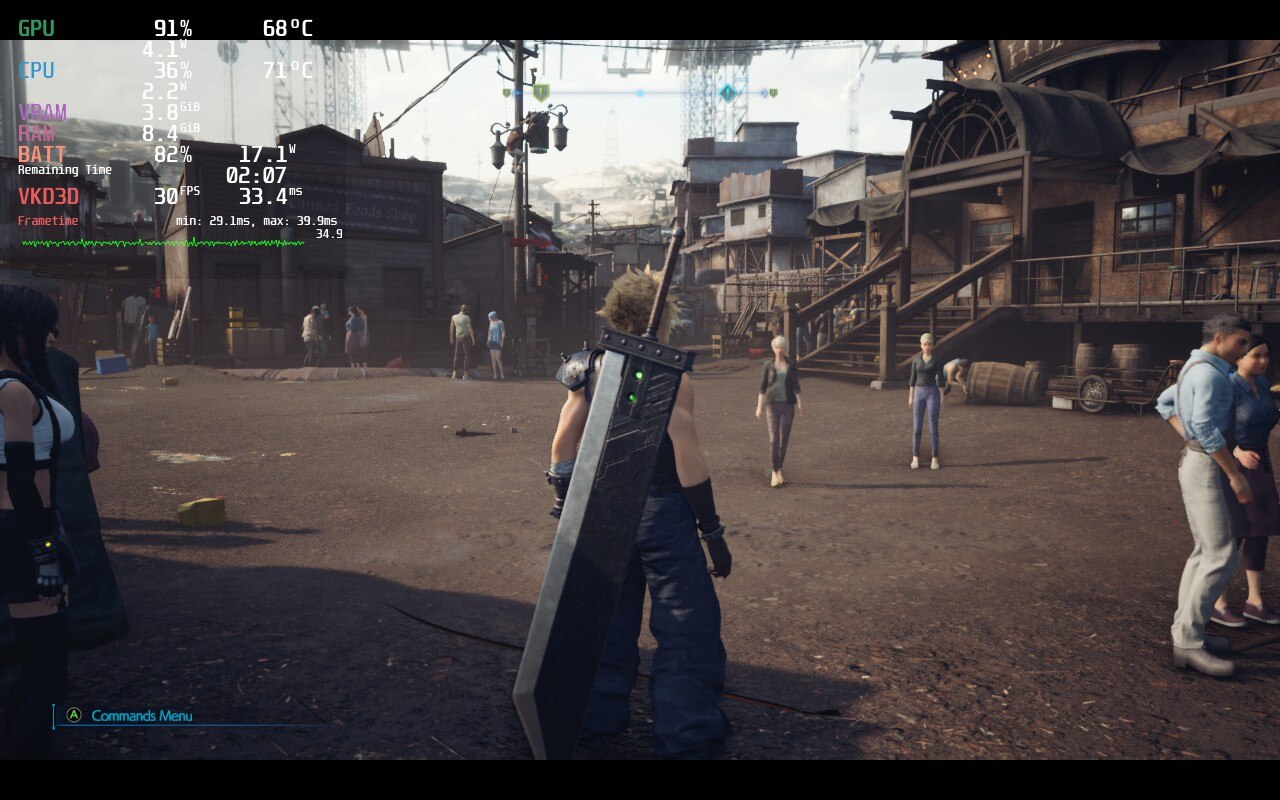
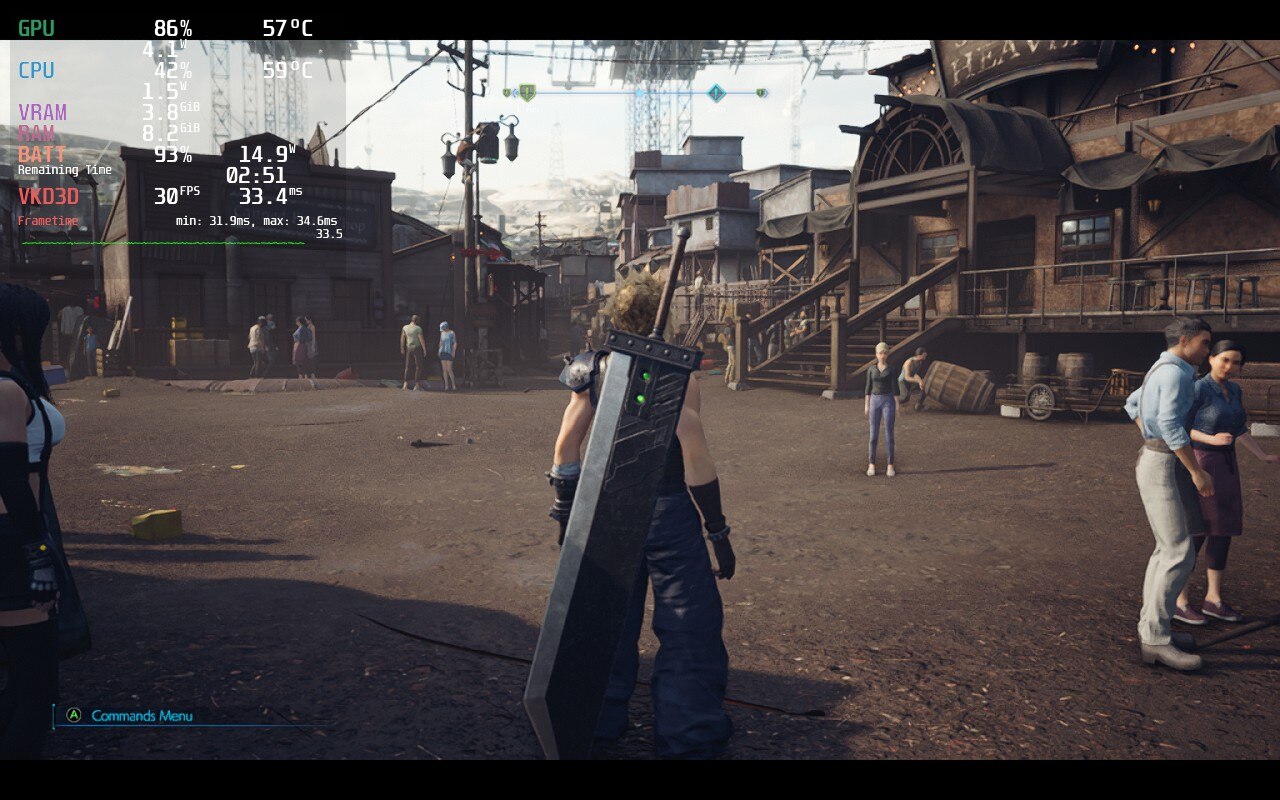
While there's slight worsening of the text, the gains in temperature and battery life are obvious and phenomenal. The 1024x600 with FSR has the disable dynamic resolution mod installed.
I tested this running through one of the most demanding areas in the game, both in the base game and its DLC, and got significantly less temps and battery usage overall while still looking better. During gameplay, I got average temps for CPU and GPU around 70c while battery usage tended to hover around 15W. I set the texture and shadow resolution to low since I felt they didn’t change a whole lot visually, but did keep the framerate more stable. I didn’t see a whole lot changed with characters displayed, so I kept it at 2 and the framerate cap can be set to 30 or 60.
If you plan to use our 40 FPS build, or switch between the two builds we provided, keep this set to 60 in-game. Though I would recommend sticking with a more stable 30 FPS as it is significantly better with temps and battery throughout the game overall. I did also try launching with DX11, but I didn't feel there was any major difference in performance to warrant it.
Throughout my testing, regardless of how I set the game, there were stutters when running through areas. This is actually due to the engine this game runs on, Unreal Engine 4. On Steam Deck, when a UE4 game is loading in new assets/areas, it has been known to stutter pretty wildly. It calms down really quick, and doesn’t necessarily affect temps or battery much, but it is noticeable. Other than that, I didn’t really notice any bugs or glitches.
Final Fantasy 7 Remake is a wonderful fit for the Steam Deck. I have always felt like JRPGs are perfect on this device and this just confirms that. With the recommended build, I would say FF7R is very playable and an enjoyable experience. I would have loved 40 FPS to be a bit more stable, and it still is a little blurry even just getting the settings right, but it is playable. Needing to mod it to make it playable is a little bit of a nuisance too, but it is a huge help being able to disable that. Overall, I would recommend playing the game on Steam Deck, just note that it is a little process with some compromises.
Need some help understanding how we got to our score? Check out our Guide to Steam Deck HQ.
このレビューはPC版に基づいています。
このレビューをお楽しみいただけたなら、SteamDeckHQ の他のコンテンツもぜひご覧ください!私たちはあなたのゲーム体験に役立つこと間違いなしの様々なゲームレビューやニュースを取り揃えています。ニュース、ヒントやチュートリアル、ゲーム設定やレビューをお探しの方も、最新のトレンドを知りたい方も、ぜひご利用ください!
Tiny Tina’s Wonderlands is the newest entry in the Borderlands series, but with a unique DND twist. The game retains its looter shooter DNA and rolls in some stat building and a full overworld with random encounters and secrets to explore. This kind of one-off encounters and dungeons are a perfect fit for the Steam Deck’s pick-up and put-down style. Coupled with the Borderlands charm, this is one of the best Borderlands yet!
Gameplay aside, I was astounded by the ease of configuring the game. Due to the graphical style, upscaling through SteamOS FSR brought the 1024x640 resolution looking close to native, while saving a significant chunk on performance and battery.
To change resolution, go to the cog wheel for the game and under the general tab, change the resolution to 1024x640. With my test of FSR 2.0 though, I felt it didn't make a significant enough difference for the recommended build, but helped stabilize the 40 FPS build.
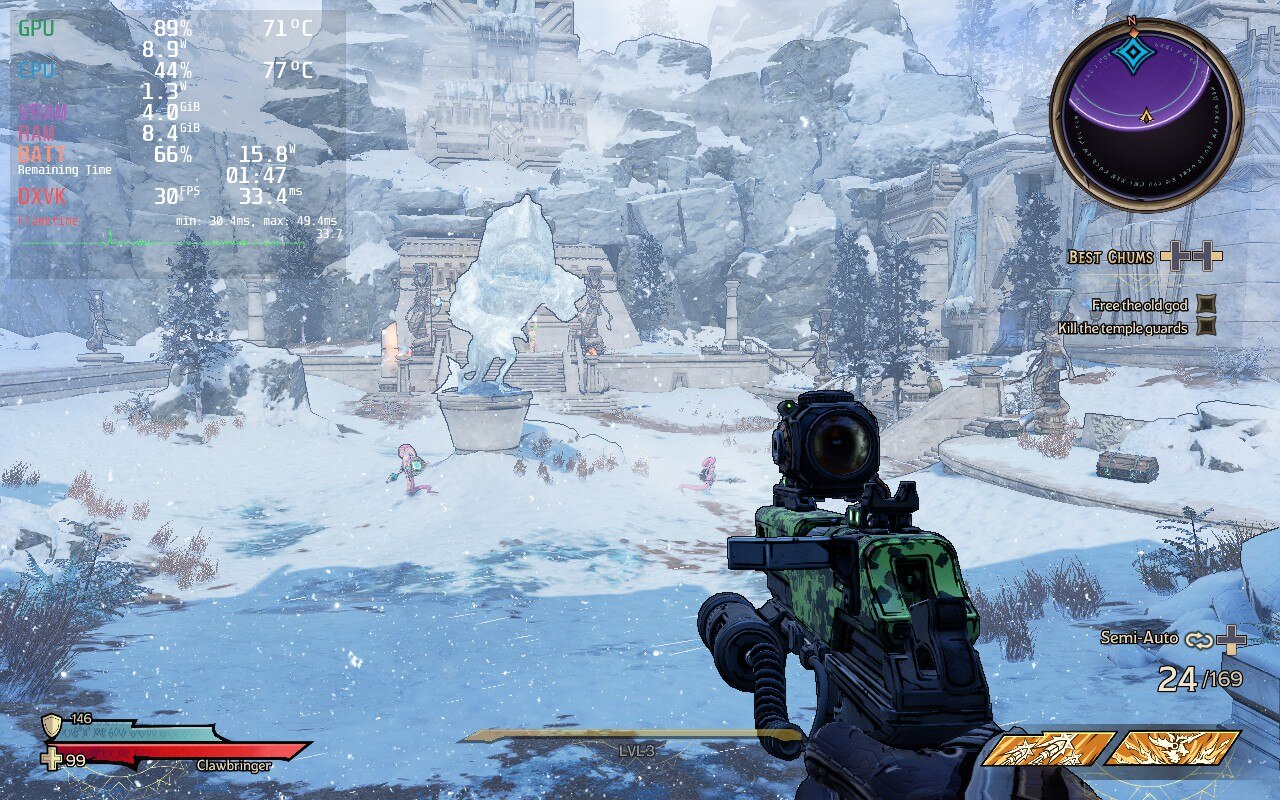
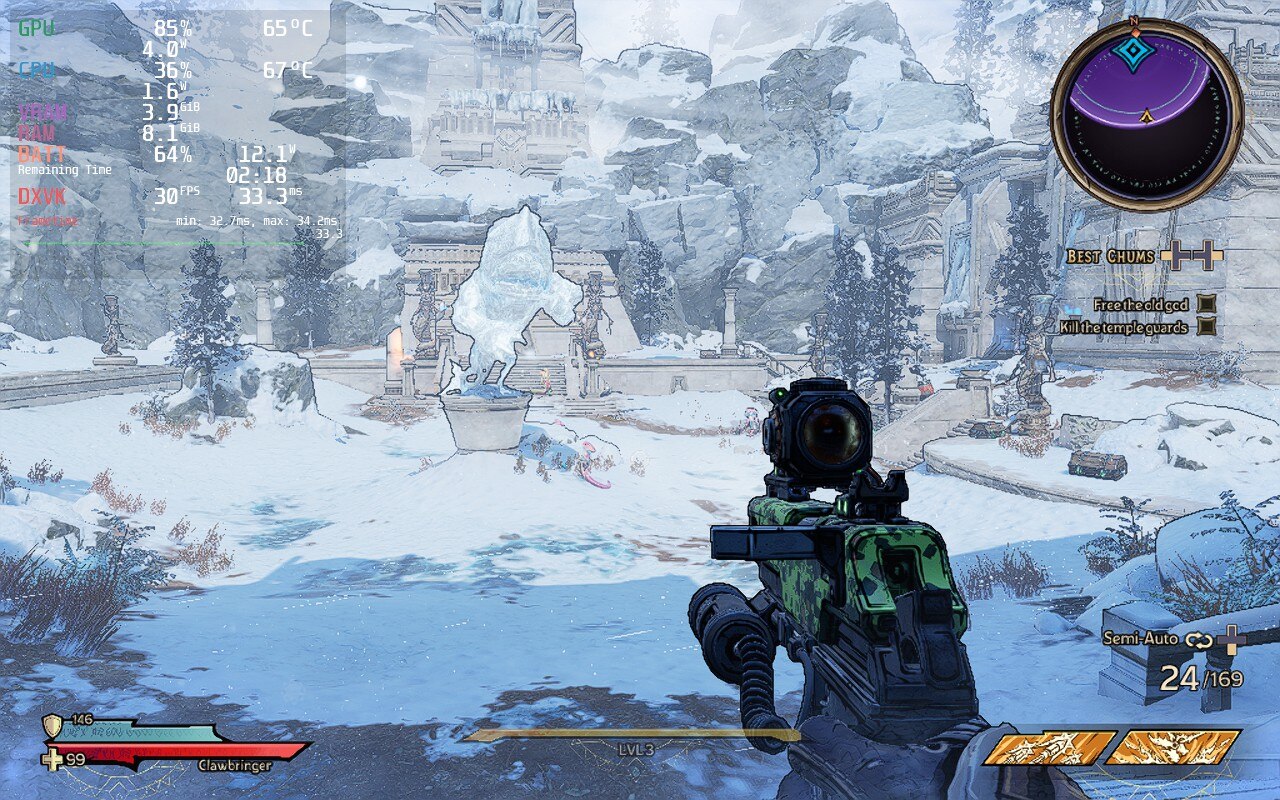
The text is a little blurrier at 1024x640, but the sharpness is noticeably better with a fantastic saving to battery and temps.
30 FPS lock was very stable on Tiny Tina's Wonderlands. I did test 40 FPS a couple times, but my Deck shut itself down from overheating while trying to test it, do not have TDP limit off for 40 FPS.
I also ended up turning the in-game settings to medium, anti-aliasing off, and draw distance to low. I didn’t feel these inhibited the look of the game and ended up saving even more battery while keeping temps to around 65c - 70c.
Proton GE is also required simply due to the videos in the game being broken trying to use regular proton. I also checked DX11 vs DX12 and felt there was minimal difference, so either or can be chosen. Multiplayer did end up increasing battery by 1W, but temps largely remained the same and it still felt stable.
Throughout gameplay, I didn’t really feel any huge bugs or glitches that inhibited my playthrough. I did encounter one bug where when I paused the game and tried to scroll down on the menu, my first button press downwards would bring me back up. I did also have 1 crash trying to go into a mirror in a town, but so far that has been an isolated incident. This is a UE4 game as well, so expect some temp and battery spikes when loading environments in.
Tiny Tina's Wonderlands runs significantly better than I could have expected. For a game that really just came out not long ago, it runs cold and stable most of the time. Other than the spikes from loading the environment in, fights are stable and looking gorgeous. With multiplayer being so easy on the system, this is a perfect fit for a portable device.
If you need help understanding how to use this guide, don't forget to check out the How to use SDHQ tutorial!
このレビューはPC版に基づいています。
このレビューをお楽しみいただけたなら、SteamDeckHQ の他のコンテンツもぜひご覧ください!私たちはあなたのゲーム体験に役立つこと間違いなしの様々なゲームレビューやニュースを取り揃えています。ニュース、ヒントやチュートリアル、ゲーム設定やレビューをお探しの方も、最新のトレンドを知りたい方も、ぜひご利用ください!
Horizon Zero Dawn is an open-world action game taking place on an Earth recovering from a terminator-like event. Developed by Guerilla Games, you play as Aloy, the girl wonder with no parents, who has been tasked to save the world from a corruption taking over the rampant machines roaming the wildlands.
Throughout the journey, you will have to fight, craft, and explore your way to saving this world and figuring out who you are. With a beautiful setting, enjoyable combat, and a unique story, this game is definitely worth your time. I am a sucker for post-apocalyptic settings and open-world games in general, so this already checked so many of my boxes before playing. Just based on the game’s content, I would say it is a worthwhile purchase, but what about the performance on deck?
After my initial testing, I ended up feeling that 30 FPS was the way to go. While it’s possible to increase it, I felt a much more stable 30 still plays really well and keeps temps and battery further down than I expected. There were some drops still, but they were few and didn’t impact gameplay. Game settings wise, I ended up feeling a slightly lower than native resolution with low settings, shadows at medium, and FSR turned on in-game to Ultra Quality, was the best medium for stable performance and quality visuals. This also kept battery life around 2.5-3 hours with around 14W - 16W usage.
I did see some performance and battery spikes under certain situations though. The biggest one that spiked both was when traveling around the world fast. When running, the world would render more and this would cause spikes in battery, usually up to 17.5W, and some performance hiccups. The only other one I really noticed was when walking around crowded cities, but leaving the immediate area remedied that.
There thankfully wasn’t too many game-breaking bugs that I encountered, though there were two that stick with me. First, when loading into the game, I opened my quick access menu, the button with the ellipses, and it froze on that screen. The game kept playing in the background and I had to power cycle the device since no buttons worked to close it. Second, there was one time I was running around and fighting robots, but my right analog stick randomly stopped working.
I could still press down on it and it responded in game, but I could not move it around. I had to close and re-open the game to fix that one, and luckily, I had just saved the game. Both of these only happened once though and I don’t expect it to be a huge issue. There was some minor audio stuttering at a few points, but that could have been the speakers and wasn’t anything of significance.
Overall, Horizon Zero Dawn ended up running better than I anticipated. Getting around 2.5 - 3 hours of battery life while temps staying around 70c. Framerate was stable 95% of the time at 30 FPS and still looked wonderful with FSR on and resolution slightly under native. It was a blast to play this game as much as I did on the Steam Deck and I cannot wait to see how Horizon Forbidden West and even Marvel’s Spider-Man will fare!
Side Note: For those who have Power Tools installed through the plugin manager, make sure CPU Boost is turned off. When it is turned on, temps and W usage jump a lot due to the CPU overclocking. This is not necessary for the game though and just adds unnecessary temp and battery usage.
なぜこのようなスコアになったのか、理解するのに助けが必要ですか?スチームデッキHQのガイドをご覧ください。
このレビューはPC版に基づいています。
このレビューをお楽しみいただけたなら、SteamDeckHQ の他のコンテンツもぜひご覧ください!私たちはあなたのゲーム体験に役立つこと間違いなしの様々なゲームレビューやニュースを取り揃えています。ニュース、ヒントやチュートリアル、ゲーム設定やレビューをお探しの方も、最新のトレンドを知りたい方も、ぜひご利用ください!



